Over time, Windows PCs become slow as you use them. It is a universal fact! Windows creates a lot of internal data every time you do something on your PC. Well, that's how every OS works. There are several ways to clean up this junk and speed up your PC. But you may not get enough time to do that every day. In such a situation, IObit Advanced SystemCare 20 Pro is a useful tool.
Advanced SystemCare 20 Pro Review: Does it Really Work?
IObit Advanced SystemCare Pro is a PC Cleaner and Optimization software. As mentioned, over time, there are a lot of junk files on your Windows PCs. It may also cause issues with the registry, privacy, and shortcuts. Advanced SystemCare Pro aims to deal with such matters as well. With this single tool, you can track the different issues. Not only can it find them, but it can also fix them with ease. You can also optimize your device for faster performance. The best part here is that everything is automatic.


Quick Summary
Pros
- Modern & Easy Interface
- Efficient Maintenance Procedure
- Protection of Private Data
- A lot of Handy Tools
- AI Tools
- Custom Cleaning
Cons
- Support response is slow
- Upsells ads in the Pro version
overall
USD 10.95
Supported Platforms: Windows
Ease of Use
5/5
Features
5/5
Accuracy
5/5
Support
3.5/5
Now, I will go through the different aspects of IObit Advanced SystemCare 20 Pro. I will also share my experience with this optimization suite. To start with, let's talk about installation and setup for IObit Advanced SystemCare 20 Pro.
How to Install Advanced SystemCare 20 Pro
Advanced SystemCare 20 is quick to install and easy to configure. Download the setup file from the official website of IObit. The file size is around 58.3 MB.
During installation, use the Custom Install screen to review the available setup options and choose whether to accept or decline any optional offers. After installation, launch Advanced SystemCare 20 to get started.
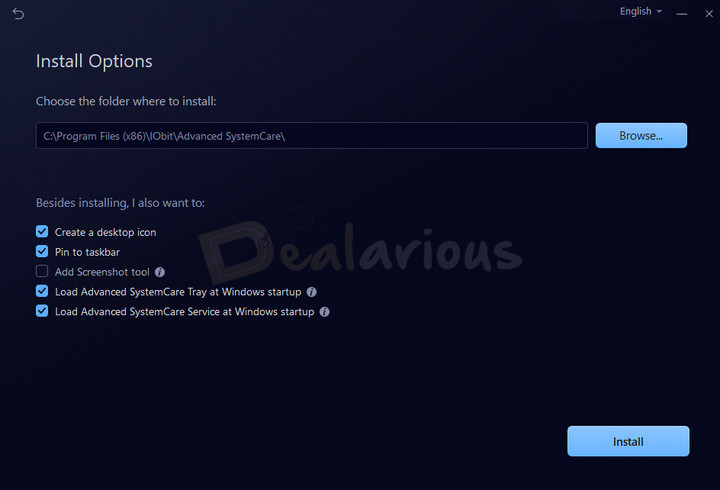
The small installer size makes it easy to install Advanced SystemCare 20. The installer is clean and does not include any bundled packages.
Pricing
Are you interested in upgrading to the Pro version? You can upgrade to the Pro version by purchasing the 3 PCs/year license for USD 89.97 from the official website. However, you can also buy it for USD 10.95 for 3 PCs/2 years license using Advanced SystemCare Pro coupons from Dealarious Store.
Would you like a program that completely removes unwanted Windows applications? For more information, check out our IObit Uninstaller Pro review.
Advanced SystemCare 20 Pro: Features Review
In fact, Advanced SystemCare 20 Pro offers more than a few Optimization features. Moreover, it's not possible to list every single one. So, I will go through the features based on categories such as Optimization, Cleaning, and Utilities.
Speed Up
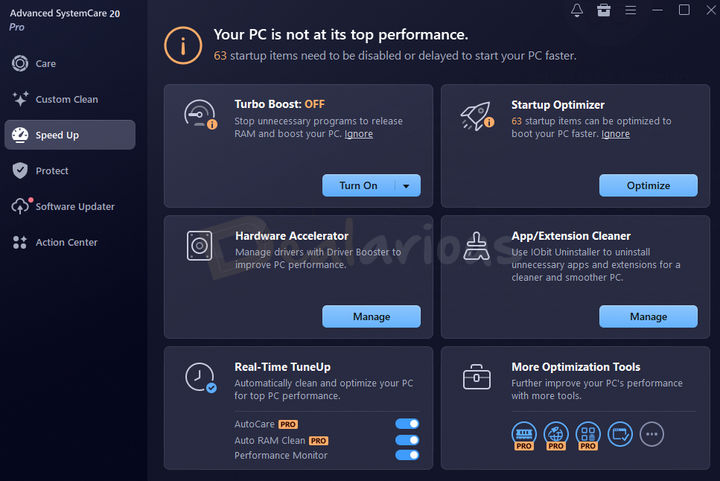
In this Advanced SystemCare 20 Pro review, this is the section where you can get the maximum boost to system speed.
- Turbo Boost helps you stop unnecessary services. Hence, it frees up RAM. You can turn it on for regular monitoring. You can configure all actions.
- Hardware Accelerator updates your device drivers. The accelerator module uses the IObit Driver Booster. However, Driver Booster is available as a limited free version. You have to purchase the full version separately.
- Startup Optimizer optimizes startup items to boost your Windows boot-up time. With Startup Optimizer, you can manage your Startup Items, Services, Scheduled Tasks, and Browser Startups.
- Real-time TuneUp lets you optimize your system performance with three features: AutoCare, Performance Monitor, and Auto RAM Clean. AutoCare automatically optimizes your PC's performance. You can customize it in Settings-->Automatic Service.
- App/Extension Cleaner removes malicious and harmful extensions from your Web Browsers. Please note that IObit Uninstaller adds this feature. It is also available in a limited free version.
- More Optimization Tools include PRO features like Registry Cleaner, Smart RAM, and Internet Booster to improve your system performance. You can directly visit the Toolbox tab from here.
AutoCare quietly runs in the background to keep my PC fast, with easy customization.
Get IObit Driver Booster Pro for 3 PCs at 85% Discount
Custom Clean
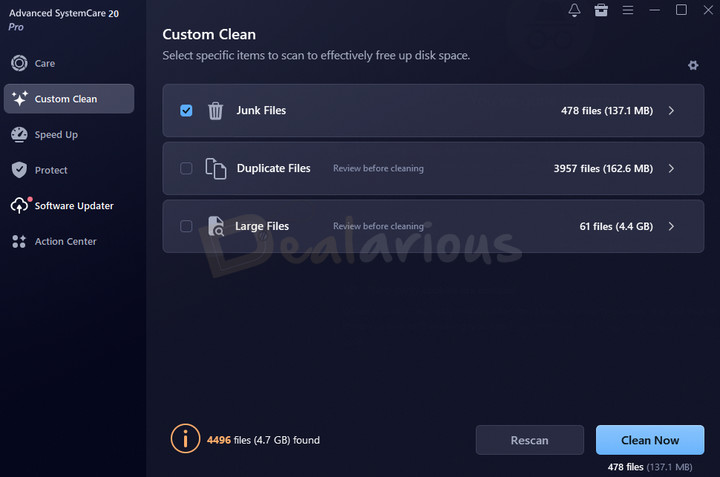
The new Custom Clean gives you more control over the cleaning process by allowing you to choose what to remove. It scans for junk, duplicate, and large files that take up disk space. You can choose which drive to scan and check the results before cleaning. You can review the available cleaning options in Settings (gear icon) and adjust them based on your needs.
Protect
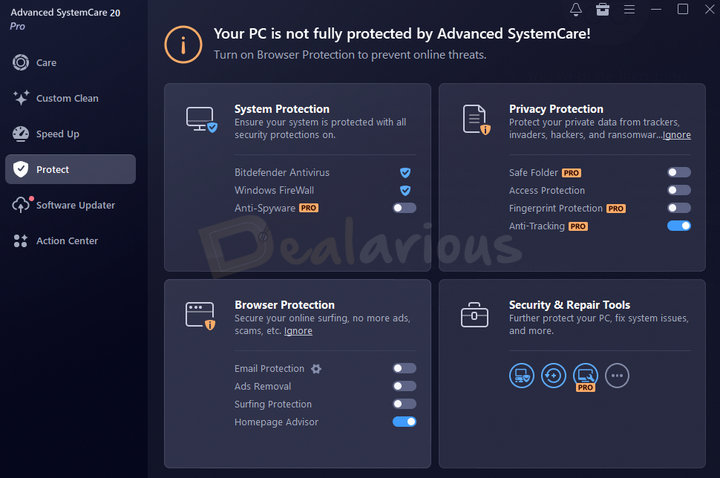
Advanced SystemCare 20 Pro comes with privacy protection features for devices and data. Also, you can access Toolbox from this tab.
The Protect Tab consists of three protection features.
- System Protection includes Antivirus Protection, Firewall Protection, and Anti-spyware (for PRO users).
- Browser Protection includes Email Protection, Ads Removal, Surfing Protection, and Homepage Advisor. However, keep in mind that you must enable the IObit Surfing Protection extension for Email Protection, Ads Removal & Surfing Protection to work.
- Privacy Protection protects your data by preventing unauthorized access. It includes Safe Folder, Access Protection, Fingerprint Protection, and Anti-Tracking.
A key addition is Safe Folder, which helps protect your important files and folders from unauthorized access. You can also set passwords for additional security.
Safe Folder is easy to use and keeps my important files safe.
Note: Safe Folder, Fingerprint Protection, and Anti-Tracking are PRO-only features.
Care
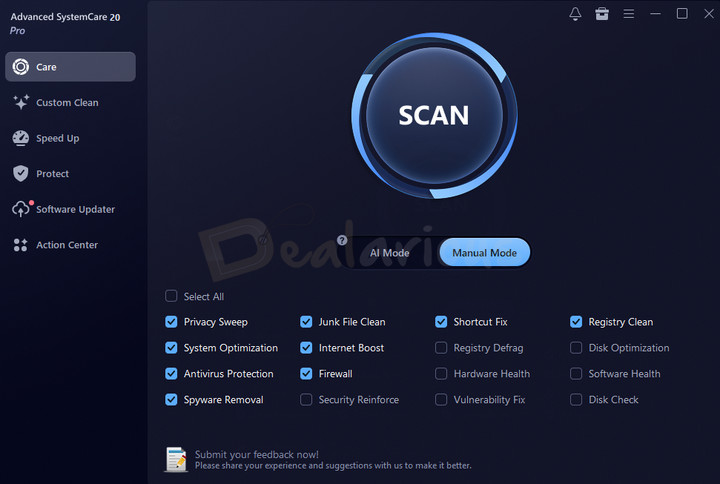
The Care tab finds all issues in a single scan using the new AI-based Smart Scan engine, which checks multiple modules simultaneously. It has AI Mode and Manual Mode, which you can switch between to perform the required tasks.
AI Mode uses AI to scan and fix your system for improvements. In addition, by switching to Manual Mode, you can pick the modules to scan. For instance, you can select System Optimization, Privacy Sweep, Shortcut Fix, or Internet Boost. You can also select all of them. Once you press the Scan button, Advanced SystemCare will start scanning all those sections.
The available options are:
- System Optimization
- Antivirus Protection
- Privacy Sweep
- Firewall
- Junk Files Cleaner
- Shortcut Fix
- Registry Clean
- Spyware Removal
- Internet Boost
- Registry Defrag
- Security Reinforce
- Disk Optimization
- Vulnerability Fix
- Hardware Health
- Software Health
- Disk Check
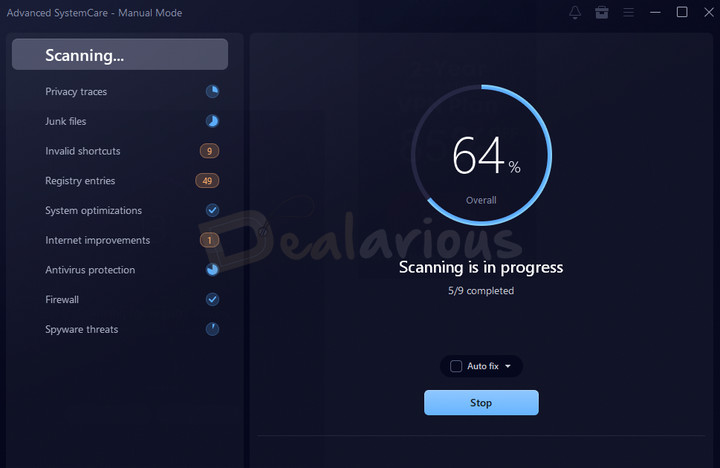
Software Health helps update outdated software, and Hardware Health scans and updates outdated drivers.
Depending on your PC's errors, you can get the report in a few minutes. Now it’s your turn to decide whether to optimize these sections for a better personal computing experience.
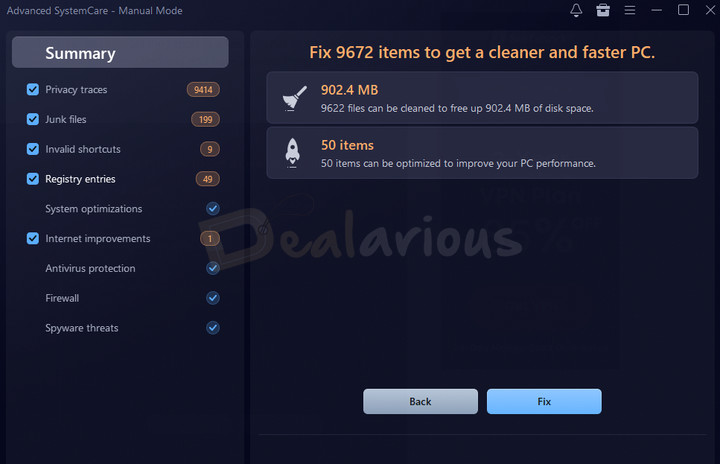
In my tests, Smart Scan checked multiple modules at once, making it easier to identify junk files and system issues in one scan.
Note that scanning does not affect other running apps or interrupt your computing experience. The selection process makes it easy to scan particular areas instead of running complete scans. Again, it is your choice!
Software Updater
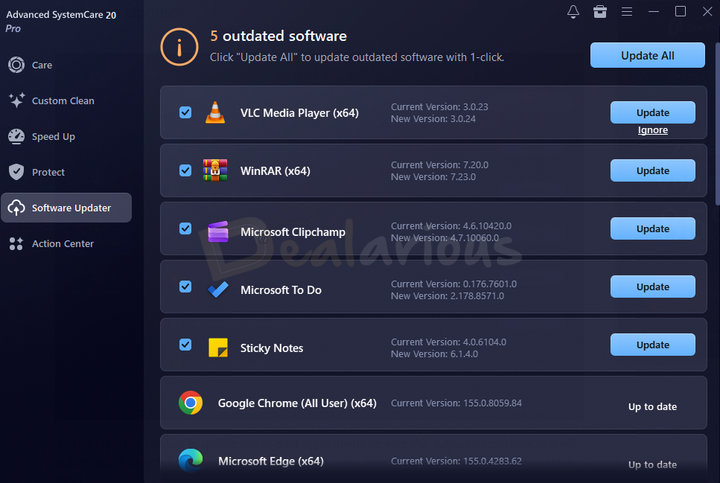
Use this module to update out-of-date applications on your PC. Advanced SystemCare will automatically search for software updates and inform you. Hence, all you have to do here is update them.
In short, the features of IObit Advanced SystemCare 20 Pro are cool. For the price you pay, you get a bunch of tools that make sense.
Having all scan options in one place and centralized actions makes it convenient to fix issues at once.
Toolbox
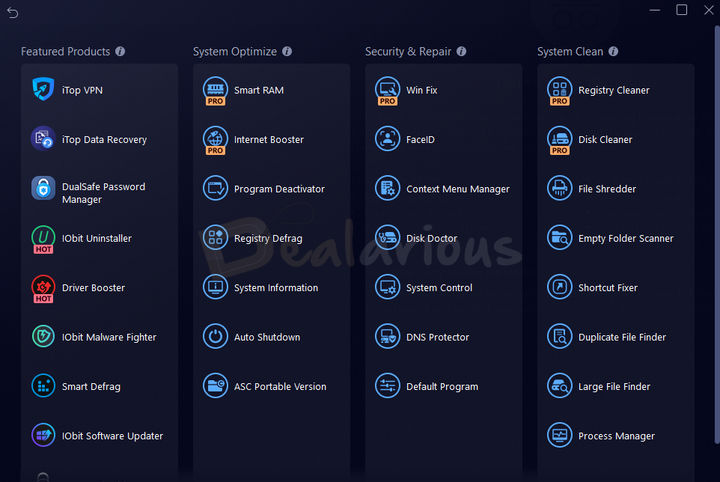
If you are a Pro user, you will love the Toolbox section. The Toolbox is an excellent collection of useful utilities. Some utilities are already available, but you can download the rest as needed.
Please note that you have to purchase the applications under the Featured Products tab separately. Clicking on these apps only downloads their Free versions.
The products listed under Featured Products are other recommended IObit products. If you're interested, you'll need to install them and then use them. Popular IObit products include Uninstaller, Driver Booster, Malware Fighter, Smart Defrag, and Software Updater. To get huge discounts on IObit products, you can search for IObit coupon codes and save more.
Performance Monitor
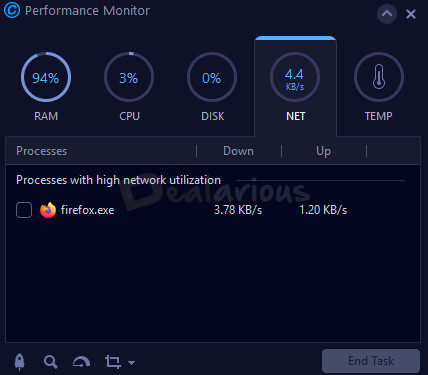
The Performance Monitor lets you check your PC's resource usage and hardware status, including CPU and RAM usage, disk activity, and temperatures. It also has a Network Speed Monitor and a Disk Temperature Monitor.
User Interface Review
Advanced SystemCare 20 Pro features a redesigned user interface. Its multi-tabbed layout provides access to different sections like Speedup, Care, Software Updater, Protect, and the new Custom Clean. So, when you need a solution, you can navigate to the corresponding tab and do what is necessary. Also, IObit Advanced SystemCare 20 Pro uses a modular architecture for additional tools.
The three horizontal lines in the upper right corner open the Options menu. From here, you can access Quick Settings, Settings, the User Manual, My subscription, and other useful options.
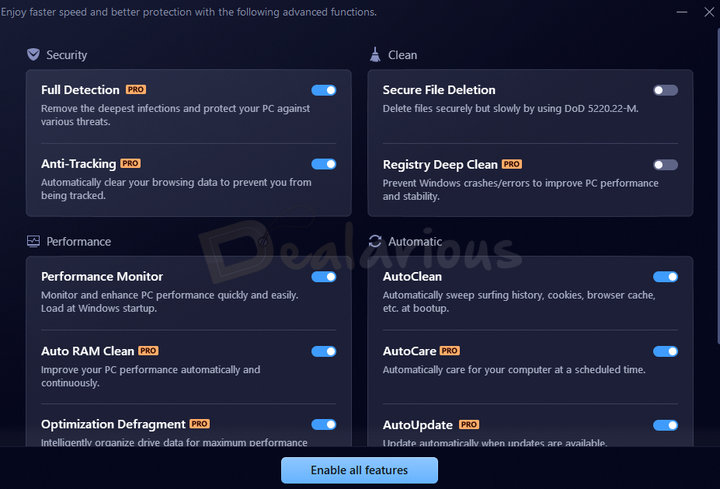
I especially liked the Quick Settings, which give instant access to key functions like AutoCare, Registry Clean, Anti-Tracking, and more.
Compatibility
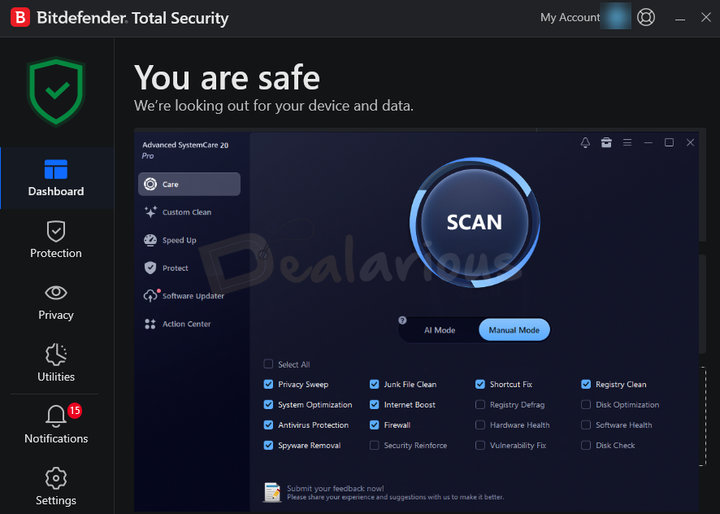
You can combine Advanced SystemCare with any third-party antivirus application. We tested Bitdefender, Vipre, McAfee, and Avira without any conflicts. However, Advanced SystemCare has issues with Malwarebytes.
If you use Malwarebytes, installing Advanced SystemCare can be difficult. Malwarebytes detects it and automatically removes it, considering it a PUP. This is a simple case of false positive detection and an old and ongoing conflict between the two companies.
Advanced SystemCare Free vs.Pro: How to Choose the Right One
The free version of Advanced SystemCare covers basic PC maintenance, like cleaning junk files, speeding up startup, and freeing up RAM. You will get the following advanced features in the PRO version.
- Deep cleaning to remove hidden junk files
- Automatic RAM cleaning to manage system resources in real-time
- Email and real-time PC protection.
- Speeds up your Internet with Internet Booster
- Registry cleaning to fix errors and reduce crashes
- Digital Fingerprint Protection protects your privacy online
- Safe Folder to protect files from ransomware
- 1-click update feature to keep all important software up-to-date
- Auto-update to the latest version of Advanced SystemCare
- Premium 24/7 technical support
Here is the full comparison of both versions.
Advanced SystemCare Pro Review: Overall Experience
What I Liked
- Navigating through Advanced SystemCare Pro was such a delight. All the tools you need to get started are within reach, and applying them is just a click away.
- Having a plethora of tools to optimize system performance, plus tools for device and data protection, eliminates the need to install separate utility apps.
- The clever integration of AI functionality makes operation easy with a single click.
- The new Custom Clean feature is a nice addition. It lets you decide what is taking up space before deciding what to remove.
What I Disliked
Slow support response can be frustrating, especially when you are dealing with critical issues that require prompt attention.
Compared with Other PC Cleaners
We compared Advanced SystemCare with other best PC Cleaners like CCleaner, System Mechanic, Avast Cleanup, and AVG TuneUp.
Is Advanced SystemCare better than CCleaner?
Both programs share many features. Compared to CCleaner, Advanced SystemCare has more features in the Toolbox section, such as Internet Booster, Smart RAM, and FaceID. You can also install additional IObit programs, like IObit Driver Booster and Uninstaller (free versions). As for pricing, Advanced SystemCare is quite affordable.
Advanced SystemCare is available for Windows PCs only, while CCleaner is available for Windows, Mac, and Android devices. You can find the detailed comparison in this article on Advanced SystemCare vs CCleaner.
Is Advanced SystemCare better than System Mechanic?
Compared to iolo System Mechanic Pro, Advanced SystemCare has many built-in tools that you can install to meet your requirements. You will find features like Driver Updater and Software Updater missing in System Mechanic.
One advantage of System Mechanic over Advanced SystemCare is that the former can be installed on a maximum of 10 PCs in your household. In contrast, the latter can be installed on a maximum of 3 PCs only.
iolo's System Mechanic Ultimate Defense includes advanced features like Malware Killer and Password Manager. Read more in this iolo System Mechanic Ultimate Defense Review.
Is Advanced SystemCare better than Avast Cleanup?
Both tools have pros and cons. Learn more here to understand which one is better. Always choose the one that suits your requirements.
This Avast Cleanup Vs Advanced Systemcare comparison will be of great help in decision-making.
Is Advanced SystemCare better than AVG TuneUp?
It is another reliable PC tuneup tool that competes with Advanced SystemCare. Even though the program is not as feature-rich as Advanced SystemCare, it still can handle PC optimization tasks quite efficiently with its Disk Cleaner, Sleep Mode, Updater, Uninstall Simulator, and many more features.
AVG TuneUp boasts a clean and intuitive user interface and multi-platform support. Hence, if you are looking for a simple yet effective solution, consider using AVG TuneUp. To learn more about its features and performance, check out this AVG TuneUp review. Additionally, you can take advantage of our AVG TuneUp Coupon code for a discounted price.
If you want a feature-rich experience, then IObit Advanced SystemCare will be the right fit for you.
Frequently Asked Questions
Is Advanced SystemCare Good & Safe to Use?
Yes, Advanced SystemCare is safe to use and does what it's supposed to do, based on my experience over the years. Read our in-depth analysis.
Is Advanced SystemCare a Virus?
No, Advanced SystemCare is not a virus. However, many antivirus programs detect it as a PUP. We haven't encountered any issues in our testing over the years.
Should you buy Advanced SystemCare Pro?
Advanced SystemCare Pro is a useful tool for boosting PC speed and cleaning it. IObit has included additional privacy protection features, including Fingerprint Protection. It also offers a range of features for digital identity and anti-spyware protection.
Is Advanced SystemCare Pro Worth It?
IObit Advanced SystemCare 20 Pro has every feature required for a better PC experience in a single package. If you want to boost PC performance, you can count on this tool. Compared to other PC Optimization software, Advanced SystemCare Pro gives more features. Besides, you get all these benefits at a much lower price. So it is worth the money.
Changelog

Sourojit is the Executive Editor at Dealarious and has been writing reviews, tips, and how-tos since 2008. A Computer Science Engineer by degree, he enjoys turning complex tech into simple, useful insights.
Outside of work, he’s a DIY enthusiast who enjoys gardening, long drives, and building custom PCs, often experimenting with water-cooled setups. Over the years, he has played the roles of reviewer, storyteller, experimenter, and teacher.
Adanced System Care Pro 18 is worthless and their web site is a bunch of lies. They do not have online tech support, they only have email support which they tell you that they will resond back to you in 48 hours. I keep having my computer slow down and after Norton’s tech checked out my computer to to what was slowing it down, they advised that Adanced System Care Pro 18 was not clearin my data which was building up and slowing my computer down. I remove Adanced System Care Pro 18 completely from my computer and now it runs a lot faster. Their spport was no help are all and they are worthless.
Thank you for sharing your experience. I’d like to add some clarity based on my own tests of Advanced SystemCare 18 Pro.
You’re right that IObit doesn’t offer live chat or phone support. Everything goes through their ticket system, and replies usually take up to 48 hours. It’s not the fastest, and I also marked this as a drawback in my review, but it’s still an active support channel rather than “no support.” I have received several responses to random support requests within 24 hours.
As for performance, on my own system ASC 18 Pro never caused slowdowns. The program stays light in the background, and resource spikes only happen during a scan, which is expected. Once the scan ends, CPU and RAM usage go back to normal. In fact, during my review I monitor this aspect carefully because many people worry about optimizers hogging resources in general, but I didn’t see any unusual impact. If your computer felt faster after uninstalling, it could be due to Norton and ASC overlapping. Norton has a history of marking system optimizers as unnecessary, and when both run together they can double up on background tasks like monitoring or cleanup. That overlap can create the kind of sluggishness you described, and it makes sense that Norton support pointed at ASC. Whether that was a genuine conflict or just Norton wanting you to stick with its own tools, I can’t say.
On the cleaning side, ASC is built to remove junk files, privacy traces, startup clutter, and registry leftovers. In my tests, it cleared out thousands of items in one run. So the idea that it “was not clearing data” doesn’t really fit. If junk was still there, it usually means the right modules weren’t run or Norton stopped ASC from doing its job.
There’s also another angle, junk isn’t a one-time thing. Temporary files, browser caches, and Windows logs regenerate constantly in the background. For example, every time you browse the web, Chrome or Edge will leave behind cache and cookie data. Opening large apps like Photoshop or playing games often creates new temp files in the Windows Temp folder. Even something simple like Windows Updates generates log and leftover files after installation. So if you scan once, clean everything, and then check again a day or two later, you’ll always find “new junk.” That doesn’t mean ASC didn’t clean—it just means the system produced fresh files after the cleanup.
I wouldn’t call the program worthless. It’s not a miracle fix, but it does handle routine maintenance in one place and, when used properly, it helps keep systems smooth. Some people see a big difference, others see less because their PCs are already well maintained. That’s why experiences differ.
It would also have helped if you had left a real email ID with your comment. With that, I could have looked deeper into your exact case to see what went wrong.
Seems like a paid promotion of software that spends more time upselling itself than it does protecting your PC. Shady.
Hi Craig,
It is not a paid promotion; as the upselling part, you have mentioned in already mentioned in the Cons section of the Review. It will greatly benefit the community if you can add more details about the performance issues you faced with the application.
Paid for Pro edition upgrade. The installs didn’t work, the purchased upgrade failed. Horrible and frustrating experience endangering my computer. FAILED Service!
I’ve been using their Products for years with NO problems and no issues with malware and virus BS but I am not a young kid that goes to suspect sites and clicks on any link they find fun…
I have tried advanced system care several times:they offer a key for a once clean up –but it does not clean all –only some –unless you buy. I tried again today: Thousands of files>>>but is it true? 3% defragged-I defragged today. I cleaned with PRIVAZER–yet it found many files to delete –why and what ? I have just to believe it!
I found also that the machine slows when it is installed.
I removed it again after 10 minutes —I just do not “trust” it to make a true statement at the end of the scan. .Price in Dollars: what dollars? I am in Australia -if it is US dollars then it nearly twice the price –but which company ever bothers to make clear what currency you pay in>> and for that matter_ WHERE THEY ARE. Privazer is still the most “logic” cleaner I have found and I can see what it is doing! Again ..it may not do what it says if Systemcare is right –but what now? What to trust to clean up? I used RED yesterday – 5000 obsolete files -Advanced system care di not find that many! RED is free (remove empty directories)-I used the clean up tools windows 10 has included –and do not pay any money anymore
Advanced SystemCare 12 is that act as a Anti virus?
Hi Chirag,
ASC 12 Pro only removes basic Spyware. In case you need Antivirus you will need ASC 12 Ultimate version.
Their “Ultimate” versions come with the Anti Virus software
Nice blog good detailed review
Should I use advanced system care pro 12 with Windows 10?
Does it not interfere with the security system attached to Windows 10?
Is it better to renew Advanced Sysytem 11 or upgrade to 12?
Does Advanced SystemCare 11 act also as an anti virus or would I need as well to install an anti virus?
Hi Bugeja.
Only Advanced SystemCare Ultimate version has a built-in antivirus, but I would suggest that if you want a proper virus protection you get full-fledged antivirus like BitDefender antivirus.
Advanced SystemCare and most IObit products use the Bitdefender Engine. So, it is always better to use the original BitDefender product, where you will get the latest updates (not just the virus signature, but on the entire antivirus software) directly from BitDefender. There are some other features like scanning individual files, ransomware protection, and others that you will not get with the version of antivirus in Advanced SystemCare.
The best combination for you will be BitDefender total security 5 devices 1-year plan and Advanced SystemCare pro (links below). You can buy it from our store at a great discount, or from the official website at a higher price. That is completely your wish, but make sure you buy and download it from a legit source.
https://www.dealarious.com/coupon/bitdefender-total-security-multi-device/
https://www.dealarious.com/coupon/advanced-systemcare-pro/
Stay protected and cheers.
Thanks,
Team Dealarious
i just bought advanced systemcare pro 11 and registry cleaner and disk cleaner wont open. help please
07/07/’17 in Sydney: downloaded today full load / at a very reasonable price / very impressive-looking / first scan was quick and cleared more than a gigabyte of space on a laptop six weeks from new. So, you beaut! Kevin/Gauvain/Gavino aged 96. []
Have used ASC for years. Now in spite of license code info from iobit I’ve been unable to install, to activate with my license code. Now the messsage comes up “this won’t run on this computer”. (an Acer running Windows 10). I’m trying to install ASC Ultimate. NO GO! No Good!
All attempts to solve problem are stymied.
Strange! I never faced an issue like this. Did you try to reset your license or request a license transfer for reinstallation from iobit? If it is a license issue, that might help.
Good stuff, but annoying as hell if you don’t buy all the components. It keeps telling you to upgrade to the full suite, which you surely don’t need.
Version 9 PRO worked perfectly, but when it upgraded to Version 10 it wouldn’t install properly. I did get to to scan once but it froze on the ‘Registry Scan’, I think that is where the problem lies). I uninstalled and tried to reinstall it twice but it wouldn’t work. I emailed the so called ‘Help’ TWICE with NO REPLY (and that is the guaranteed 48 hour reply because it is the PRO version), and I still have a month left on my subscription… Will I be renewing it after receiving no reply from the so called ‘help; and also loosing out on a month of my subscription ? You guess the answer ! (Clue : It is the opposite of ‘Yes’ !)
OF COMPUTER FIXES REPAIR PROGRAMS I DO PREFER JUST THOSE THAT DO FIX MY COMPUTER PC ERRORS FOR FREE AT OF NO COST TO ME
I should point out that the Driver Booster and IObit Uninstaller are not trial versions. You can purchase the pro versions of them, which have more features, but the free versions are fully functional. For example, the freee version of Driver Booster will update all tjeoutdated and missing drivers it finds, but the paid Pro version, sometimes finds more driver updates and will download the updates faster.