Regardless of the purpose, everyone needs a faster computer! Unfortunately, junk files pose a threat that affects your PC's performance. Your computer generates junk files as you use it.
Moreover, if you forget to clean these files, your PC will run more slowly. That is why someone came up with the idea for PC Cleaning Software, which can boost PC performance by clearing unwanted files. Advanced SystemCare and CCleaner are the two major solutions you can use for cleaning your PC. However, it is not so easy to pick one from the Advanced SystemCare vs. CCleaner duo.
In this Advanced SystemCare vs CCleaner article, I will provide an in-depth comparison of the two. Hence, you can choose the one that best suits you. First, let me start with an introduction to both tools.
Advanced SystemCare Vs CCleaner: Introduction
Advanced SystemCare is a Cleanup and Optimization software for Windows PCs. IObit has been developing various software products since 2006. It is envisaged to be an all-in-one cleaning software. Also, it can take care of different sectors, such as Privacy and Speed. We can also say that Advanced SystemCare is not limited to Windows temporary files. Instead, you can have plenty of options for speed optimization. To know more in detail, read our Advanced SystemCare Pro Review.
CCleaner has been the standard solution for PC Cleaning for a long time. CCleaner, unlike its competitors, is available for Windows, Mac, and Android. From unused files to residual browser cache, CCleaner can take care of several slowdown factors across all your devices. Features do vary depending on the plan, but CCleaner is worth the deal.
Pricing plans
Both products have free and paid versions. We will compare the Pro versions of Advanced SystemCare and CCleaner.
Advanced SystemCare PRO Pricing
Advanced SystemCare PRO has a single pricing plan that supports 3 PCs for 1 Year. You can purchase it from the official website for USD 89.97. However, you can get it for USD 10.95 (3 PCs/2 years) using Advanced Systemcare Pro coupons. The Pro version has a huge collection of features. For instance, it has an Internet Booster, Automatic updates, Deep Registry cleaning, Antivirus and Firewall Protection, etc.
CCleaner Pro Pricing
CCleaner Pro offers three pricing plans: CCleaner Pro, CCleaner Pro Plus, and CCleaner Premium.
CCleaner Pro version supports only 1 PC for 1 Year. You can purchase it from the official website for USD 44.95. However, you can get it for upto 65% Off by using our CCleaner Pro Coupons.
CCleaner Pro Plus is a bundle of three different tools: CCleaner Pro, Recuva Pro (for file recovery), and Speccy Pro (for hardware monitoring). There are one and two-year subscription plans available.
The CCleaner Premium bundle supports 5 devices (Windows, Mac, or Android) and comprises CCleaner Pro Plus, Premium Support, and the privacy app Kamo.
You can check the official website for updated offers.
Advanced SystemCare Pro has better pricing, considering the availability of discount coupons.
Advanced SystemCare Vs CCleaner: Features
Now, let us look at the prominent features offered by Advanced SystemCare and CCleaner. Please visit the IObit Official page for more details on features.
Feature | Advanced SystemCare Pro | CCleaner Pro |
|---|---|---|
Custom Cleaning | Yes (Manual + AI Modes) | Yes |
Automatic Cleaning / Scheduling | Yes | Yes |
Real-time Monitoring | Yes | No |
Startup Optimization | Yes | Yes |
Junk Cleanup | Yes | Yes |
Registry Cleaner | Yes | Yes |
Privacy / Browser Cleanup | Yes | Yes |
Software Updater | Yes | Yes |
Disk Optimization / Defrag | Yes | No |
Duplicate File Finder | Yes | Yes |
Performance Booster | Yes | No |
Auto RAM Cleaner | Yes | No |
Browser Protection | Yes | No (only browser cleanup) |
File Shredder | Yes | No |
DNS Protection | Yes | No |
Fingerprint / Anti-tracking Protection | Yes | No |
Cloud Drive Cleaner | No | Yes |
Uninstaller | No | Yes |
Driver Updater | Yes (Built-in Driver Updater offers only manual updates) | Yes |
Note: CCleaner's Automatic cleaning refers to the new scheduled cleaning added in latest version of Cleaner.
Advanced SystemCare Features
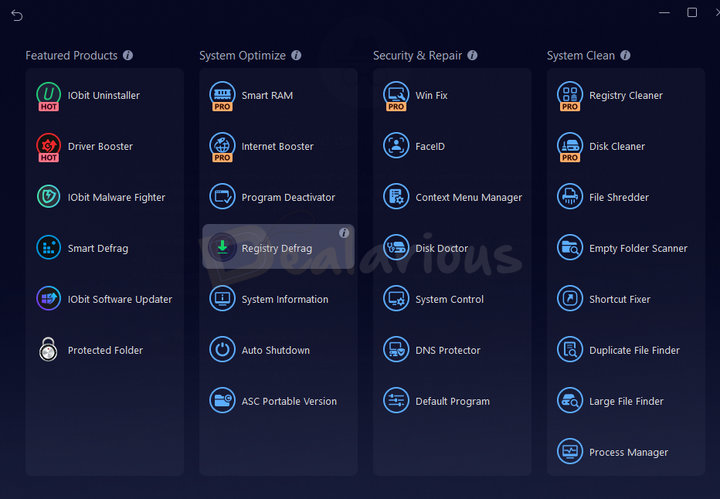
One impressive feature of Advanced SystemCare is that you can easily download additional modules. For instance, you can download IObit Malware Fighter, Driver Booster, and Uninstaller free versions. There are also many free modules you'll get. Installing these modules significantly extends the capabilities of Advanced SystemCare. Learn more about the new and advanced features in our Advanced SystemCare Pro Review.
CCleaner Features
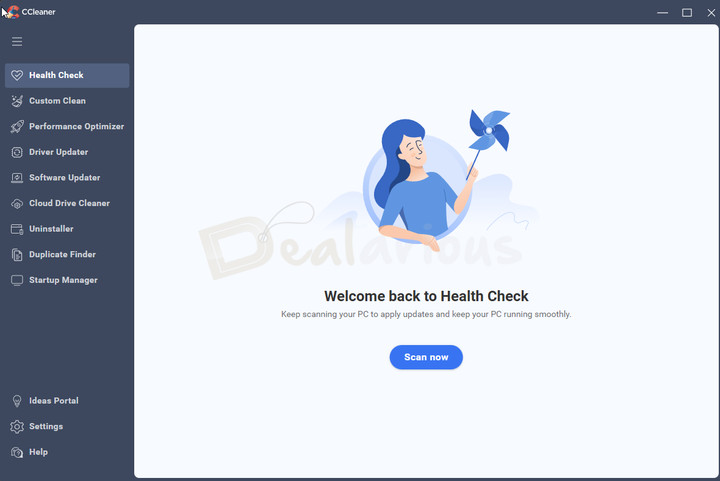
CCleaner Pro also offers an impressive feature list. Unlike Advanced SystemCare, it has no "install it when you want it" structure. It includes Performance Optimizer, Uninstaller, Software Updater, Driver Updater, Startup, etc. Learn more about the features in detail in our CCleaner Pro Review.
So, Advanced SystemCare and CCleaner share many features. Advanced SystemCare Pro has more features in the Toolbox section than CCleaner. Advanced SystemCare has useful features like Face ID, surfing protection, and Fingerprint Protection.
Advanced SystemCare has way more features than CCleaner.
Automatic Cleaning
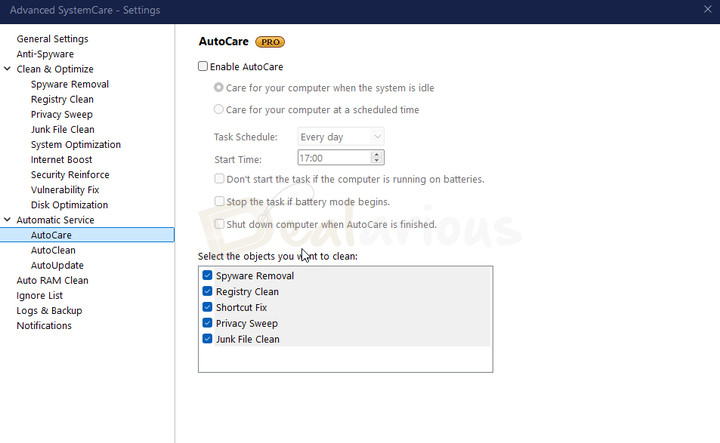
Advanced SystemCare Pro provides AutoCare which can automatically perform system cleanup, privacy sweep, and routine maintenance based on a schedule. You can customize it in Settings-->Automatic Service.
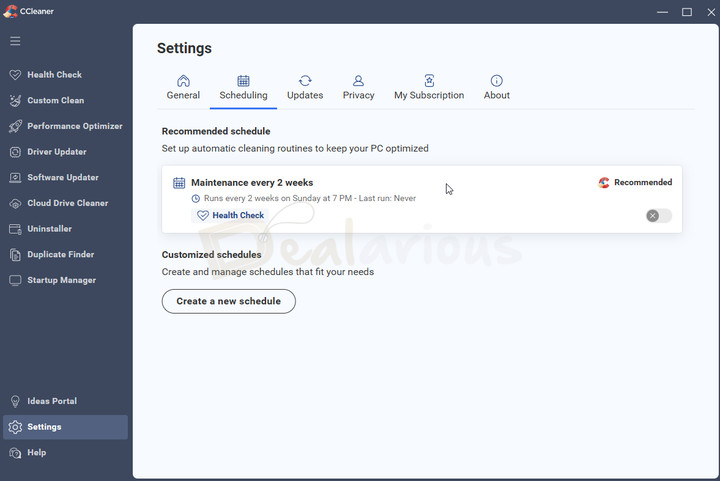
CCleaner Pro now supports automatic cleaning through scheduled maintenance. The Scheduling option allows you to set up daily, weekly, every two weeks, or even startup maintenance to keep your computer optimized.
Advanced SystemCare offers more control over which tasks run automatically.
Advanced SystemCare Vs CCleaner: User Interface
Obviously, you are concerned about the User Interface of both tools. In my experience, both tools have awesome user Interfaces. It's simple to understand.
Advanced SystemCare Interface
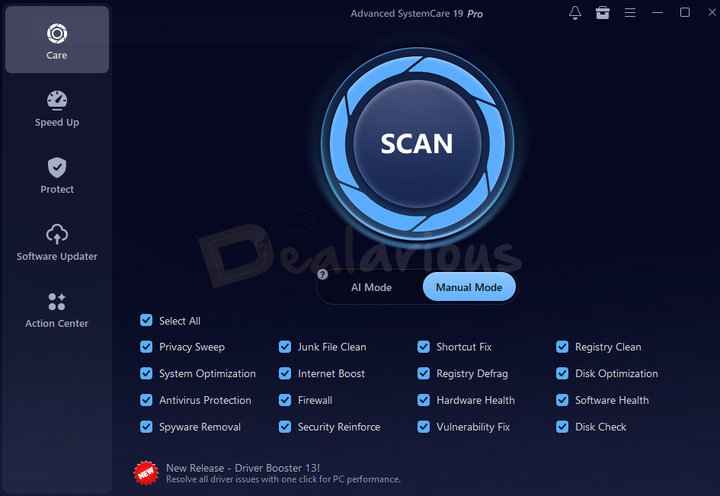
In the case of Advanced SystemCare, it's a multipurpose interface with different tabs. The main tab allows you to perform the optimization with a single click. Then, you can open other tabs for Protection, Speedup, and Software Updater. In short, Advanced SystemCare has arranged all the features in an easily accessible manner. And in case you did not notice, the Toolbox section includes the features of different tools.
CCleaner Interface
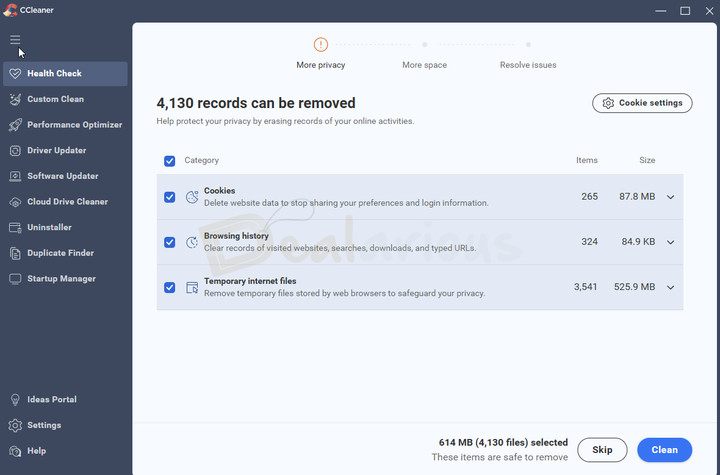
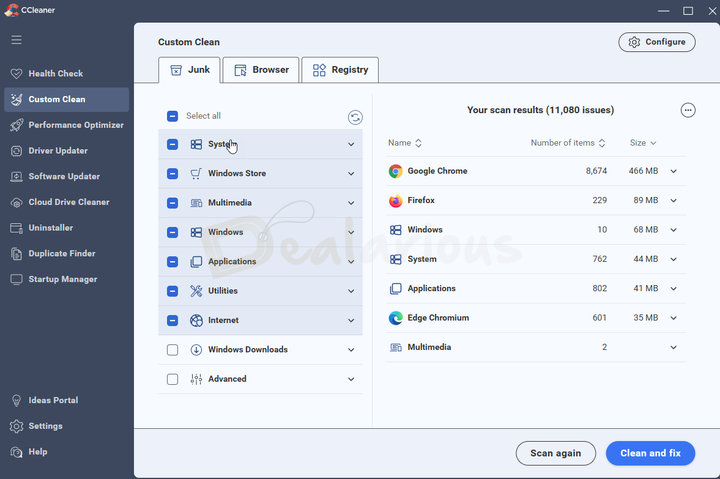
The CCleaner Interface is rather minimal. It has different tabs in the left section: Health Check, Custom Clean, Performance Optimizer, Driver Updater, Software Updater, Cloud Drive Cleaner, Uninstaller, Duplicate Finder and Startup Manager. In each tab, you will find optimization options.To sum up, we say the CCleaner user interface is also worth praising.
CCleaner has a clean Interface. Best suited for Home Users.
Both Advanced SystemCare and CCleaner have simple and easy-to-use interfaces.
Advanced SystemCare Vs CCleaner: Performance
When using a system optimizer, you do not want it to slow down your PC. If it does, the point of having the application fails. In this case, both applications perform equally well.
Does Advanced SystemCare slow down your computer?
Advanced SystemCare has Zero Impact on your system. It works in the background, so there is no need to worry. However, when it comes to scanning and optimization, it does the job very well. This tool's scanning speed is very high compared to its counterpart.
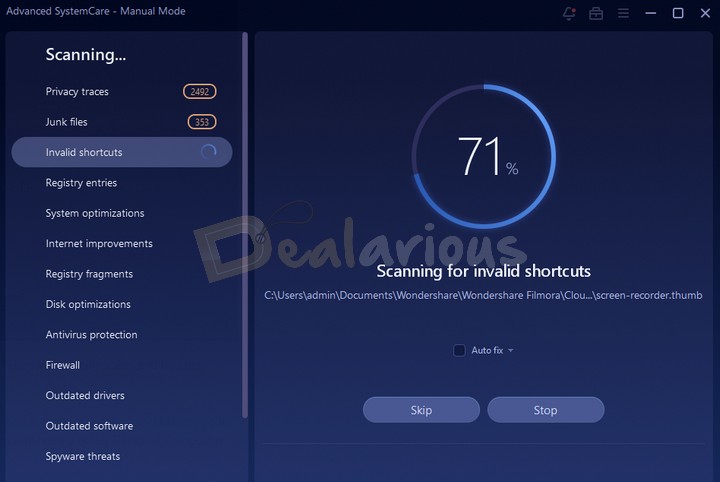
Advanced SystemCare uses AI technology to scan the system. In a few seconds, you can find and optimize different sorts of errors. It will automatically notify you of unwanted junk stuff on your PC. In such situations, you can optimize the system in a single click. In addition, Advanced SystemCare offers Turbo Boost and Deep Optimization. Wrapping up, we achieved a huge performance boost in the shortest possible time.
Does CCleaner slow down your computer?
CCleaner, too, does not affect the actual performance of your system. In fact, the installation size and procedure of CCleaner are pretty simple. Depending on the package you select, you will get a bunch of features. For instance, real-time optimization and automatic updates are available with the Professional version. Considering the scanning time, it's the same as Advanced SystemCare Pro.
However, please note that the deep scan is not that good. Nevertheless, CCleaner offers a variety of customization options. You can decide to eliminate elements during the cleaning process.
Both perform equally well. However, Advanced SystemCare has the edge with additional applications.
In-App Ads
Both applications can display advertisements. Getting ads in your premium application is not something we like. Hence, it is a negative point for both applications. However, CCleaner allows you to opt out of data sharing for offers from its 3rd-party partners. These settings are turned on by default, and you can disable them in the Settings section.
Meanwhile, in Advanced SystemCare, there is no way to turn off in-app ads. They use the bottom section of the app and a dedicated "Action Center" to upsell their products. Many customers find it inconvenient. Also, note that the Advanced SystemCare setup can bundle 3rd-party applications. So, while installing it, be careful.
In this regard, CCleaner scores higher.
CCleaner is better when it comes to in-app ad display. It allows you to opt out of offers for their own and partnered products.
Advanced SystemCare Vs CCleaner: Reputation
In this section, we will not discuss whether a Windows cleaner application is necessary. That's an entirely separate discussion you can get into with a simple Google search.
Both the maintenance software have a dent in their reputation. The common issue for both cleaners is that many antivirus systems flag them as PUPs (Potentially Unwanted Programs). Though the detections are false positives, the applications try to upsell 3rd-party or their own products.
CCleaner Reputation
In 2017, CCleaner was hacked, and people using the PC version downloaded the infected version. The company quickly implemented the changes, but the malware had already infected approximately 2.27 million computers.
Also, the parent company, Avast, was caught stealing personal user data in their free Antivirus software. Once the matter came to light, Avast stopped the practice. However, this incident damaged Avast's reputation.
Advanced SystemCare Reputation
We have already covered a detailed article on Is Advanced SystemCare safe? It has no instances like CCleaner. Even more antivirus software still detects it as a PUP (false positive).
It has also received criticism for bundling other products with the installer or for upselling them. One of the concerns we encountered was their call support. Many customers have reported that their call support tries to upsell paid products. One important thing to note is that IObit's call support is a third-party service, not handled directly by the company. Hence, try to avoid their call support.
Hence, both Cleaner applications have reputational issues. Selecting a winner in this category is difficult. If you are comfortable ignoring PUP warnings when they appear, you can buy the application of your choice.
Frequently Asked Questions
Is CCleaner safe to use now?
CCleaner faced issues in 2017; however, according to an official statement from the company, the issues have been resolved. Learn more about how safe CCleaner is.
Which registry cleaner is the best? Are there any other alternatives?
Both Advanced SystemCare and CCleaner are good at registry cleaning. If you are looking for alternatives, we have compiled a list of the best registry cleaners for Windows.
Advanced SystemCare Vs CCleaner: Which is the Best?
So, we have seen the different aspects of Advanced SystemCare Pro and CCleaner Pro here. We hope you can select the best from the duo at this point. As we have seen, Advanced SystemCare Pro offers more useful features. Its Internet Booster is a prominent example; it lets you diagnose and fix several issues that slow down your internet. Similarly, options for Real-time Spyware Protection, Antivirus and Firewall protection support, etc., make sense.
Regarding pricing, Advanced SystemCare is much affordable than CCleaner, considering the best discounts. For just USD 10.95, you can have a bunch of features. You can easily manage and organize the features. And, thanks to the modular structure, you can download utilities according to your needs. In summary, we think that Advanced SystemCare is way better than CCleaner.
It won't make a difference if you are sticking to the free versions of both. But are you ready to spend some money to optimize your PC and unleash its full potential? Advanced SystemCare Pro is the best choice.
Changelog

Sourojit is the Executive Editor at Dealarious and has been writing reviews, tips, and how-tos since 2008. A Computer Science Engineer by degree, he enjoys turning complex tech into simple, useful insights.
Outside of work, he’s a DIY enthusiast who enjoys gardening, long drives, and building custom PCs, often experimenting with water-cooled setups. Over the years, he has played the roles of reviewer, storyteller, experimenter, and teacher.
What about system mechanic ?
I’ve been using ASC for many years and have found it to be indispensable. There have been a couple of instances where my computer seemed absolutely hand-cuffed by it’s performance, and running the ASC Pro version returned the computer to what it should be. I only heard of CC in the case of cell phones, not knowing it could be used on PCs, too. I did have occasion to install and use it on my former Samsung Galaxy S4 Mini (arguably the worst consumer electronic product ever made) and it seemed to work well with that, too. I’ll stick with ASC simply because it has worked well for me for many years.
Thanks for the info. I have had advance system care for years and never had any problems,infact I believe this program helped my Computor run fast and trouble free!!