People have long regarded Avast as one of the leading antivirus solutions, but in this Avast Antivirus Review, I wanted to answer one question first: is Avast actually safe to use?
To find out, I took a deep dive into Avast's current product lineup.
In this review, my main focus will be on Avast Premium Security. I'll share my experience with the program's features, security, and performance to help you decide whether Avast is still worth considering.
Avast Antivirus Review: Quick Summary
Pros
- Clean, well-organized, and intuitive interface
- Rich collection of security features
- Advanced settings customization
- Sandbox
- Advanced firewall
Cons
- Annoying upselling attempts
- Past privacy concerns
- Limited dark web monitoring
overall
USD 12.95
Supported Platforms: Windows, OSX, Android, iOS
Interface
4/5
Protection
4/5
Performance
4/5
Support
4/5
In this Avast Antivirus Review, I’m focusing on Premium Security, but I’ll also point out how it compares to Avast’s other plans where it matters.
Founded in 1988, Avast has been protecting our devices for over 35 years. Its long-standing presence in the cybersecurity space speaks a lot about its trust among its massive global user base. Avast gained its widespread popularity, especially after launching its freemium model in 2001.
Over the years, Avast expanded through innovation and acquisitions, including the 2016 acquisition of AVG Technologies. Later, in 2022, Avast merged with NortonLifeLock, which was later rebranded as Gen Digital, to provide a well-rounded digital security experience.
Quick Verdict: Should You Buy Avast Premium Security?
In this Avast Antivirus Review, Avast Premium Security felt like a solid upgrade from the free version if you want extra protection tools like Sandbox, Bank Mode, and an advanced firewall. It feels designed for everyday home risks, like risky downloads, online payments, and network threats, without making the interface hard to navigate.
That said, the upsell prompts can get annoying, especially when you’re just trying to finish a scan or check a privacy feature. If you want a suite that feels more “complete” without add-on nudges, Norton 360 Deluxe or Bitdefender Total Security are worth a look.
Is Avast Safe?
Avast claims to stop billions of attack attempts each month, which points to strong protection coverage. That said, its past privacy-related issues still make some users hesitate, so it’s worth looking at what happened and what Avast has changed since then.
Past Privacy Concerns
Browser Extension Privacy Issue
In late 2019, critics accused Avast and its subsidiary, AVG, of collecting user data, including browsing history and behavior, through their browser extension. This led Firefox, Chrome, and Opera extension stores to temporarily remove the extensions. After Avast made privacy-related changes supported by the browsers, the stores restored the extensions. No confirmed breach of user accounts was reported.
Jumpshot Data Collection
In early 2020, the biggest issue surrounding Avast shook the trust of its user base. A joint investigation by Motherboard (online magazine launched by VICE media) and PCMag reported that the free versions of Avast Antivirus and AVG Antivirus sold detailed user data to third parties through their subsidiary, Jumpshot. Reports said the data related to over 100 million devices. In response, Avast immediately shut down Jumpshot and ceased all operations. In February 2024, the FTC (Federal Trade Commission) fined Avast $16.5 million and imposed strict restrictions on its data practices. The FTC now prohibits Avast from selling user data to third-party advertisers.
To get more clarity on whether you were affected, check Avast's official Jumpshot Settlement FAQs.
Anti-Rootkit Driver Issue
In December 2021, SentinelOne discovered two high-severity flaws in the Anti-Rootkit driver of both Avast and AVG antivirus products. These vulnerabilities could have put devices at risk until a fix was available. In 2022, Avast addressed the issue by releasing security updates as part of version 22.1. Thankfully, researchers did not report any confirmed system exploits before the fix rolled out.
Actions taken by Avast
- Avast now clearly discloses the types of data it collects (e.g., Avast account data, Product data, and Billing information) to improve transparency.
- On its privacy policy page, Avast states that it does not share user data with third-party advertisers.
- Avast’s improvement program is enabled by default in Avast Free Antivirus and in paid versions starting with Premium Security. This is a common data collection practice used to analyze app usage for product improvement, but you can opt out. To disable unnecessary data collection, navigate to Menu > Settings > General > Personal Privacy.
Despite Avast's past concerns, it still delivers strong antivirus protection worldwide. If privacy is your top priority, it’s smart to review the Personal Privacy settings during setup and keep the app updated. If Avast does not fully meet your expectations, you can check out several other powerful and affordable alternatives, such as Norton 360 Deluxe, AVG Ultimate, and Bitdefender Total Security.
Pricing Plans
Avast offers three premium plans: Avast Premium Security, Avast Ultimate, and Avast One.
While Avast Premium Security and Avast Ultimate are available only as paid plans, Avast One is offered in both free and paid versions.
Note: Pricing can change based on region, device count, and seasonal discounts. I’m listing the prices shown on Avast’s official site at the time of writing, so it’s still worth double-checking before you buy.
Avast Premium Security
On the official website, the product is available under two pricing plans:
- 1 PC: USD 77.99/year (Windows only)
- 10 devices: USD 99.99/year (Windows, macOS, Android, and iOS)
Avast also offers a 30-day fully functional free trial of Premium Security, and it does not require payment information. That’s handy if you just want to test the interface and features without committing.
Avast Ultimate
The company’s all-in-one suite. Below are the prices listed on the official website:
- 1 device: USD 109.99/year (Windows only)
- 10 devices: USD 139.99/year (Windows, macOS, Android, and iOS)
Avast One
Free and paid plans are available. The paid version of Avast One, Avast One with Premium Security, is priced at USD 77.99/year and covers 1 PC. You can visit the Avast’s official website for the most up-to-date pricing details.
Product Line Overview
There are 4 main products: Free Antivirus, Premium Security, Ultimate, and Avast One.
Avast Free Antivirus
The program actively monitors your system for suspicious app activity, scans for dangerous email attachments and websites, identifies network vulnerabilities, and much more, all while silently working in the background. Avast uses the same core engine throughout its product line, and the Free Antivirus is no different. Additionally, Avast's Anti-Rootkit Shield and Ransomware Protection add an extra security layer, along with other security features.
In short, if you want to keep your system protected without spending any money, Avast Free Antivirus will do the job.
Avast Premium Security
Besides all the core antivirus features offered by Avast Free Antivirus, Avast Premium Security packs in a few extra tools to take your protection up a notch. It includes Advanced Firewall, Sandbox, Bank Mode, Email Guard, Webcam Shield, Remote Access Shield, and Sensitive Data Shield, to name a few.
Overall, if you are looking for more than basic protection, then Avast Premium Security is a solid choice.
Avast Ultimate Suite
It combines the security features of both Avast Free Antivirus and Avast Premium Security, along with additional tools like Avast SecureLine VPN, AntiTrack, and Avast Cleanup Premium.
In essence, Avast Ultimate Suite is recommended for those seeking an overall secure digital environment while maintaining their system's privacy and performance. Additionally, you can get the best discounts with Avast Ultimate Suite coupon codes.
Tip: Avast Cleanup Premium is also available as a standalone application. To get a closer look at its PC optimization capabilities, read this Avast Cleanup Premium review.
Avast One
Avast One is Avast’s all-in-one security solution that combines antivirus protection with privacy and performance tools in a single app. It is available in both free and paid versions, depending on the level of protection required.
The free version includes basic antivirus protection, and you can add more Avast tools from inside the app as needed. To unlock premium tools (like Premium Security, SecureLine VPN, Cleanup Premium, or BreachGuard), you upgrade based on what you want to include.
Note: Avast currently maintains two versions of Avast One: a newer version (available from 23 October 2025) and an older version. New installations install the newer version, and currently, the newer version is available only for Windows and Mac. This overview mentions the newer version.
Tip: Keeping your drivers up to date improves both system performance and security. Avast offers Driver Updater as a standalone app; read this Avast Driver Updater review for a detailed analysis before committing.
Feature Comparison
The table below highlights a detailed feature comparison across different Avast Antivirus plans.
Features | Avast Free Antivirus | Avast Premium Security | Avast Ultimate | Avast One |
|---|---|---|---|---|
Manual and Auto Scanning | Yes | Yes | Yes | Yes |
Ransomware Protection | Yes | Yes | Yes | Yes |
Firewall Protection | Yes (Basic) | Yes | Yes | Yes |
Network Inspector | Yes | Yes | Yes | Yes |
Scam Guardian | Yes (Avast Assistant and Web Guard) | Yes | Yes | Yes |
Email Guard | No | Yes | Yes | Yes |
Webcam Protection | No | Yes | Yes | Yes |
Sensitive Data Shield | No | Yes | Yes | Yes |
Data Shredder | No | Yes | Yes | Yes |
Sandbox | No | Yes | Yes | Yes |
Software Updater | Yes (Partial, Manual scan and update) | Yes | Yes | Yes |
Quarantine | Yes | Yes | Yes | Yes |
Bank Mode | No | Yes | Yes | Yes |
VPN | No | No | Yes | Yes |
AntiTrack | No | No | Yes | Yes |
PC Optimization | No | No | Yes | Yes |
Dark Web Monitoring | No | Yes (Partial, Hack Alerts) | Yes (Partial, Hack Alerts) | Yes (Avast BreachGuard) |
Password Manager | No | No | No | No |
Parental Controls | No | No | No | No |
Avast Antivirus: Key Features Review
Scam Guardian
Avast's Scam Guardian module includes three tools:
Avast Assistant
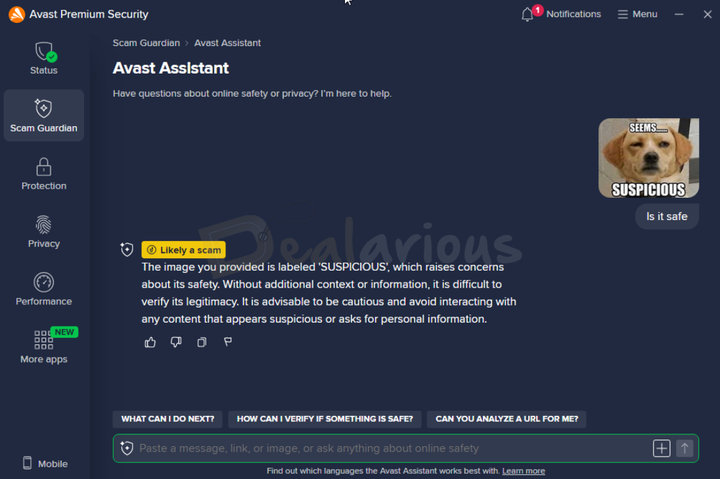
It is an AI-powered tool introduced by Avast to help spot suspicious elements in text, emails, links, or image files. You can ask questions like how to keep your personal information secure, or how to verify the authenticity of a message. The assistant then gives practical guidance, which is useful if you’re not sure what to trust.
During my Avast Antivirus review, I shared an image file with the assistant and asked, "Is it safe?" The tool flagged the image as a potential scam. However, when I submitted the URL of the downloaded image, no negative findings were detected. This showed me something interesting: an image can look suspicious, but the link hosting it might still be clean.
In short, Avast Assistant doesn’t work like a traditional malware scanner. Instead, it looks for scam signals in the content and gives you guidance before you interact with something risky.
Overall, I found the feature helpful for quick safety tips and general guidance on digital safety.
Tip: It's always wise to stay cautious while browsing. You can increase your awareness with these quick online safety tips to navigate the web more securely.
Web Guard
Enabled by default, the Web Guard feature monitors your online activity and blocks fake websites, scam links, malware, and suspicious downloads before you can interact with them.
What I liked here is the option to manually add websites, which lets you block access in advance instead of waiting for a warning later.
Email Guard
The Email Guard feature uses AI to analyze your incoming emails after you add your email account, flagging messages as safe or unsafe. It’s designed to reduce phishing and scam emails before you click anything.
With a single subscription, you can protect up to five email accounts, including services like Gmail and Outlook. However, Email Guard does not support Yahoo and AOL.
Note: Email Guard is not available in Avast Free Antivirus. It is included starting with Avast Premium Security and higher plans.
Protection
Virus Scan
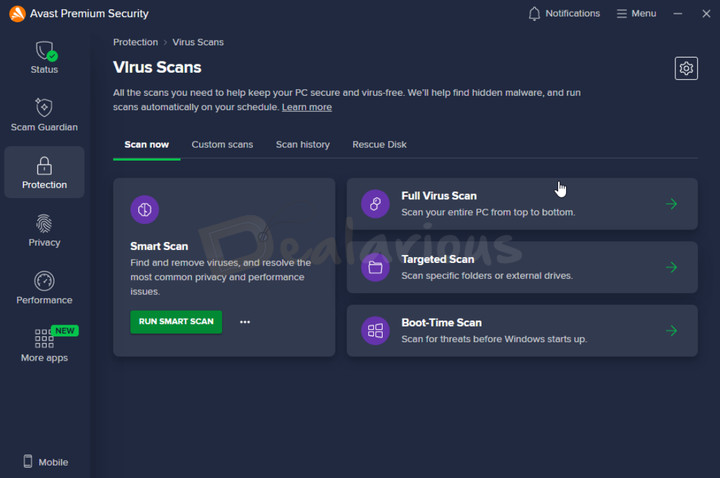
To help you manually check for threats, Avast offers multiple scanning options, including Smart Scan, Full Virus Scan, Targeted Scan, Quick Scan, and Boot-Time Scan. You can also schedule scans at your preferred frequency (Once, Daily, Weekly, and Monthly) and toggle advanced parameters, which gives you control over how deep each scheduled scan goes.
During my test, Avast's Smart Scan took about 3 minutes to complete. It didn’t flag any malware, but it did point out 2 system settings and 10 performance issues. When I clicked to fix the performance issues, Avast opened a pop-up for Avast Cleanup Premium, and that felt a bit pushy.
Core Shields
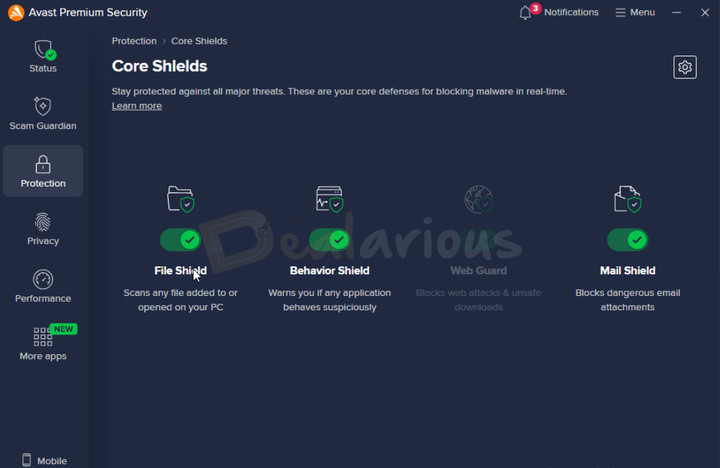
Avast’s lineup provides real-time protection through its Core Shields module. It includes three tools: File Shield, Behavior Shield, and Mail Shield, all of which are enabled by default. Together, they monitor suspicious app activity, scan files, and detect dangerous mail attachments to help protect you from malware and phishing attempts.
Tip: If you are a newbie, enabling Hardened Mode in Core Shields' settings is a smart move. It uses a reputation-based service to determine the legitimacy of an executable file and blocks suspicious ones automatically. It adds an extra layer of protection when you are unsure whether a file is safe.
Ransomware Shield
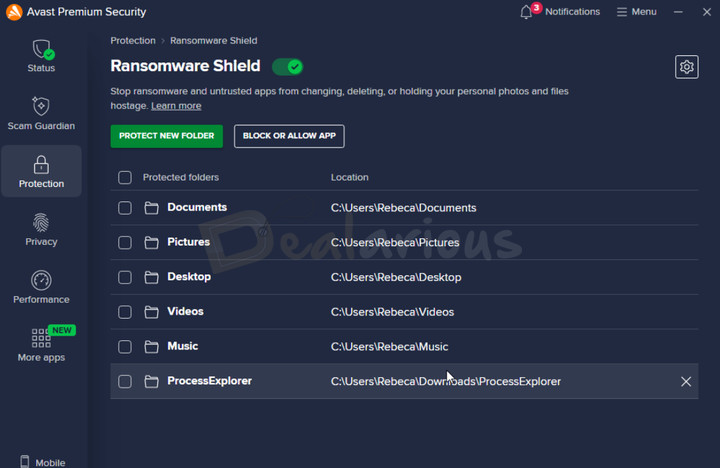
A ransomware attack is one of the most dangerous cyber threats, in which hackers take control of your personal data and demand a ransom for its release. Even if the ransom is paid, there's no guarantee that your system will be fully secure again.
Avast's Ransomware Shield resolves this issue by creating a protective barrier around your important files (photos, documents, videos, etc.) and folders, and blocking unauthorized access. It automatically detects personal data on your system, allows you to add custom folders, and lets you control which applications can modify protected files. It ensures untrusted apps cannot change, delete, or modify your files.
Network Inspector (Formerly known as Wi-Fi Inspector)
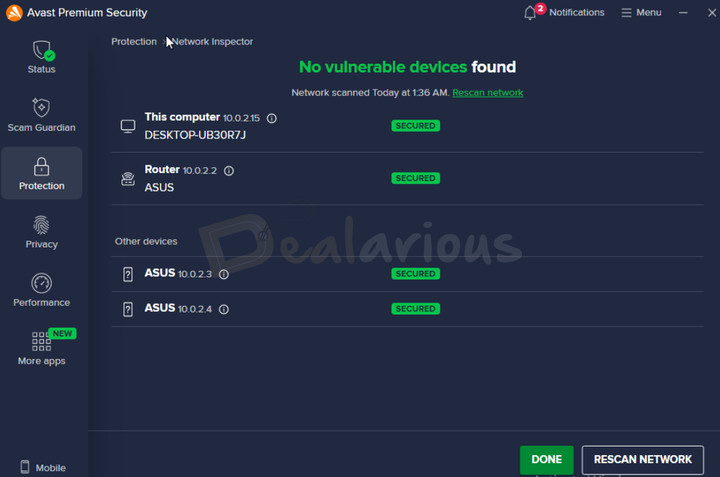
The Network Inspector feature in Avast works around the clock to detect network-level threats (DNS hijacking, WannaCry/DoublePulsar attacks, Misfortune Cookie vulnerability, etc.) and alert you so you can take immediate action. Besides that, it can also detect devices connected to your network.
During my test, the program quickly detected devices connected to my home network along with their security status. Everything showed as secure, and Avast didn’t find any unknown devices connected to my network.
Advanced Firewall
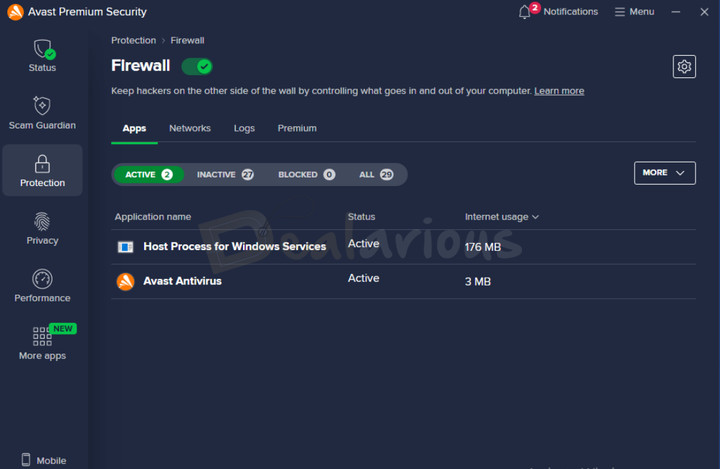
Avast includes a two-way firewall component across its antivirus product line. In Avast Free Antivirus, the firewall is limited to scanning inbound and outbound connections, blocking potential threats, and offering basic customization.
Paid plans, starting with Avast Premium Security, offer advanced firewall controls to help protect your system against data leaks, port scanning attempts, spoofing attacks, and man-in-the-middle attacks. This feature is especially useful if you connect to public or unsecured networks.
Bank Mode
Avast's Bank Mode feature is useful for those who regularly make online transactions. When activated, Bank Mode opens a separate secure virtual window for you to do online transactions and related tasks. It works with Firefox, Edge, Chrome, and Avast Secure Browser to help keep your sensitive data safe from malicious script injection, keyloggers, and screenshot attempts by third-party applications.
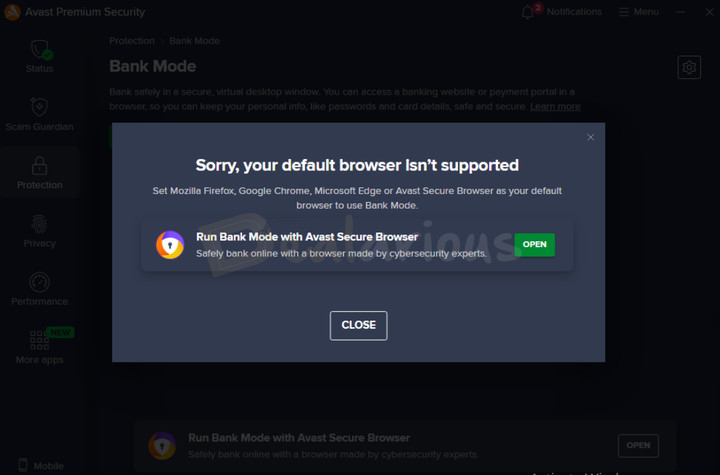
During my test, I had trouble opening Bank Mode in my default browser (Microsoft Edge). It displayed a pop-up saying "Sorry, your default browser isn't supported" and prompted me to install Avast Secure Browser to run Bank Mode. After contacting their support team, they suggested I run a repair on the program. Even after applying the suggestion, the issue persisted.
Interestingly, when I changed my default browser to Firefox, Avast opened Bank Mode without any issue.
Sandbox
It is one of my favorite features that many antivirus providers lack as a built-in option. The Sandbox feature lets you run suspicious apps in a safe virtual environment, keeping your main system protected if the app turns out to be infected. Any changes made by the app stay contained within the Sandbox.
Real Site
With the advancement of technology, it is becoming difficult to differentiate between real and fake websites (often containing malicious content). Avast's Real Site feature is useful in such scenarios. It helps protect you against DNS hijacking by directing you to the intended website, preventing redirection to fraudulent sites. It does so by establishing a connection between your browser and Avast's own DNS servers, ensuring that the websites you visit are authentic and secure.
Privacy
Hack Alerts
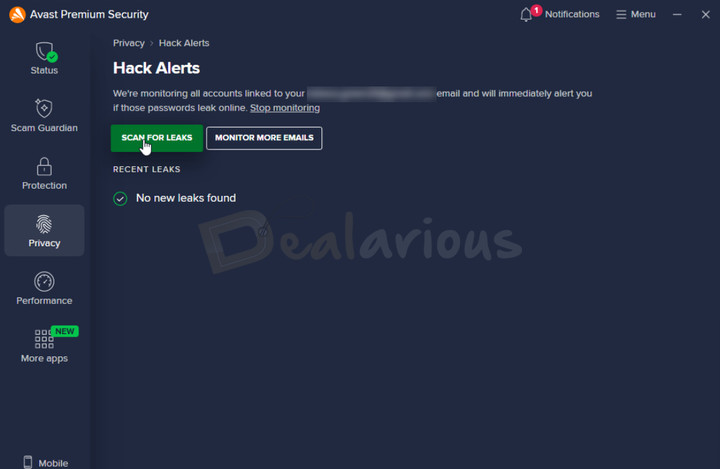
It is another basic yet useful feature I noticed during this Avast Antivirus Review. Hack Alerts monitors the email address linked to your Avast account around the clock, checking for password leaks or data breach exposure. If anything is found, the program notifies you.
During my test, the feature did not detect any leaks for the email address I provided. However, my experience was disrupted by Avast's upsell for Avast BreachGuard as soon as I clicked the "Monitor More Emails" option.
Browser Shield
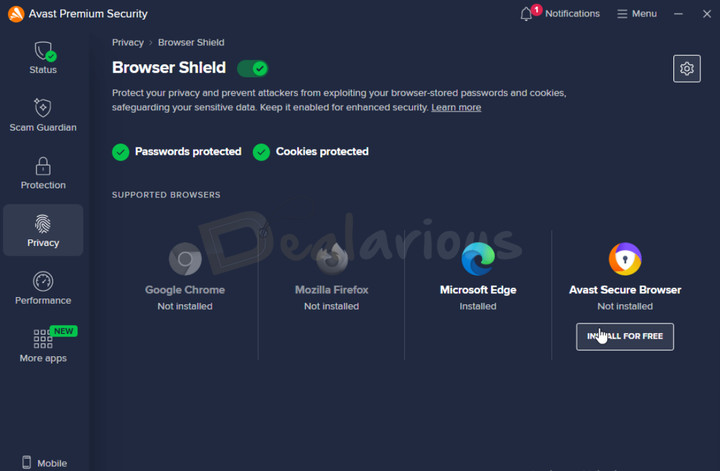
While Avast's antivirus does not include a built-in password manager, its Browser Shield feature works as a partial alternative. It helps protect your browser-stored passwords, cookies, and other sensitive data from theft or unwanted access by applications. For more control, the program also lets you add apps to an allowed or blocked list. If suspicious activity is detected, Avast alerts you.
Note: Currently, Avast's Browser Shield supports Chrome, Firefox, Edge, and Avast Secure Browser.
Sensitive Data Shield
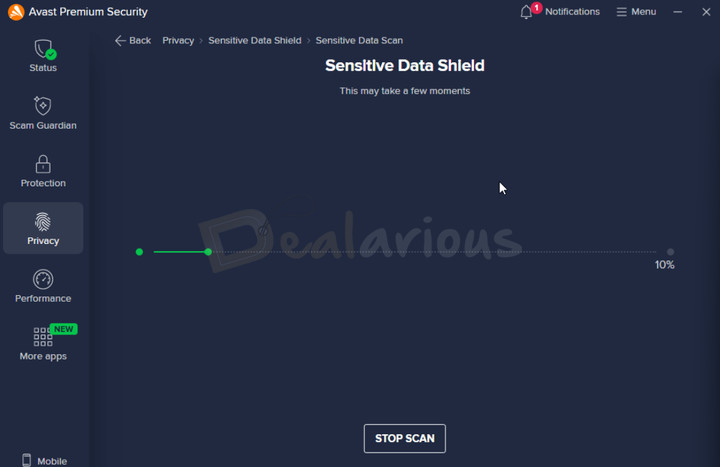
This feature helps keep your sensitive files (e.g., banking details, passwords, IDs, payslips) safe from malware, spyware, and unauthorized access. Sensitive Data Shield supports common document formats like .pdf, .doc, .docx, .xls, and .xlsx, which is practical since most important files usually come in these formats. You can either initiate a scan to let Avast automatically detect the files or add them manually.
In short, the feature is easy to use and does a good job of protecting important files, especially if your work involves sensitive information.
While Avast helps protect your files, tools like Wondershare PDFelement can help you manage, edit, redact, and organize PDFs before storing or sharing them. If you are curious, check out my Wondershare PDFelement review. And if it fits your needs, you can unlock deals with our Wondershare PDFelement coupon codes.
Performance
When it comes to Performance, Avast provides two common features available across all Avast Antivirus products:
- DND Mode and
- Software Updater.
DND Mode helps reduce distractions by limiting pop-ups while you’re working, watching, or gaming. Software Updater, on the other hand, checks for outdated apps, which is useful since old versions can become an easy target for security issues.
However, unlike Avast's free version, which requires manual software updates, the paid plans automatically keep your outdated apps up to date.
Other Notable Features
Besides the key features mentioned above, Avast packs a few other advanced system protection tools as well:
- Data Shredder
- Webcam Shield
- Remote Access Shield
- Rescue Disk, etc.
What I noticed while testing is that these extras are easy to find from the left menu, but Avast still nudges you toward other add-ons in the “More Apps” area, so it’s worth clicking carefully.
Performance
No one likes an app that lags during multitasking. So before committing, it’s worth checking how Avast behaves during everyday use and during scans.
In this Avast Antivirus Review, I’ll share my hands-on experience with Avast’s performance. But first, here’s what independent lab reports say.
Note: I conducted the performance test for Avast Antivirus using a virtual machine (VM). So the results may vary depending on your system specs and background load.
Performance (Independent Lab Test Results)
In the latest AV-Test report for November - December, 2025, Avast achieved perfect scores of 6 out of 6 in Protection, Performance and Usability.
Furthermore, Avast demonstrated its ability to protect against 0-day malware, achieving a 99.8% score and successfully detecting 100% of widespread malware during AV-Test lab evaluations. Besides, Avast has also received AV-Test's Top Product Award.
Additionally, according to the latest AV-Comparatives Real-World Protection test report, Avast successfully blocked 100% of malware attacks. (In the AV-Comparatives table, Avast is grouped with AVG and Norton, and the same row shows 8 false positives.)
To further demonstrate its reliability in 2024, Avast secured Gold in the Real-World Protection Awards, Bronze in the Malware Protection and Advanced Threat Protection Awards, and was also awarded the Top Rated Product by AV-Comparatives.
Impact on System
Despite my virtual machine's limited specifications, Avast booted up quickly and finished scanning the system fairly fast. However, I did notice occasional lags, which is likely because I was testing it on a VM.
My system specifications were:
- Processor: AMD Ryzen 5 3500U, 2100 Mhz, 4 Core(s), 8 Logical Processor(s)
- RAM: 12.0 GB
- OS: Windows 11 Home Single Language
- Graphics: AMD Radeon Vega 8 (Integrated)
Full Scan
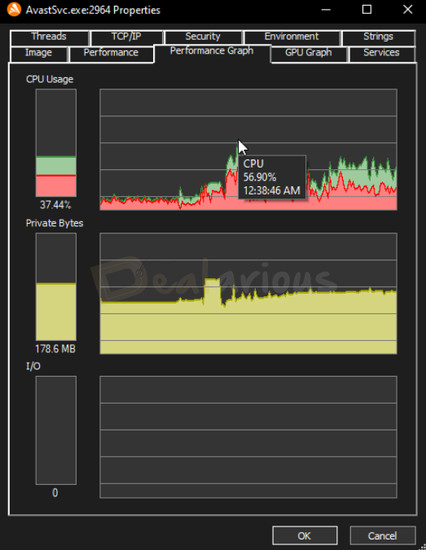
To my surprise, Avast completed its Full Scan within 38 minutes, which is impressively fast compared to other antivirus programs I have tested so far. During this scan, Avast scanned 3,333,143 files and detected no threats.
While the scan was fast, it put noticeable stress on my VM. CPU usage peaked at 56.90%, and RAM usage reached 347 MB. Throughout the scanning process, CPU usage fluctuated between 35% and 45%, and RAM usage stayed between 170 MB and 185 MB.
Quick Scan
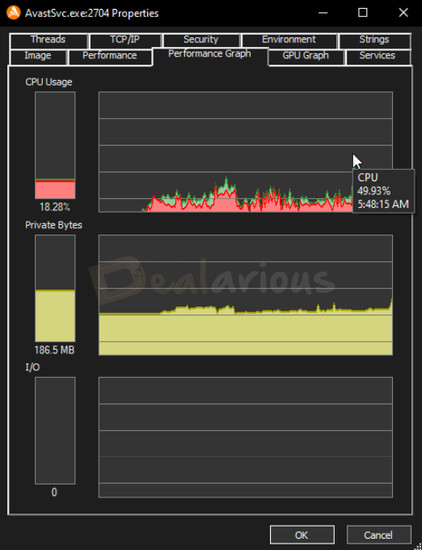
Avast's Quick Scan also performed well, using around 49.93% CPU and 186.5 MB of RAM at its peak. The Quick Scan completed in 12 minutes, during which Avast scanned 44,844 files and found no threats.
Impression: During my test for this Avast Antivirus Review, Avast had minimal impact on system performance during normal usage. However, a full system scan can cause slowdowns, especially on low-end systems.
Customer Support
Avast offers multiple support options, including a comprehensive FAQs section for common questions, and 24/7 customer support via email, call, and live chat.
My live chat experience was mostly satisfactory, but it depended on the agent I spoke with. A few times, I had to wait over 15 minutes for a response. Still, most agents were patient and clear in their answers, and my questions were resolved without me having to go back and forth too much.
Avast Antivirus Review: Overall Experience
What I Liked
- The interface is intuitive, so there’s less guesswork of finding a specific tool.
- The layout is clean, and the tools are organized in a way that made it easy to act quickly.
- I also liked that most customization options are explained in plain language, so you know what a toggle actually does.
- One feature I genuinely appreciate is Avast’s Sandbox. It’s not built into many top-tier antivirus tools. Since I frequently test different apps, Sandbox helped me check suspicious files without risking my main system.
What I Disliked
- Avast’s upselling can get frustrating. I ran into pop-ups while testing Hack Alerts, Network Inspector, and Smart Scan.
- It only takes one click on a “fix” button for Avast to push another product, and that breaks the flow.
- Hack Alerts felt a bit basic. It mainly checks for leaks linked to your Avast account and alerts you in real time. It’s still useful, but plenty of web-based breach monitoring tools already offer similar checks.
Alternatives
Bitdefender Total Security
Bitdefender is a leading name in the antivirus space and a strong alternative to Avast. Both programs have strong antivirus engines that detect and block modern threats. They also include an easy interface and core security tools like real-time scanning, firewall protection, and defenses against banking and phishing attacks.
That said, Bitdefender Total Security includes a Cryptomining Protection module, which Avast lacks. In contrast, Avast offers a built-in Sandbox for app testing and its AI-based Scam Guardian tools. In the end, both can protect you well, so it really comes down to which extra features you’ll actually use.
If you want to learn more about Bitdefender, give our Bitdefender Total Security review a read.
Norton 360 Deluxe
The same parent company, Gen Digital, owns Norton and Avast. However, unlike Avast Antivirus, Norton 360 Deluxe includes more tools, such as Parental Controls, a Password Manager, and Cloud Backup. In contrast, Avast offers a 30-day free trial for Premium Security and a free antivirus, which is a nice advantage if you just want to test things first.
When testing both apps, I found Avast's interface more intuitive than Norton's, but this depends on personal preference. You can read my Norton 360 Deluxe review to check if it's the right fit for you.
AVG Antivirus
Similar to Norton, AVG also comes under the same parent company as Avast, Gen Digital. So you can expect similar threat detection capabilities and a familiar overall approach. Both include the same core security tools, but AVG Antivirus lacks a dedicated Sandbox feature, which Avast includes. I also found Avast’s layout a bit more organized than AVG’s during navigation.
Overall, if you prefer a simpler, budget-friendly option within the AVG ecosystem, both AVG Internet Security and AVG Ultimate can be a good deal.
F-Secure Antivirus
F-Secure is another reliable alternative to Avast Antivirus. Compared to F-Secure, Avast offers a wider range of protection features and more customization options. F-Secure, on the other hand, can cover up to 25 devices on a single subscription, compared to Avast’s 10-device coverage.
Avast also offers additional tools like PC optimization, AntiTrack, and Driver Updater (depending on the plan), which F-Secure doesn’t focus on as much. F-Secure feels lighter overall, which can be a better fit for low-end systems.
For an in-depth look at F-Secure’s effectiveness, read our F-Secure Antivirus review.
FAQs
In this Avast Antivirus Review, these are the questions I see most often from readers before they download or subscribe.
Is Avast reliable?
Despite past concerns that Avast has addressed, the program remains a strong antivirus option for everyday users. It scans, blocks threats, and provides solid protection against common malware and phishing attempts.
Does Avast Antivirus slow down your PC?
It depends on your system. During regular use, Avast didn’t cause noticeable slowdowns for me. However, on low-end devices, manual scans (like Full Scan or Quick Scan) can still impact performance while they run.
Which version of Avast should I buy?
If you want basic real-time protection with core scanning and firewall coverage, Avast Free Antivirus is usually enough. For more than the basics, Avast Premium Security adds tools like an advanced firewall, Bank Mode, Real Site, and Sandbox.
For the most complete Avast bundle, Avast Ultimate is the safer pick. It includes everything from Premium Security, plus extras like Avast SecureLine VPN, AntiTrack, and Cleanup Premium.
And if you want an “all-in-one” Avast app that mixes security with privacy and performance tools, Avast One is another option, depending on the version and platform you’re using.
Does Avast Premium Security have a free trial?
Yes, Avast Premium Security offers a 30-day fully functional free trial.
Conclusion
Based on my experience with this Avast Antivirus Review, I found Avast Premium Security to be an effective antivirus solution. It covers the essentials, including an advanced firewall, real-time protection, network protection, banking protection, sensitive data protection, and more. Its clean, organized interface also makes it easy to navigate without hunting around for tools.
That said, Avast is not free from drawbacks. The upselling can feel overly annoying at times, especially when you’re trying to fix something or explore a feature. And while Avast has taken steps to address its past controversies, some users may still have privacy concerns. The good part is that Avast is now more transparent about its data practices and gives you privacy controls during setup.
If you’re a home user looking for strong protection with a lot of extra tools, Avast Premium Security is worth trying. Start with the 30-day free trial, see how it feels on your system, and then decide if it fits your needs.
Tip: If you are feeling confused by the available options, it's best to first understand what to look for in an antivirus before buying. It can help you make a more informed decision.

She reviews software at Dealarious, mostly recovery and productivity tools, which she tries out herself. Her goal is to keep things simple so readers don’t waste hours figuring out what works. Over the years, she has tested dozens of apps and learned that small details often make the biggest difference.
When she isn’t testing programs, you’ll usually find her hiking in the mountains or enjoying the rain. She believes good tech should quietly make life easier, not more complicated.