From video calls to meetings, interviews, or online classes, webcams have become an integral part of our lives. However, this growing dependence has also made webcams a common target for hackers.
That's why learning how to protect yourself from webcam spying is essential in today's digital world. This guide focuses on simple ways to strengthen your webcam security without compromising convenience.
What Are The Dangers of Webcam Spying?
Before getting into the risks of webcam intrusion, it helps to understand how attackers usually get in.
How attackers actually spy on webcams?
Outdated OS, Software, and Drivers
Outdated apps, drivers, and operating systems are easier targets because they may be missing recent security patches. Those updates often fix known weaknesses, including issues that can affect webcam-related components. When updates are ignored for weeks or months, the gaps stay open. That gives attackers more room to exploit vulnerabilities, install remote access tools, and try to use your webcam without permission.
Spyware Risks in Fake or Cracked Software
Fake and cracked software is one of the easiest ways to invite spyware onto a device. The app may even look normal after installation, which is what makes it risky. In many cases, users click through the setup process quickly and approve permissions without checking much. Meanwhile, hidden malware can slip in and keep running quietly in the background. Sometimes, that includes attempts to access the webcam.
Malicious Browser Extension
Browser extensions can be useful, but some ask for far more access than they really need. A basic extension should not raise eyebrows, yet some request permission for tabs, browsing activity, camera access, or microphone access during installation. If that gets approved without a second look, those permissions can be abused.
Reviewing extension permissions once in a while is a small step, but it helps. So does sticking to trusted developers.
Remote Access Trojans (RATs)
Remote Access Trojans, or RATs, are malware programs that let attackers control a computer from somewhere else. In real-world cases, infections often start with something simple, a malicious email attachment, a fake download page, an unsafe link, or software from an untrusted source.
Once a RAT is installed, the attacker can do much more than just watch a webcam. They may change settings, browse files, log activity, or turn on the camera without the user noticing. That is what makes RAT-based attacks especially invasive.
Tip: Many webcam-related attacks start with poor digital habits, not just advanced hacking. Staying informed about important internet safety facts and tips can help lower the chance of webcam spying and other cyberattacks.
How Webcam Spying Can Affect You in Real Life
Webcam spying does not stop at invading your privacy; it goes far beyond.
Loss of Privacy
Think about where your webcam is placed. Most probably, it will be set up in a bedroom, home office, or another private space. This makes it an attractive target for attackers. If compromised, someone can silently watch or record your daily activities, invading your personal space. A simple communication tool can become a means of surveillance or even stalking.
Stealing Personal Information
Webcam spying is often part of a larger attack. In some cases, attackers may view your screen and keystrokes, steal passwords and documents, and commit identity theft.
In May 2014, the FBI led a global operation known as the BlackShades RAT takedown. This RAT allowed attackers to remotely access computers, spy through webcams, and steal personal and login information. It compromised over 500,000 computers in more than 100 countries.
Extortion and Blackmail
Hackers may record private moments by infiltrating a webcam. Then they use the footage for blackmail or extortion, in exchange for not sharing the footage publicly.
In September 2013, the Miss Teen USA webcam hacking case showed how private images taken through a hacked computer camera can be used for blackmail. The case highlights how unauthorized webcam access can be exploited for blackmail.
How Do I Know if Someone is Accessing My webcam?
Malware is designed to hide its activities, making it hard to spot instantly. To detect whether your webcam is compromised, look for unusual changes in your device or webcam behavior.
Physical Indicators
One of the most prominent sign of the webcam being used is the "indicator light".
Most external webcams and laptops with built-in cameras include a light indicator that serves as a privacy safeguard when the webcam is active. If the light turns on when you are not using apps like Zoom, Google Meet, or the camera app, it may indicate unauthorized access to your webcam.
It is important to note that some advanced malware may also bypass or disable the webcam indicator light.
Battery Drain
Like other hardware components, webcams need power to run. If your battery drains faster than usual for no reason, it may indicate background activity. However, battery drain alone does not confirm webcam spying.
System and Network Signs
These signs are less obvious but may suggest unusual background processes.
If you notice high RAM, CPU, or Disk usage, or loud fan noise, even without running any resource-intensive applications, it is a sign that background processes are active.
Similarly, increased internet usage and slow network performance when you are not uploading or streaming may suggest unusual background activity. In such a situation, check Task Manager for unfamiliar programs or suspicious processes. Also, check for any camera-related processes running in the background. If no video applications are open but camera-related activity appears, further investigation may be necessary.
Security and Permission Alerts
Antivirus programs can sometimes detect and flag malware or suspicious access attempts. If you suddenly start seeing camera access pop-ups without user interaction, or permission prompts keep appearing even after denying access, it could mean someone is trying to access your webcam.
Additionally, if your firewall repeatedly alerts you about blocked outgoing connections, it may indicate suspicious activity. While this doesn't mean your webcam is compromised, taking a closer look helps.
Unknown Apps and Files
If you notice unfamiliar files, third-party apps, or extensions you don't remember installing, it could indicate the presence of spyware on your device. Some spyware programs can access webcams. Remove these programs promptly to reduce the risk of webcam spying. The bottom line is that you should not keep anything on your system that you are not aware of.
Webcam Settings Alterations
In some cases, attackers can change your webcam settings to use your camera without your knowledge. To be on the safe side, review your webcam and privacy settings. Make sure that no settings have been changed without your consent.
How To Protect Yourself From Webcam Spying?
You are not paranoid for thinking that someone might be using your webcam. The key is to stay in control by applying a few simple yet effective steps to protect yourself from webcam spying.
Use Strong and Unique Passwords
Hackers often try to reach webcams through the accounts, apps, and cloud services connected to them. Weak or reused passwords increase the likelihood of unauthorized access. Using strong, unique passwords for every account reduces the risk.
Tip: Consider using a password manager such as Sticky Password Premium or Bitwarden. They can help streamline the complex password management process.
Enable 2FA
To strengthen your protection against webcam spying, enable two-factor authentication (2FA) wherever possible. It provides an additional layer of security through a second verification step (e.g., a code sent to your phone, biometric login, etc.). Even if your password gets compromised, 2FA makes it harder for them to gain access.
Review App and Browser Permissions Regularly
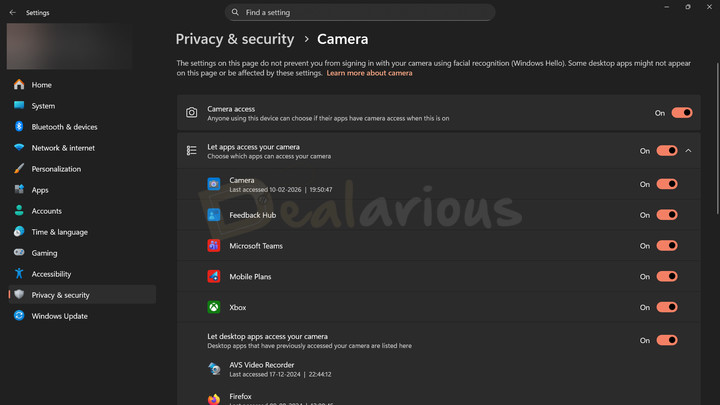
Most apps require permission before accessing your webcam and other hardware components. Make sure to grant hardware component access only to those apps that genuinely require it. Also, frequently check which apps and browser extensions have camera permission and remove access for anything unnecessary. It not only helps protect against webcam spying but also improves your overall digital safety. You can include it in your regular Windows PC maintenance checklist.
Note: Keep in mind that on Windows, camera permission controls are more detailed for some apps than others, so it is still worth checking individual app settings too.
Avoid Pirated Software
As mentioned before, pirated software comes with spyware risks. It is best to go with paid software or trusted free alternatives rather than a pirated version.
Enable Firewall Protection
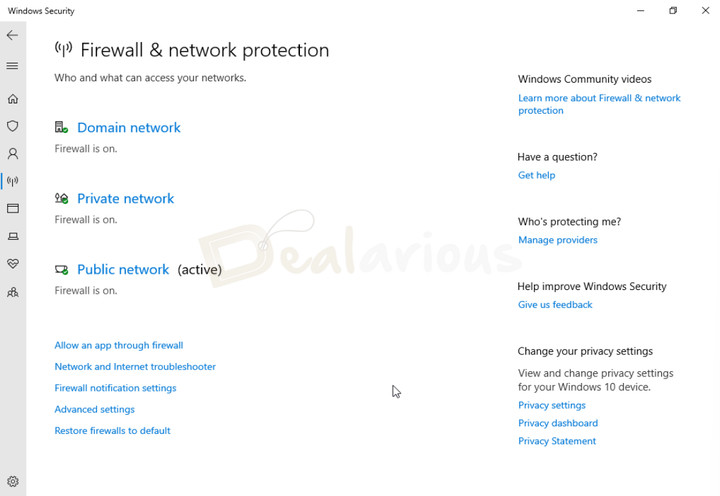
A firewall acts as a gatekeeper for inbound and outbound connections. While it cannot directly prevent webcam access, it can block suspicious connections that malware may attempt to establish to transmit data. It helps reduce the risk of webcam spying while also strengthening overall network security.
Windows includes a built-in firewall that you can manage in the Windows Security app, so make sure it's enabled.
Use a VPN on Public Wi-Fi
A VPN (virtual private network) encrypts your internet traffic and adds privacy, especially on public Wi-Fi networks. While a VPN does not prevent malware already on your device from accessing your webcam, it can add another layer of network protection.
Tip: NordVPN and Surfshark are two of the popular VPN services. To learn more about their features and benefits, read this detailed NordVPN Review and Surfshark VPN Review.
Keep Software Updated
Keeping your OS and software up to date is one of the simplest ways to secure your device. Updates fix security vulnerabilities that hackers could exploit to access your webcam in the background.
Be Careful With Phishing Emails and Fake Downloads
Be cautious before opening messages or emails from unknown senders or clicking suspicious links. Pay extra attention to messages that include attachments or urgent calls to action that seem sketchy. On Windows, make sure App & browser control (Microsoft Defender SmartScreen) is enabled. It can help warn you about suspicious sites and block risky downloads.
Disable Webcam When Not Needed
Another way to protect yourself is by disabling your webcam when it is not in use. You can either cover the webcam with tape (much like Mark Zuckerberg covering his webcam with tape) or disable it in Windows Device Manager. While these methods are not foolproof, they can provide some security against spying.
Why Built-in Protection Isn't Always Enough?
Most operating systems and devices provide basic webcam protection (e.g., permission prompts or app access controls), but that is not always sufficient. In some cases, advanced malware may bypass permissions and exploit software vulnerabilities without your knowledge. Additionally, built-in security tools and controls can be limited in scope.
While these protections reduce the risk, they don't fully eliminate the threat. That's why combining them with additional security measures, such as third-party antivirus tools, safe browsing habits, and physical camera covers, can help strengthen your privacy and security.
Use Antivirus Software With Webcam Protection
A reliable antivirus can help detect potential malware and block it before it causes harm. Some well-known antivirus programs that include dedicated webcam protection features are Bitdefender Total Security, Norton 360 Deluxe, and Avast Premium Security.
Bitdefender Total Security
Bitdefender Total Security offers a multilayered security approach, including its Video & Audio Protection feature. It monitors apps that try to access your webcam and microphone, and it can block unknown applications while alerting you to suspicious activity. It also provides granular control over settings, allowing you to configure security parameters based on your needs. You can read this Bitdefender Total Security review to learn more.
Norton 360 Deluxe
Norton 360 Deluxe is a well-known security suite that includes SafeCam (Windows only) to help protect against unauthorized webcam access. In addition, it includes malware protection, a built-in VPN, and dark web monitoring. These tools work together to safeguard you against evolving cyber threats. Read this in-depth Norton 360 Deluxe review to learn more about its capabilities.
Avast Premium Security
Avast Premium Security includes a Webcam Shield feature as part of a broader security suite. This feature offers three different modes: Smart Mode, Strict Mode, and Block access to webcam and microphone, making webcam privacy controls easier to manage. Beyond webcam safety, Avast also includes broader protection tools such as malware protection and scam protection. Give this Avast Antivirus Review a read to learn more.
FAQs
Can someone spy on my webcam without my knowledge?
Yes. Malware such as RATs can silently access your webcam without obvious signs or alerts, especially if your apps or operating system are outdated or your device lacks strong security protection.
Does free antivirus software protect webcams?
Not always. Free antivirus tools usually provide basic protection, but they may not include dedicated webcam protection features. For stronger webcam privacy controls, a more comprehensive security suite may be a better option.
Can a VPN protect you from Webcam Spying?
No. A VPN helps secure your network traffic, especially on public Wi-Fi, but it does not stop malware already running on your device from accessing your webcam. For more insights, you can read about how VPNs work.
Is the webcam security light a reliable sign of spying?
Usually, yes, but it is not foolproof. The light often turns on when the camera is in use, but some research has shown that, in certain cases, sophisticated attacks can bypass the indicator. It is best to consider the webcam light alongside other warning signs.
Does covering my webcam help prevent webcam hacking?
Yes, partly. A physical cover can block visual spying through the lens, but it does not prevent malware, microphone monitoring, or deeper device compromise. Webcam hacking, often referred to as camfecting, is usually part of a larger security issue, so a cover should be treated as one layer of protection, not a complete fix.
Conclusion
Here's the harsh reality of the digital world: cybercriminals are always looking for new victims. Webcams can be exploited to invade your privacy, steal data, and even be used for blackmail or extortion. If your webcam ever starts to act up, don't ignore it. Look for related warning signs and run a malware scan immediately.
Along with practicing good digital habits, investing in a reliable antivirus solution adds another layer of protection. You can explore our list of best antivirus software for enhanced protection. While manual steps will help reduce risk, antivirus software can act as an extra layer of defense.

She reviews software at Dealarious, mostly recovery and productivity tools, which she tries out herself. Her goal is to keep things simple so readers don’t waste hours figuring out what works. Over the years, she has tested dozens of apps and learned that small details often make the biggest difference.
When she isn’t testing programs, you’ll usually find her hiking in the mountains or enjoying the rain. She believes good tech should quietly make life easier, not more complicated.