Often, unnecessary piles of junk programs and files slow down the system over time and create interruptions during your workflow. In such scenarios, PC tune-up software can optimize your system performance by thoroughly scanning and removing redundant files.
Avast Cleanup Vs CCleaner: Quick Summary
Parameters | Avast Cleanup Premium | CCleaner Pro |
|---|---|---|
Pricing Options | ||
Interface | ||
Startup Optimizer | ||
Cleaning Tools | ||
Registry Cleaner | ||
Eliminate Unnecessary Apps | ||
Automatic Cleaning | ||
Software Updater | ||
Additional Features | ||
Customer Support |
Winner
CCleaner Pro
Score: 9/10
CCleaner Pro and Avast Cleanup Premium are two of the most renowned cleanup tools. They aim to fix most device performance issues. In this article, I will compare Avast Cleanup vs CCleaner based on many factors. This comparison will help you decide which tool is the best and worth the purchase.
Avast Cleanup Vs CCleaner: Introduction
Widely recognized as a robust antivirus program, Avast maintains its reputation even in the PC tune-up category. Avast Cleanup Premium includes comprehensive optimization tools to boost your device performance. It removes unnecessary junk files, programs, and broken shortcuts. Read the full Avast Cleanup Premium Review.
On the other hand, CCleaner Pro, developed by Piriform, is recognized as one of the most popular PC optimization programs. CCleaner Pro works vigorously to keep your system clutter-free of unwanted files, keeps your device up to date, and offers quick fixes regarding system errors. To learn more about the features and functionality, read our CCleaner Pro Review.
Avast acquired Piriform in 2017. Later, in Sept 2022, NortonLifeLock merged with Avast to expand further.
Following the merger, NortonLifeLock changed its company name to Gen Digital Inc. The new company includes cybersecurity brands like Norton, Avast, LifeLock, CCleaner, Avira, and AVG to tackle the challenges faced by the cybersecurity industry.
Warning Note
An unseen system change can leave your snowflake-like device inoperable. Thus, before making any changes to the system using PC tune-up utilities, creating a backup of important files or mirroring the drive will be a smart move. It can help retrieve the files if anything goes sideways.
However, it is advised to pay close attention to the process before making any critical changes to the system. It's better to be aware at first than to regret it later.
Avast Cleanup Vs CCleaner: Features Comparison Table
Features | Avast Cleanup Premium | CCleaner Pro |
|---|---|---|
Sleep Mode | Yes | Yes |
Automatic Cleaning | Yes | Yes (scheduled automatic cleaning) |
Registry Cleaner | Yes | Yes |
Software Updater | Yes | Yes |
Driver Updater | No | Yes |
Disk Defrag | Yes | No |
Bloatware removal | Yes | No |
Cloud Drive Cleaner | No | Yes |
Data Recovery | Yes | No |
Undo Center | Yes | No |
Uninstall Simulator | Yes | No |
Avast Cleanup Vs CCleaner: Comparison Parameters
Pricing Options
Avast Cleanup Premium Pricing
As per the official website, here are the subscription plans and pricing details:
65.99 USD
1 PC / 1 Year
19.99 USD
10 Devices / 1 year
The 10-device plan supports Windows, Mac, and Android devices.
Avast Ultimate Suite and Avast One include Avast Cleanup as part of the package. If you use Avast products, you can enjoy great Avast discounts by purchasing the bundle rather than purchasing them separately.
CCleaner Pro Pricing
It offers a free version with limited features. The paid version is available in the following subscription plans:
CCleaner Professional
10.95 USD
1 PC / 1 Year
CCleaner Professional Plus
12.95 USD
3 Devices / 1 year
CCleaner Premium
16.95 USD
5 Devices / 1 year
The Professional Plus variant supports Windows, Mac & Android devices. The CCleaner Premium Bundle supports 5 devices.
You can also save a lot of money on the subscription by using CCleaner Pro coupons and get the best discounts on the Pro, Pro Plus, and Premium plans.
CCleaner
Pricing Verdict
Based on the pricing comparison, I found it worth choosing CCleaner Pro if you want extended PC optimization at a comparatively fair price.
Avast Cleanup Vs CCleaner: Interface
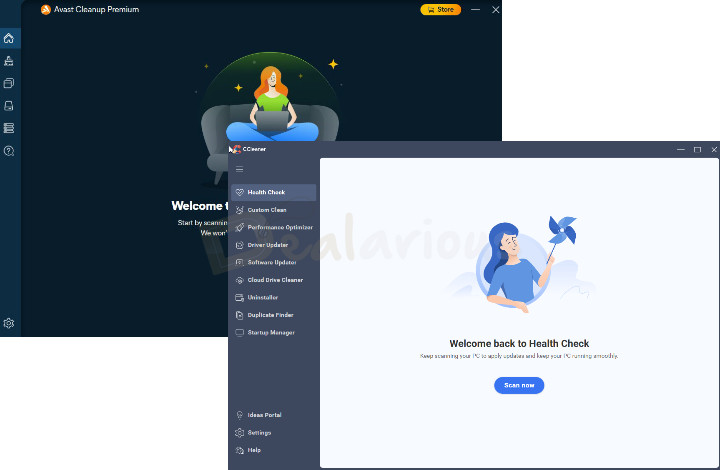
Both programs have a well-designed user interface with easily navigable features.
During my Avast Cleanup Premium Vs CCleaner test, I found Avast Cleanup's interface visually appealing. However, there is a slight drawback. Suppose you are an existing user of Avast Cleanup Premium. In that case, the latest redesigned interface and feature organization might confuse you. But by spending a little time, you will get around the new environment.
On the other hand, CCleaner Pro, which previously had a traditional design, now features a revamped interface. The new interface offers an organized dashboard. It still includes the Health Check option, and it is easy to access all the optimization tools without any hassle.
DRAW
Interface Verdict
With CCleaner's recent redesign, both utilities now offer modern, organized, and easy-to-use interfaces. This segment ends in a draw.
Avast Cleanup Vs CCleaner: Features
Below are the features that will help you choose the best tune-up tool relevant to your device requirements.
Startup Optimizer
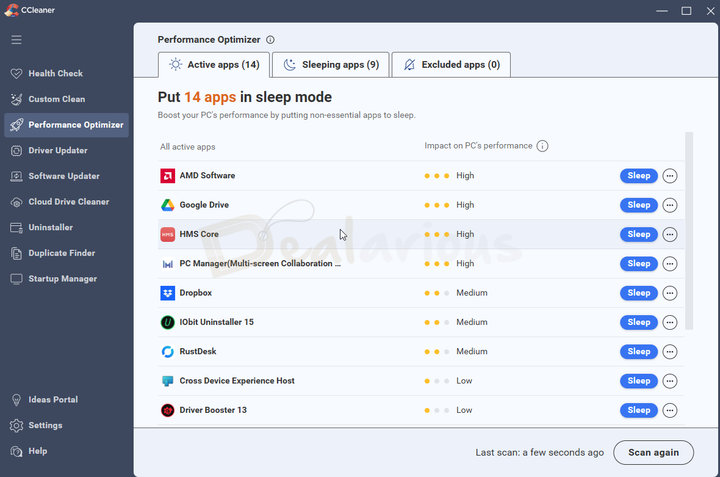
Unwanted startup and background programs often slow down your system performance and Windows boot time. Sleep mode is a feature that safely turns off these programs, restricting them from consuming system resources.
Both Avast Cleanup Premium and CCleaner Pro let you choose which unnecessary startup programs stealthily run in the background and disable them from starting up. This feature greatly improves Windows boot time.
This feature is in the "Sleep Mode" section of Avast Cleanup Premium. CCleaner Pro lists all resource-consuming programs under the Performance Optimizer tab.
Note: You can launch a program you have put into sleep mode. It will automatically revert to the assigned mode once you exit the application.
DRAW
Startup Optimizer Verdict
Regarding my personal experience, both Avast Cleanup Premium and CCleaner Pro performed efficiently, killing unnecessary background and startup programs.
Cleaning Tools
Both utilities include effective cleaning tools to remove junk files, browser data, and invalid registry entries.
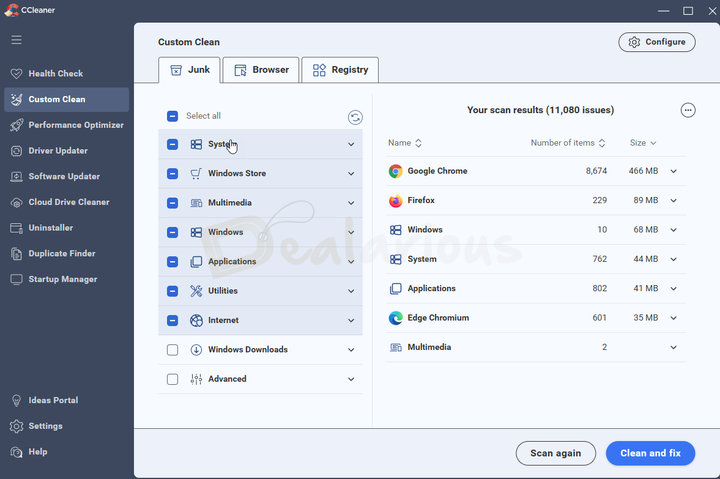
In the latest version of CCleaner Pro, all the cleaning options are grouped under the new Custom Clean layout, which includes Junk, Browser, and Registry cleaning categories. This redesign gives users better control over what to clean.
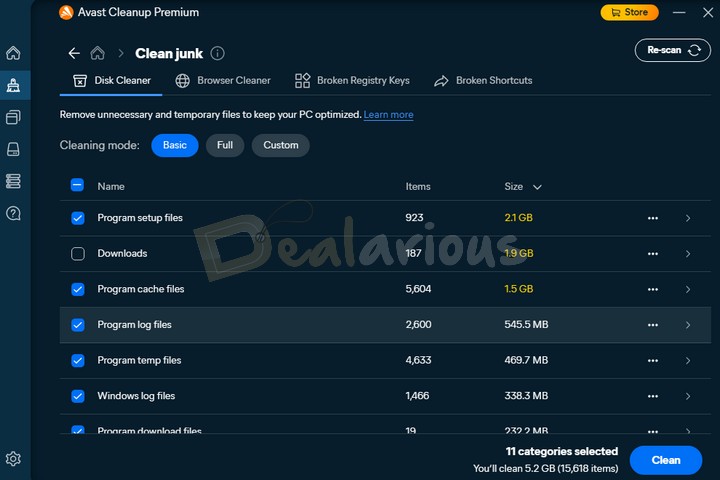
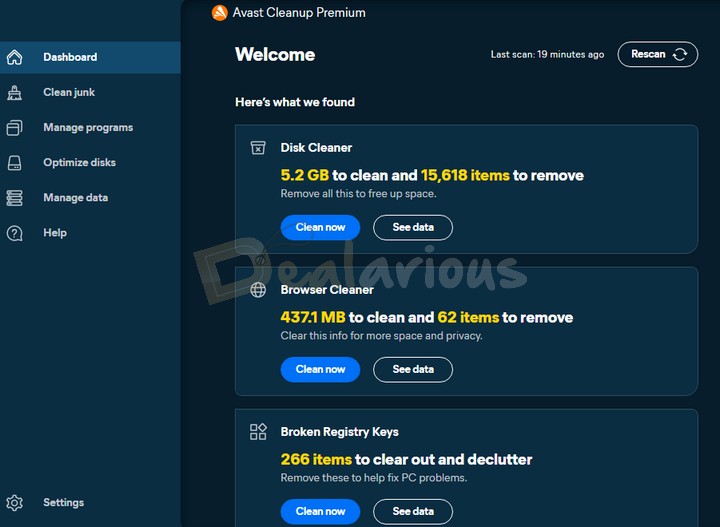
Avast Cleanup Premium, on the other hand, has a Clean junk feature that includes four tools: Disk Cleaner, Browser Cleaner, Broken Registry Keys, and Broken Shortcuts. Furthermore, it also provides three different cleaning modes, Basic, Full, and Custom, to help you efficiently delete unnecessary files from your system.
CCleaner
Cleaning Tools Verdict
While both tools remove junk and optimize your system, CCleaner Pro offers more manual control through the Custom Clean module.
Registry Cleaner
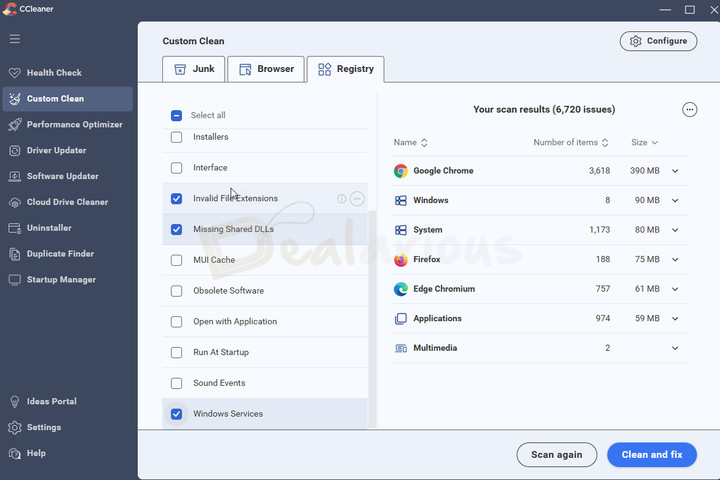
The Registry Cleaner forms the base of any PC tuning utility since the registry is the heart of any PC. Thus, deleting broken registry entries that accumulate in your system, along with unnecessary junk, can restore your system's performance.
Avast Cleanup Premium optimizes the Windows Registry by fixing broken entries during its Maintenance scan. It scans for Open-with keys, MUI cache keys, Obsolete software keys, & Recent file keys.
CCleaner also scans & fixes registry entries. However, CCleaner scans for a lot more in the registry. You can choose between DLLs, Unused File Extensions, Windows Services, and more. CCleaner scans 15 registry entries.
CCleaner
Registry Cleaner Verdict
In this segment, CCleaner has the edge over Avast Cleanup in most areas, including its advanced toolset for identifying and resolving registry issues. In contrast, Avast Cleanup can only efficiently identify and delete broken registries.
Eliminate Unnecessary Apps
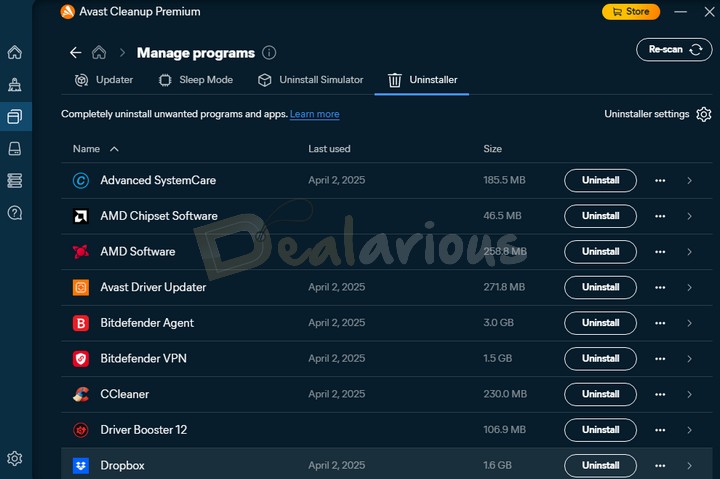
Avast Cleanup Premium effectively lists unwanted apps that haven't been used in a while. You can then choose to uninstall them from the same window and recover disk space. The feature is available in the Manage programs section as 'Uninstaller'.
In addition, you can choose a preferred time during which Avast will recognize an application as unnecessary and automatically uninstall it.
In CCleaner 7, the Uninstaller has been significantly improved. With the new uninstall engine, you can now uninstall multiple programs at once, clean up leftover files, and even temporarily remove apps to test their impact on system performance.
CCleaner
Uninstaller Verdict
With the latest update, CCleaner’s enhanced Uninstaller easily takes the lead. It provides more control and reliability than Avast Cleanup’s automatic removal feature.
Automatic Cleaning
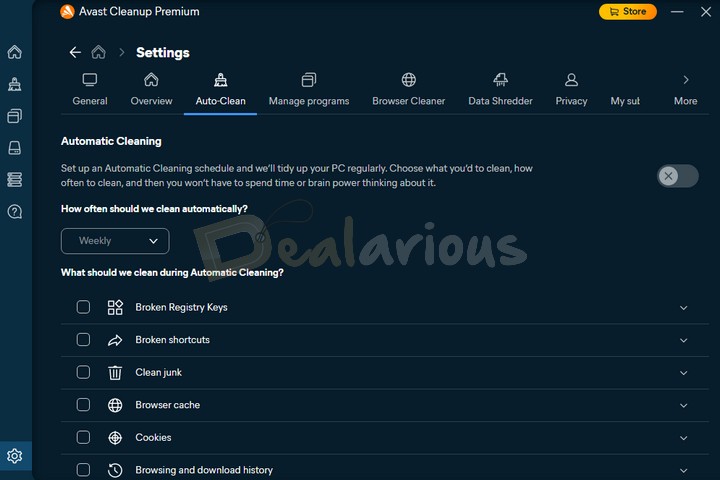
Avast Cleanup Premium includes an Automatic Cleaning feature that runs routine cleanup tasks in the background to keep your system optimized.
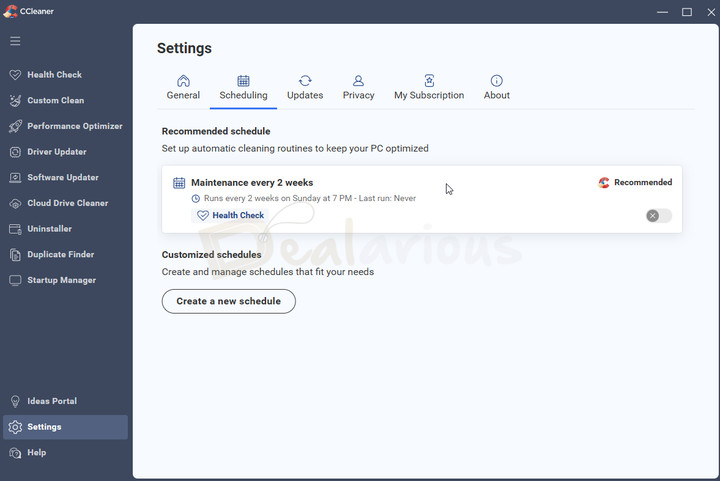
With the latest CCleaner Pro update (December 2025), automatic cleaning has been restored through scheduling. Paid users can set CCleaner to run its cleanup routine automatically on a daily, weekly, or customized schedule.
Avast Cleanup
Automatic Cleaning Verdict
Avast Cleanup Premium takes the lead. Its Auto-Clean feature works silently in the background and doesn’t rely on fixed schedules, offering real-time automatic maintenance. Automatic cleaning in CCleaner Pro is limited to scheduled runs, rather than continuous background monitoring.
Software Updater
The Software Updater in both Avast Cleanup & CCleaner monitors all apps for available updates. You get a list of all programs with available updates, and you can choose to update them manually or automatically. In Avast Cleanup Premium, the feature is named Updater and is found under the "Manage programs" section.
Note: Both tune-up tools support automatic updates for programs listed in their databases. By default, programs excluded from their database will not be updated.
DRAW
Software Updater Verdict
Here, it is a draw. Both utilities perform similar functions and work efficiently to update outdated software.
Avast Cleanup Vs CCleaner: Additional Features
Here are the extra features that I found in the tune-up utilities.
Additional features included in CCleaner Pro
Driver Updater
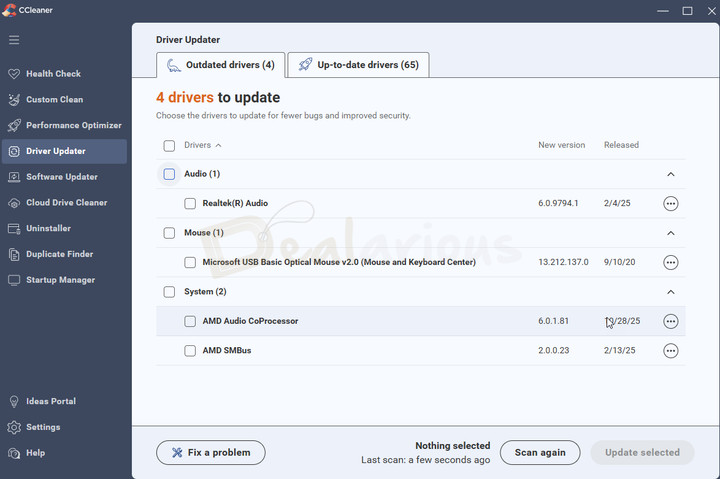
CCleaner Pro comes with a Driver Updater feature that automatically updates your Windows drivers. If anything goes wrong, you can also restore to the previous update.
You are advised to use this feature at your own risk. You can either let Windows update the driver or update drivers directly from the manufacturer's website.
This feature is missing in Avast Cleanup Premium. Avast Driver Updater is available for purchase as a stand-alone package.
Tip: If none of the programs work, you can check Driver Booster Pro from IObit. Learn more about what makes it a great updater for Windows PCs in this Driver Booster Pro Review.
Duplicate Finder
In CCleaner 7, Duplicate Finder scans your drives and folders to find duplicate files that are clogging up your system's storage space. You can then select and remove those files to free up space.
Cloud Drive Cleaner
It checks your cloud accounts, Google Drive, and OneDrive, for duplicate or unused files, helping you free up space in your cloud storage.
Additional features included in Avast Cleanup Premium
Disk Defrag
Unlike the previous version, Avast Cleanup Premium no longer offers a dedicated Disk Defragmentation feature in the latest update. Instead, Avast has automated the Disk Defragmentation task by including it in the Optimize disks feature. Hence, if the feature finds any issues during the analysis process, the program will automatically trigger the defragmentation task to rearrange your disk files, optimize your HDD for improved storage efficiency, and enhance performance.
In CCleaner, it is available as a separate purchase.
Data Recovery
This feature in Avast Cleanup Premium allows you to restore deleted files from both internal and external drives. The Data Recovery feature also allows you to fine-tune your selection for lost or deleted data for recovery.
Undo Center
It is a handy feature introduced by Avast Cleanup Premium. This feature can reverse unnoticed changes made by using the program. However, for now, this feature can only reverse actions such as deleting broken registries and shortcuts and putting applications into hibernation. I hope the upcoming updates of the program will include more items to be reversed in this feature.
Uninstall Simulator
The Uninstall Simulator creates a safe, simulated environment for practicing program uninstallation. This action allows you to assess whether removing the program from your system resolves any issues you are facing without affecting the program itself.
CCleaner
Additional Features Verdict
The clear winner in the additional features segment is CCleaner Pro. It takes the lead with more practical tools like Cloud Drive Cleaner and Driver Updater to enhance your system's performance.
Avast Cleanup Vs CCleaner: Support
Both utilities provide good support to paid subscribers.
Avast provides useful FAQs and community forums to solve most user queries. Premium users also get access to live chat and phone support.
CCleaner offers live chat along with a Knowledge Center, video tutorials, and a community forum for self-help.
DRAW
Support Verdict
It's a draw. Both tools provide reliable help options.
Pros and Cons
Avast Cleanup
Pros | Cons |
|---|---|
Convenient and visually appealing User Interface | It is expensive |
Routine Maintenance | Lacks Driver updater |
Automatic updates | Cell |
Enhances system performance | Cell |
CCleaner
Pros | Cons |
|---|---|
Easy to use | No email support option |
Enhanced Custom Clean | No Real-time Monitoring |
Affordable | Cell |
Driver Updater | Cell |
Scheduled Automatic Cleaning | Cell |
Alternatives to Avast Cleanup and CCleaner
While comparing utilities, you can also look at popular products like Advanced SystemCare Pro from IObit, AVG TuneUp and iolo System Mechanic products.
For more alternatives, here's a list of the best PC tune-up utilities you can try.
Avast Cleanup Vs CCleaner: Frequently Asked Questions
Which tune-up utility is better for Android?
Both PC tune-up utilities work rigorously to ensure smooth performance of your Android device.
Is it worth paying for Avast Cleanup?
Yes. Protecting multiple devices (Windows, Mac, Android) under a single subscription is better.
Is CCleaner worth it?
Yes. A budget-friendly program for Windows and Mac Users.
Is there a free version of Avast Cleanup?
It doesn't offer a free version. However, it does offer a free 30-day trial of the full-featured cleanup. You will have to purchase it to continue using it.
Does Avast Cleanup come with a Bloatware Removal feature?
Yes, it supports the Bloatware Removal feature. This feature detects and removes Bundleware, Browser toolbars, and adware from your device.
Avast Cleanup Vs CCleaner: Which One Is Worth Buying?
Avast and CCleaner are two of the most renowned and robust PC tune-up software. They provide all the necessary optimization tools to boost device performance.
Most users prefer CCleaner Pro as it provides additional features at a comparatively lower price for a single Windows PC. However, CCleaner Pro Plus can protect upto 3 devices (Windows, Mac, Android), and CCleaner Premium can protect upto 5 devices under a single subscription.
Avast Cleanup also stands out in the comparison game with its speedy optimization features. Also, Avast has a long-standing reputation for its antivirus application and protects upto 10 devices (Windows, Mac & Android) under a single subscription.
You can choose between them based on your requirements and your budget.
CCleaner
Winner Declared
Based on the comparison, my recommendation for purchase would be CCleaner Pro if you have to manage upto 3 or 5 devices.
Changelog

She reviews software at Dealarious, mostly recovery and productivity tools, which she tries out herself. Her goal is to keep things simple so readers don’t waste hours figuring out what works. Over the years, she has tested dozens of apps and learned that small details often make the biggest difference.
When she isn’t testing programs, you’ll usually find her hiking in the mountains or enjoying the rain. She believes good tech should quietly make life easier, not more complicated.
Parabéns pela iniciativa de fazer esses testes comparativos entre o Ccleaner e o Avast Cleanup.
Estou usando os dois softwares e tudo confere com o seu teste.
Assim que vencer o período de testes do Avast, não irei renovar.
Obrigado por esclarecer essas questões.