Over the past few years, the VPN industry has been growing at an exponential rate, with many VPN providers in the market. Each VPN provider promises the best online security tools and features to give you complete online anonymity. With so many choices, picking the best one can be hard.
In this Surfshark VPN review, I will go through all the features and safety parameters of this service. Hence, it will be easy for you to decide if it fits your needs.
Surfshark VPN Review: Summary

Pros
- High Speeds
- Supports Torrents
- Double VPN Feature
- Unlimited Devices
Cons
- None to mention
overall
USD 59.76
Supported Platforms: Windows, OSX, Android, iOS, Web Browsers
Ease of Use
5/5
Features
5/5
Tech Support
5/5
VPN Speed
5/5
Surfshark VPN is excellent for continuous, reliable data transfers for online gaming, streaming, and torrenting. Surfshark is a good choice if you're really into streaming. It hides your real IP address and unblocks most streaming sites like Hulu, BBC iPlayer, Netflix, and Amazon Prime Video. You can enjoy your streaming content from anywhere and without any issues.
Surfshark VPN: Company Origins

Surfshark VPN is a registered company in the Netherlands. The provider was earlier located in the British Virgin Islands (BVI). The Netherlands has no data retention laws and isn't part of any country groups. Best of all, Surfshark has a no-logs policy to help protect your online privacy. However, like any VPN, it can't guarantee complete anonymity online.
Surfshark VPN Features Overview
- No logs privacy policy
- AES 256-bit Encryption
- OpenVPN UDP, OpenVPN TCP, and WireGuard protocols
- IKEv2 protocol (Android and iOS)
- P2P and Torrent support
- Over 4500 servers in 100 countries
- Kill switch
- Dynamic Multihop
- Alternative ID
- Surfshark now offers free public DNS servers with no active subscription needed to use this service. Configure it on your device and start using it.
- Protect yourself from IP and DNS Leaks
- Unlimited devices (simultaneous connections)
- Located in a VPN-friendly jurisdiction
- Available for iOS, Android, Mac, Windows, Routers, Linux, Smart TVs, PlayStation, Xbox, and browser extensions.
Surfshark VPN Pricing
For unlimited devices, Surfshark VPN offers monthly, yearly, and 2-year plans. For the latest offers on SurfShark VPN, you can also check our Surfshark Coupons section.
1 Month Plan
Standard Offer
$
12.95
/mo
Billed every month
24 Months Plan
+3 Extra FREE Months
Best Offer
$
2.21
/mo
USD 286.80 USD 59.76
12 Months Plan
Great Offer
$
6.49
/mo
USD 143.40 USD 71.88
Billed every 12 months
Compared to NordVPN, CyberGhost, and Private Internet Access VPN, Surfshark offers a much better price on their 2-year plans, including an additional 3 months for free.
Platforms & Download

Initially, Surfshark started as an extension for Chrome and Firefox and for Android devices. If you want to get it on mobile devices (Android and iOS), simply search for it on the Google Play Store or App Store. Alternatively, to get links to their Chrome, Firefox, and Edge extensions, you can visit the Surfshark website.
Getting started with Surfshark is very easy.
- Visit the Surfshark website.
- Create an account with a working email address. You can create or log in to Surfshark using your Google, Apple, or Microsoft account. You can also log in to Surfshark by scanning the QR Code.
- Pick a pricing plan.
- Download your Surfshark VPN and start enjoying anonymous browsing.
Android, Mac, Linux & Router Apps
Following the success of their Android and iOS apps, the developers at Surfshark decided to develop apps for other platforms, including Windows, Mac, and Linux. Also included are smart TVs and Amazon Fire TV. All the details for setting up the VPN are available on their official website.
The browser extensions are essentially proxy servers, which means you can only use them to secure your browsing privacy within your web browser.
Surfshark VPN: Windows Application

The Windows installation file is about 12MB, which is a rather lightweight file. Click on the .exe file to start the installation, then select the installation location. The installation should not take more than a few seconds.
Surfshark VPN receives regular app and feature updates.
Once the VPN installation is complete, you can start the application, log in with your account details, select a server location, and enjoy your online privacy. That's simple enough!
For this Surfshark VPN review, I will primarily use the Windows application.
Surfshark VPN Review: The Interface
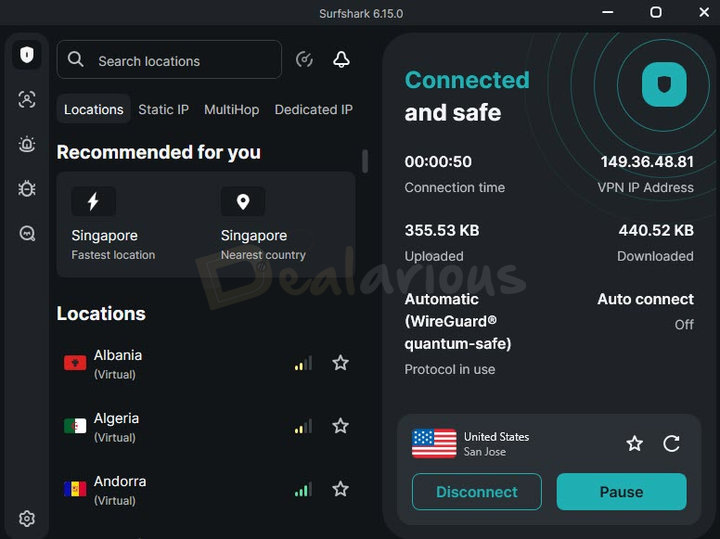
Surfshark has updated its user interface, which is easy to use and understand. Hence, it is perfect for first-time VPN users as well as experienced ones. There are no unnecessary buttons or drop-down menus to confuse you.
Once you open the app, you'll see a dynamic dashboard in the screen's right corner that includes details on the Protocol in use, Uploaded and Downloaded data, VPN IP Address, and the features you have enabled in the app.
Note: Depending on the features you enable, the dashboard will display them in one place. This way, you can quickly look at all the features you have enabled by seeing the dashboard.
Underneath that is the Quick-connect button. You can either connect quickly to the fastest server by clicking on the Quick-connect or select from the list on the left corner of the screen and connect to your preferred server location.
Apart from VPN, other options in the left corner of the screen include Alternative ID, Alert, Antivirus, Search, and Settings. To use additional features like Alert, Antivirus, and Search, a Surfshark One subscription is required. It is a separate subscription, not to be confused with your current Surfshark VPN subscription.
Surfshark VPN Review: Settings
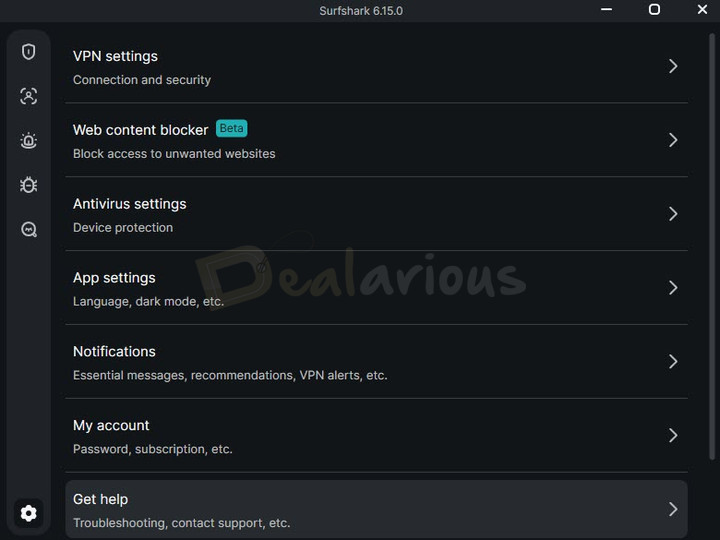
A gear icon in the lower-left corner of the screen gives you access to Settings.
Under the Settings section, you will find VPN settings, App settings, Notifications, and My account. App settings include the appearance, language, current version, and notifications. In addition, you can also send anonymous crash reports. The My account section will track your account status and when your subscription expires.
Surfshark VPN Review: VPN settings
The VPN settings section primarily has two categories that you can explore. These are:
- Connectivity
- Advanced Security
Let's take a look at their functions.
Connectivity
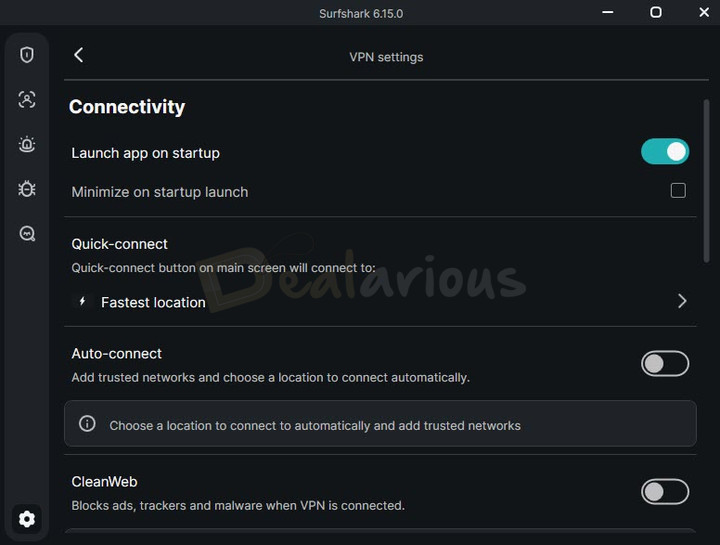
Quick-connect
As the name indicates, you can quickly connect to the fastest location. If that location doesn't meet your needs, you can choose from the given list of locations.
Auto-Connect
You can always stay connected to a secure server from the moment your computer boots up. Combine Start with Windows and then use the auto-connect option.
The Auto-connect option allows you to pre-select a server. It then automatically connects to that server as soon as the application starts.
CleanWeb
It is an in-built Surfshark feature that blocks trackers, malware, and ads. CleanWeb does exactly as the name suggests. It analyses and prevents all malicious software at the server level. Hence, your devices are much safer and clean while browsing anonymously.
CleanWeb is available in the Surfshark app on Android, iOS, macOS, Windows, and Android TV. In Chrome, Firefox, and Edge browser extensions, it is called Ad blocker, and Surfshark Support identifies it as CleanWeb 2.0.
On Windows and other supported platforms, CleanWeb mainly works through DNS filtering. In the browser extensions, CleanWeb 2.0 provides browser-level ad and tracker blocking, along with a cookie pop-up blocker. You can also turn it off for specific websites.
Kill Switch
It is an important feature. To avoid any privacy leaks, you can disable your internet connection as soon as you switch off the VPN. You get 2 options to choose from - soft & strict. The soft Kill Switch will automatically block your internet traffic if your VPN connection drops accidentally. A strict Kill Switch will block all your internet traffic if you are not connected to a VPN.
Advanced Security
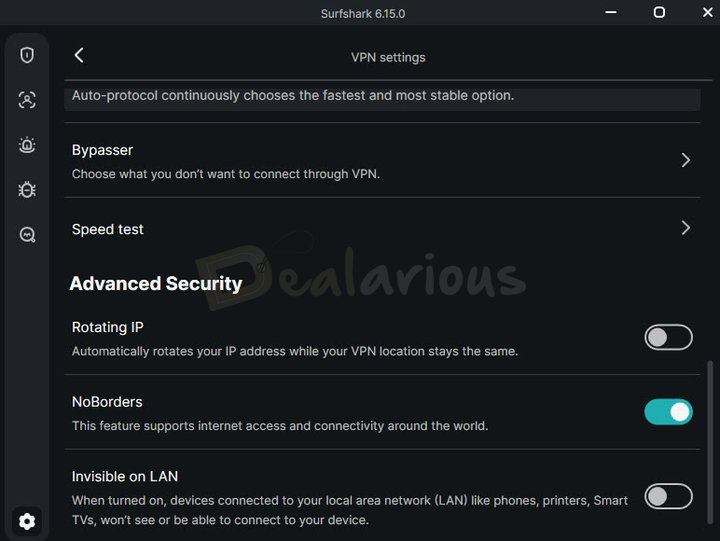
If your ISP implements measures to block VPN connections, then enable NoBorders mode. Also, if you want to isolate your device on the network, you can use the Invisible on LAN option. However, please do not use it with your home network; otherwise, you cannot connect to your Home network Printer.
IP Rotator will automatically rotate or change your IP address every 5 to 10 minutes without disconnecting from the VPN connection, thus enabling a higher level of security and privacy.
Rotating IP and Dynamic Multihop are available to users as part of the Surfshark Nexus, based on SDN (Software-Defined Networking).
Privacy & Security Features
In this section, we will look at the advanced features that enable Surfshark VPN to efficiently protect your online privacy. To maintain transparency, Surfshark now publishes the Transparency Report instead of the Warrant Canary report.
Hence, you can always check the amount of data the company discloses in case of an inquiry by law enforcement agencies. You should always check this report before choosing a VPN service.
Protocols and Encryption

Surfshark is a dedicated VPN service that supports five VPN protocols: WireGuard, OpenVPN, IKEv2, Dausos, and Automatic. Surfshark uses AES-256 encryption to protect VPN traffic.
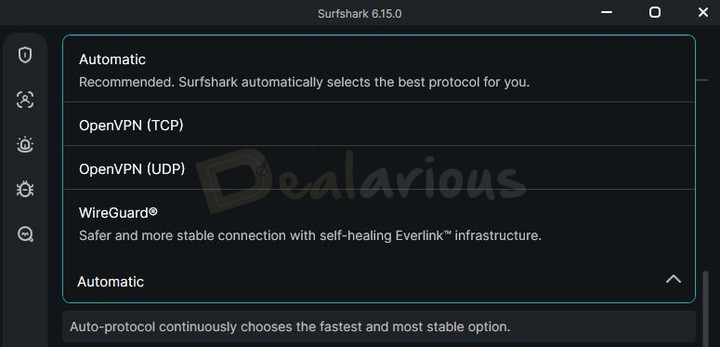
- WireGuard: Surfshark states that WireGuard provides the best speeds and protection of the VPN protocols it offers. It is available on macOS, Android, Windows, iOS, Linux, and supported routers. Surfshark also describes its WireGuard connection as quantum-safe, with Post-Quantum Encryption designed to protect the VPN connection against potential attacks using quantum computing.
- OpenVPN: OpenVPN is the only open-source VPN protocol Surfshark offers.
- IKEv2 is the most popular among smartphone users because it is less power-intensive than OpenVPN. Also, Surfshark has stopped supporting IKEv2 on Windows.
- Dausos: Surfshark's proprietary VPN protocol, currently available on macOS through the App Store version of the Surfshark app.
- Automatic: This option allows Surfshark to automatically select the appropriate protocol.
If you are unsure which protocol to select, choose Automatic. Doing so will allow Surfshark to select the best protocol for you.
Surfshark's patented Everlink technology keeps your VPN connection on even during server issues or maintenance. It is enabled by default with WireGuard on Windows, macOS, iOS, Android, and Linux.
Know more about VPN Protocols and how to select the best protocol for a secure connection.
Dynamic MultiHop
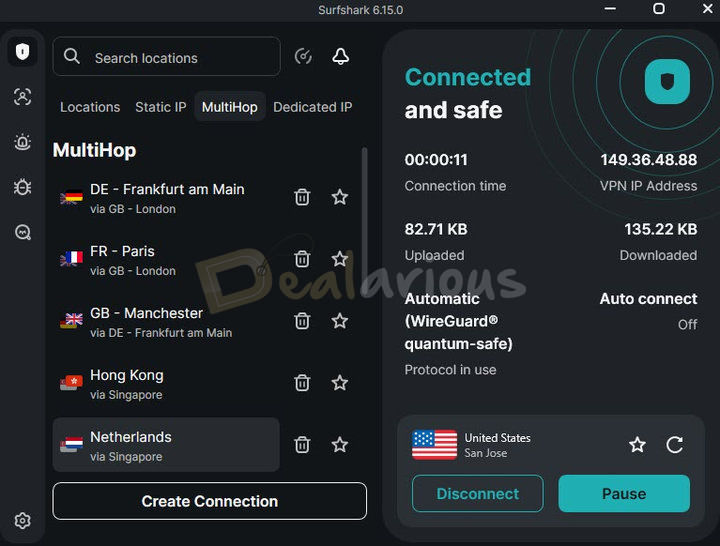
This security feature lets you set up a VPN chain that can make you untraceable on the internet. This feature may be overwhelming. However, note that the MultiHop feature is not for everyone..
The MultiHop option gives you an extra layer of privacy. It eliminates any risk of privacy leaks by routing your data through two different proxy servers.
MultiHop is the best security feature needed to combat more aggressive surveillance techniques. You might have already heard about such a feature in other VPNs. However, only a few VPN providers give this option.
Note: The old MultiHop has been replaced with Dynamic Multihop, where you can create your own server configuration. You can only use the servers that Surfshark provides. With the older MultiHop, you could only use preset locations.
Alternative ID
As the name suggests, you can create a new alternative identity online to protect your identity from prying eyes. Alternative ID is currently included for free in all Surfshark subscription packages.
As the name suggests, you can create a new alternative identity online to protect your identity from prying eyes. This feature requires you to provide details about the identity to be created. The tool will then create an alternative persona with an email address, thus hiding your real identity. While setting up, it will ask you to link this alternative ID to your real ID to forward the messages received to your alternative email. Learn more on how to set up an Alternative ID.
Alternative Number
A paid add-on that protects your real personal number from online threats. Currently, you can generate alternative phone numbers with US country codes only.
Bypasser
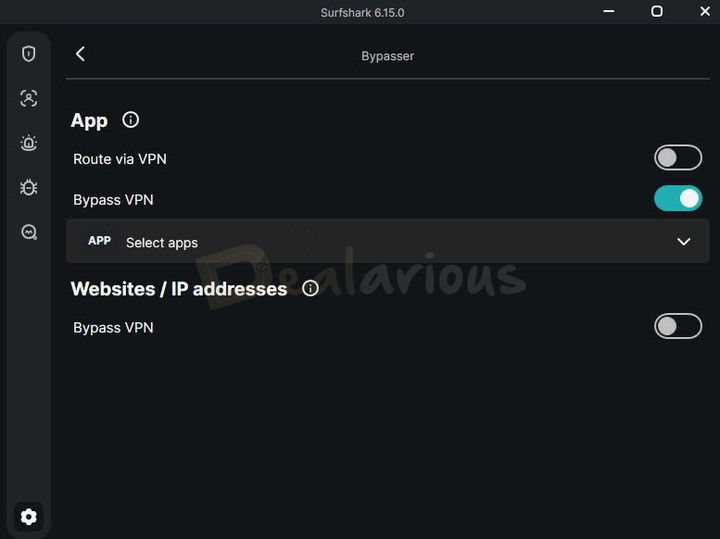
If you do not want all your apps or certain websites to use the VPN connection, this option will help you. With Surfshark VPN's Bypasser option (previously known as Split Tunneling), you can select the apps that will bypass the VPN. Hence, these apps will work at the best speeds with your actual ISP.
Dedicated IP
A dedicated IP is a unique IP address that can be used only by one person. With a dedicated IP service, you get a static IP address only you can use.
Surfshark has released this feature on iOS, Android, Mac, Windows, and Linux, offering dedicated IP addresses in 17 locations worldwide.
Note: Dedicated IP is an extra paid feature. You would need to purchase it separately. To access the Dedicated IP feature, you must have an active Surfshark subscription. Login to your account at my.surfshark.com and upgrade for an additional USD 3.75/month.
Surfshark VPN Review: Speed Test & Performance
Regularly testing the VPN's speed is one of the best practices to follow when using a VPN.
I have made several speed tests with Surfshark VPN across several servers. Their servers seemed to perform consistently over multiple tests and rechecks. This makes Surfshark an excellent VPN for gaming and using streaming services.
Speed Test Review
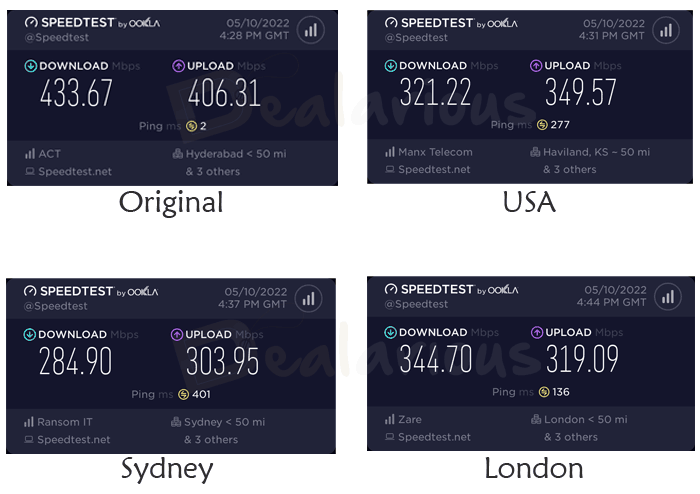
I am performing these speed benchmarks using speedtest.net. I am checking with original ISP speeds, United States, Australia, and UK servers.
Does Surfshark VPN Provide good speeds?
Yes, Surfshark provides excellent speeds using VPN servers.
At this point, Surfshark VPN has over 4500 servers in 100 countries worldwide. It still manages to give a decent performance in every speed test. I was getting up to 200 Mbps speeds using US & UK Servers in particular.
I have been using Surfshark for many years and have found the speeds to be consistent. Apart from my regular devices, I use it on my Android TV for Netflix and have never faced any lags with 4K Ultra HD streaming.
Additionally, Surfshark uses AES-256-GCM encryption (listed for OpenVPN) and ChaCha20 for WireGuard. Hopefully, they will stay consistent while also improving their services.
If you are receiving slow download speeds, check our article on factors affecting VPN speeds.
Surfshark VPN P2P support
Surfshark also supports P2P transfers. The torrent speeds on all their servers were above average. Could the speeds have been better? Yes. However, considering they are still a reasonably new VPN, the torrent speeds were quite impressive.
Surfshark VPN automatically connects or switches to a server that supports P2P as soon as P2P traffic is detected. This auto-switching is an excellent feature to keep you safe.
Surfshark VPN Review: Support

The customer service support team is very active. I have pinged their live chat many times over the week. At any time of the day, I have received an instant response. I hope their support remains this responsive over time as they grow. As of now, I will give them full marks on support.
Is Surfshark a Good VPN?

Yes, Surfshark is a good VPN.
After reviewing all the features Surfshark offers, I can safely say it is definitely worth your money. Since there's no data or device limit, you can enjoy Surfshark's protection as long as you have a subscription. What's more, you can protect all your devices with one VPN account.
It is safe to say that Surfshark has one of the best quality/price ratios, and if you're looking for an easy-to-use VPN that is well-configured, fast, and robust, then Surfshark is worth a try.
Payment Options
Surfshark has multiple payment options, such as PayPal, credit cards, Google Pay, and Apple Pay. Also, you have cryptocurrency as a payment option.
They also have a generous 30-day money-back guarantee, so you can get a refund if you're unsatisfied with a particular plan.
Comparing Surfshark with other VPNs
Is Surfshark better than NordVPN?
Both VPNs have many common features, like split tunneling, kill switch, military-grade encryption, data obfuscation, and a 30-day money-back guarantee. As far as pricing is concerned, Surfshark's two-year plan provides more value for money than NordVPN. However, Surfshark's monthly plan is a bit pricey.
Surfshark can be installed simultaneously on an unlimited number of devices in your household, whereas NordVPN can be installed on 10 devices only.
One advantage of NordVPN over Surfshark is that the former supports both Double VPN and Onion Over VPN. Learn more in this NordVPN review.
Is Surfshark better than CyberGhost?
Both use standard VPN protocols and have similar features. However, you will find the Double VPN and Obfuscation missing in CyberGhost.
Compared to Surfshark, CyberGhost can connect up to 7 devices only. Read more in this CyberGhost VPN Review.
Is Surfshark better than ExpressVPN?
Compared to Surfshark, ExpressVPN is more expensive and can connect up to 5 devices only. While comparing, I found the ad blocker feature missing in ExpressVPN.
Is Surfshark better than Private Internet Access VPN?
With Private Internet Access VPN, you can connect up to 10 devices simultaneously, and it has a huge network of servers. However, Surfshark wins in terms of unlimited device support, download speed, and privacy features.
Surfshark VPN: Frequently Asked Questions
Is Surfshark a legit VPN?
Yes. Surfshark is one of the best VPNs in the market today, protecting unlimited devices with great features, industry-standard encryption, and the best protocols. Above all, it's quite affordable.
Is Surfshark VPN free to use?
The VPN is not available for free. Surfshark offers a 7-day free trial on Mac, Android, and iOS devices. You can also use the same trial on Windows by signing in with the same account. There is no separate Windows trial.
Does Surfshark have 2FA?
Yes, Surfshark provides 2FA (Two-Factor Authentication) as an extra layer of security.
Conclusion
My remarks to end this Surfshark VPN review is that it is a service with consistent performance.
Surfshark is extremely fast and has several excellent privacy and security features. It supports torrent downloads and even unblocks Netflix. With the feature list, unlimited devices, RAM-only servers, secure encryption, and continuous updates, Surfshark is undoubtedly a great value for your money.
Changelog

Sourojit is the Executive Editor at Dealarious and has been writing reviews, tips, and how-tos since 2008. A Computer Science Engineer by degree, he enjoys turning complex tech into simple, useful insights.
Outside of work, he’s a DIY enthusiast who enjoys gardening, long drives, and building custom PCs, often experimenting with water-cooled setups. Over the years, he has played the roles of reviewer, storyteller, experimenter, and teacher.
“No border” has been removed on surfshark which make website know that I am using a vpn