Windows Update installs many essential drivers automatically, but it does not always provide the newest version available from your PC or hardware manufacturer. In this AVG Driver Updater review, I test whether the paid tool makes finding and installing missing or outdated drivers easier for an everyday Windows user.
The idea sounds convenient, but does AVG Driver Updater offer enough control, safety, and useful results to justify paying for it? That is what I wanted to find out.
AVG Driver Updater Review: Quick Summary
Pros
- Easy for beginners to use
- Individual or one-click bulk updates
- Skip and ignore controls
- Automatic backups with rollback
- Advertised database of more than 50 million drivers
- Low resource use during my test
Cons
- $43.99 per year for one PC
- Does not show driver sources
- AVG TuneUp upsell inside the paid app
- No custom scan schedule or unattended driver installation
overall
USD 12.95
Supported Platforms: Windows
Interface
4/5
Features
4/5
Functionality
4/5
Support
4/5
Overview
Developed by AVG, AVG Driver Updater is a standalone Windows utility that scans for outdated, missing, or faulty drivers. AVG says its database contains more than 50 million drivers from over 1,300 trusted hardware brands.
For home users, its main appeal is convenience. It can look for driver-related fixes when a PC has problems such as missing sound, screen flickering, or game crashes, without requiring users to search hardware-manufacturer websites themselves.
Warning
Driver updates can fix hardware problems, but they can also create new ones if the wrong or incompatible version is installed.
- A problematic update may affect sound, display, networking, or another device.
- Even a legitimate new driver can introduce compatibility or stability problems.
AVG Driver Updater backs up drivers before updating them and can restore versions it previously installed. For the lowest-risk approach, install driver updates when they address a problem, compatibility issue, or security fix. Use your PC or hardware manufacturer's updater first when it is still available.
If your PC is simply running slowly and its hardware still works, a driver updater may not be the right first step. Our Windows 11 PC maintenance checklist starts with the built-in tools most home users should try first.
Installation and System Requirements
Installation is straightforward, but check the minimum requirements before downloading the installer.
Minimum System Requirements
- OS: Windows 7 Service Pack 1 with Convenience Rollup Update or later
- RAM: 1 GB or above
- Processor: Intel Pentium 4 / AMD Athlon 64 or newer with SSE3 support; ARM-based devices are not supported
- Disk space: 2 GB of free space
Note: AVG requires 2 GB of free space, although the completed installation used approximately 271 MB on my test PC. See AVG's official system requirements for the current details.
Setting Up AVG Driver Updater
Once your PC meets the requirements:
- Download the setup file from the official AVG website.
- Launch the installer and select Install Now.
- Follow the onscreen instructions to complete installation.
On my test PC, installation completed within a few minutes and did not offer bundleware or adware.
Pricing
AVG Driver Updater costs $43.99 per year for one Windows PC. That is difficult to justify if Windows Update or your manufacturer's utility already covers your hardware. However, it may appeal to users who value guided scanning, automatic backups, rollback, and access to AVG support.
Use the 15-day full-access trial before paying. If AVG finds useful updates that your usual tools missed and works reliably on your PC, check our AVG Driver Updater coupon for the current discount.
AVG Driver Updater Review: Interface
The interface is one of the product's strongest selling points. Its clean layout keeps the scan, update, and recovery actions easy to find.
On first launch, AVG prompts you to start a scan. It then presents any detected driver updates in a single list for review.
The Main Dashboard
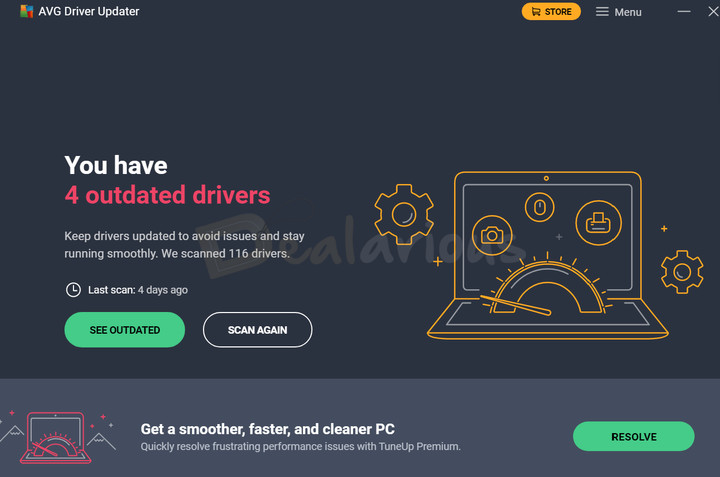
The main dashboard centers on two actions:
- SEE OUTDATED: Opens the most recent list of detected updates.
- SCAN AGAIN: Starts a new driver scan.
It also shows how many drivers were scanned, how many were flagged as outdated, and when the last scan ran.
Results Dashboard
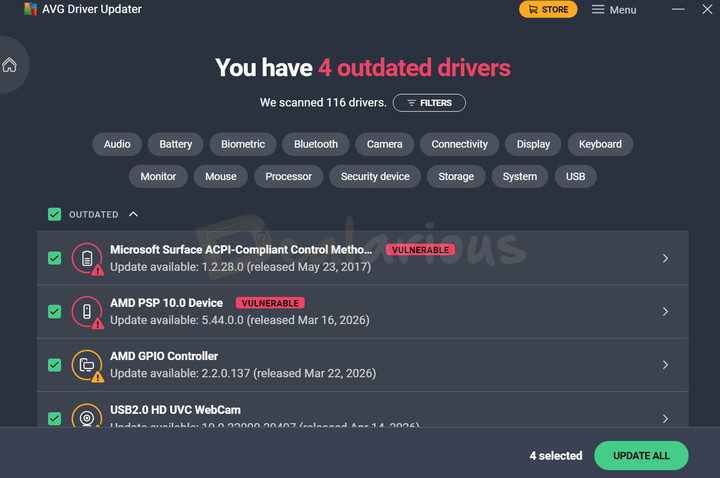
The results page lists each flagged driver and lets you update items individually or use Update All. Filters narrow the list by categories such as Audio, Battery, Bluetooth, and Camera.
The workflow is simple enough for a beginner. Even so, reviewing each proposed update is safer than installing everything automatically.
AVG Driver Updater: Key Features Review
Scanning and Update
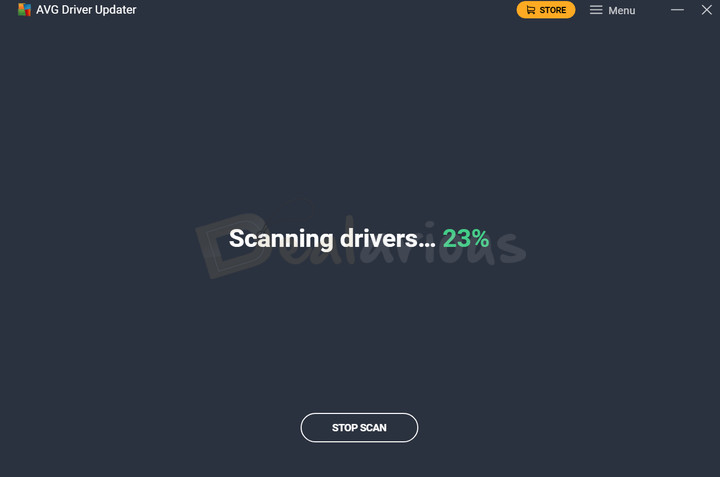
On my test PC, AVG scanned 116 drivers in 12 seconds and flagged 4 as outdated. It also rescans every seven days and notifies you when updates are available; installing them still requires confirmation.
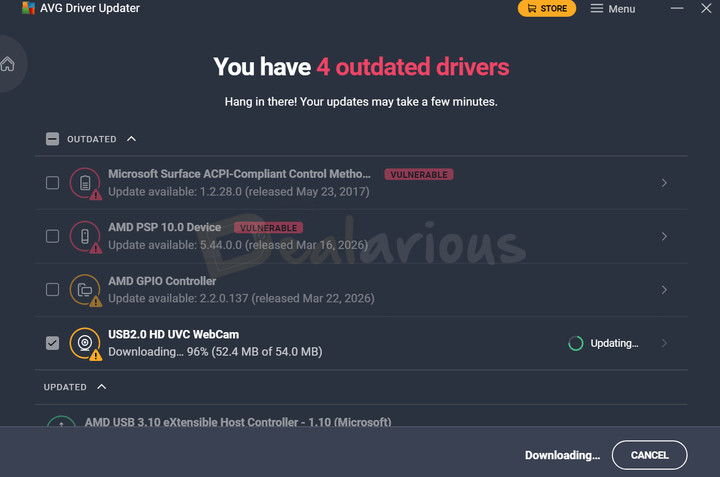
I updated only the webcam driver. AVG created a backup, downloaded the replacement, and installed it in 1 minute 35 seconds. These timings describe this test PC and will vary with the driver, hardware, and internet connection.
Backup and Restore
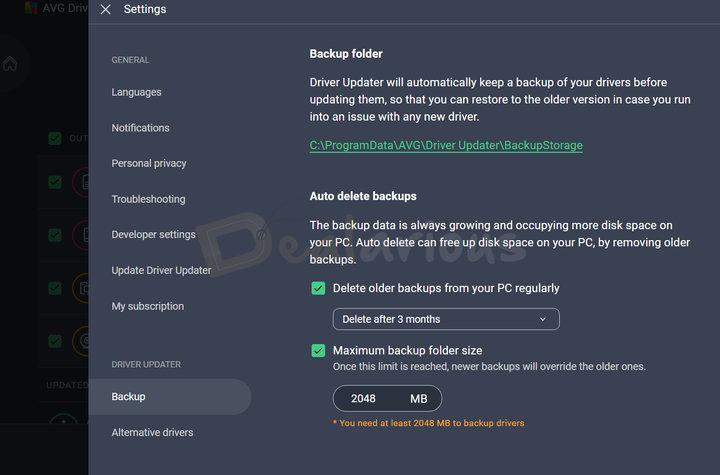
Automatic backup is one of AVG's most useful safeguards. Before installing a driver update, the program saves the current version so you can restore it if the replacement causes compatibility or stability problems.
The Settings menu lets you retain backups for one, three, or six months and set a maximum backup-folder size. Once that limit is reached, newer backups replace older ones.
The controls are simple, but they provide a practical recovery path without letting old backups grow without limit.
Tip: Driver Updater manages drivers; it is not a general PC-cleanup suite. If broader maintenance is your priority, compare our AVG TuneUp review with the more feature-rich IObit Advanced SystemCare review.
Alternative drivers
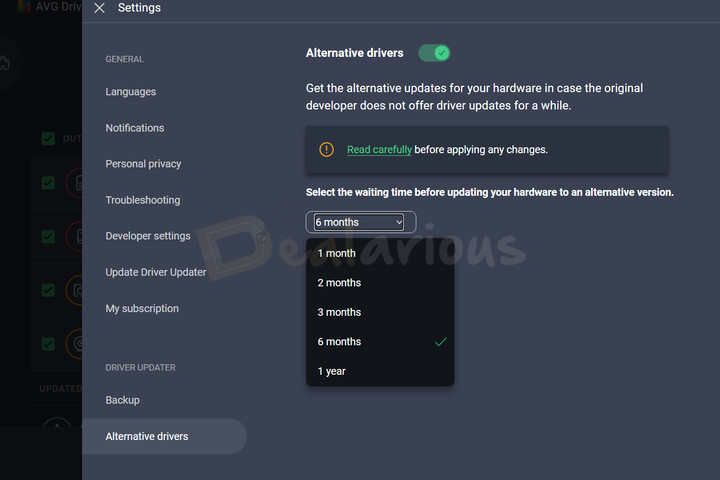
Hardware manufacturers eventually stop releasing updates for older components. If the device still works correctly, there is usually no reason to replace its driver solely because it is old.
When an unsupported component develops a driver-related problem, AVG's Alternative drivers feature can look for a compatible substitute. You can choose how long AVG should wait before offering alternatives, from one month up to one year. Treat an alternative driver as a fallback and keep the automatic backup available.
Skip update and Ignore driver
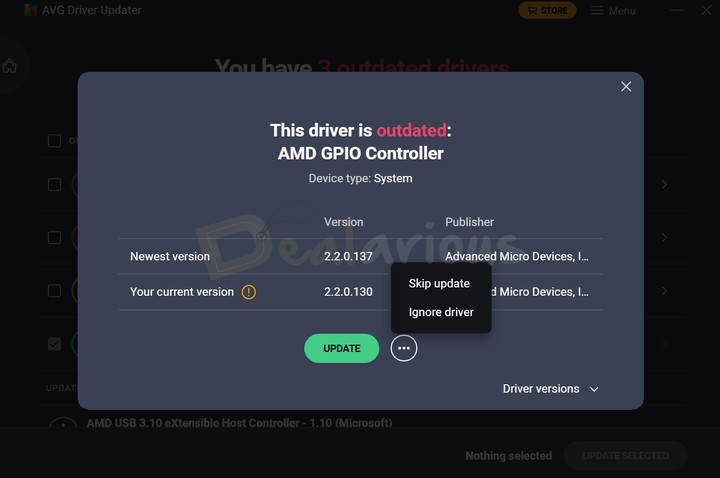
If an update causes a problem, restore the previous driver first. You can then decide whether to skip that version or ignore the driver entirely.
Skip update avoids the current version but notifies you when a newer release appears. Ignore driver stops future checks until you manually enable them again.
Use Skip when you want to wait for the next version. Use Ignore when you deliberately want to keep a known stable driver.
Customer Support
AVG provides a searchable knowledge base, FAQs, and product guides. Paying customers can also enter its support flow for technical assistance, with contact options depending on the issue and region.
For this AVG Driver Updater review, I contacted live chat and received prompt, detailed replies that resolved my question.
Is AVG Driver Updater safe to use?
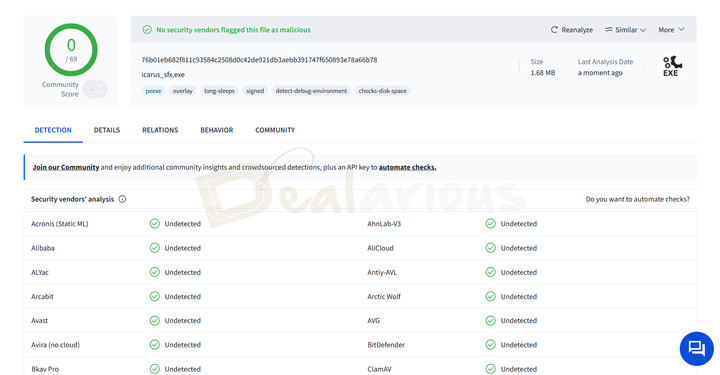
During my test, AVG Driver Updater showed no obvious signs of malicious behavior. I scanned the installer with VirusTotal, and no security engine flagged it at that time. AVG also says it checks driver downloads for malware and vulnerable drivers.
That does not make every driver update risk-free. A clean installer scan does not verify every driver, and even a legitimate update can cause compatibility problems. In my test, the webcam update caused no instability, and I could restore the previous driver without difficulty. AVG's backup and rollback tools provide a useful fallback if an update causes trouble.
AVG Driver Updater Review: Overall Experience
After testing the core workflow, these were the strongest advantages and limitations.
What I Liked
Intuitive Interface
The clean layout keeps scanning, reviewing updates, and restoring a driver easy to understand. A beginner should not need to search through complicated menus to reach the main controls.
Automatic Backup
Automatic backup is the feature I value most because it removes a step that is easy to forget. If a newly installed driver causes trouble, the saved version gives you a direct recovery option.
Light on system resources
On my test PC, the completed installation used approximately 271 MB and caused no noticeable slowdown while scanning or updating. Resource use can vary by system, but the program felt lightweight during this test.
Driver Exclusion List
The skip and ignore controls help you avoid a problematic version or keep a known stable driver without being prompted repeatedly.
What I Disliked
Upselling attempts
The paid app displays an issue at the bottom of the dashboard promising a smoother, faster PC. Selecting it opens an offer for AVG TuneUp. That cross-sell felt intrusive inside a product that already requires a subscription.
Expensive
At $43.99 per year for one PC, AVG Driver Updater is expensive for a narrowly focused utility. It scans automatically every seven days, but it does not let you choose the schedule or install detected driver updates without confirmation. The guided workflow, support, and recovery tools may justify the price for some users, but the 15-day trial should make that decision before payment.
Alternatives
If AVG Driver Updater does not match your priorities, these alternatives serve different types of users.
Avast Driver Updater
Avast Driver Updater is the closest match. Both products offer one-click bulk updates, alternative drivers, automatic backups, and a similarly simple interface. The better fit may depend on which product ecosystem you already use and the price available when you buy.
If you already use Avast products, its driver updater may feel more familiar. Compare the full experience in our Avast Driver Updater review.
IObit Driver Booster Pro
Driver Booster Pro is my preferred alternative when I want more automation. IObit advertises more than 18 million verified drivers, compared with AVG's advertised database of more than 50 million. Those totals do not guarantee which product will find the better match for a particular PC. IObit adds custom scheduling, automatic driver installation, silent mode, and extra performance tools. In my experience, it also resolved biometric and graphics-driver problems effectively.
AVG remains the better fit if you prefer a cleaner interface and straightforward backup, rollback, and alternative-driver controls. Our IObit Driver Booster Pro review compares the broader feature set.
CCleaner Driver Updater
CCleaner is the better alternative if you also want cleanup and optimization tools. Its paid plans include Driver Updater with skip, backup, and rollback controls, but you must install the full CCleaner application.
If drivers are your only concern, that broader suite may be more than you need. See our CCleaner Pro review for the complete package
FAQs
Is AVG Driver Updater safe for updating drivers?
AVG Driver Updater can be used safely with sensible precautions. In my test, the installer received no VirusTotal flags, the webcam update caused no instability, and rollback worked. Review proposed updates and keep the automatic backup available because no driver updater is risk-free.
Is AVG Driver Updater free?
No. AVG Driver Updater is a paid product, but its 15-day full-access trial does not require a credit card. Use the trial to check what it finds on your PC before buying.
Does AVG Driver Updater offer WHQL-verified drivers?
AVG says Driver Updater downloads verified manufacturer installers, but it does not promise that every driver is WHQL-certified. Check an individual driver's certification details if WHQL status matters to you.
Can AVG Driver Updater resolve hardware issues?
It can help when the problem comes from an outdated, missing, or faulty driver, such as one causing lost sound or a display or network issue. It cannot repair a physical hardware failure, and a driver update is not guaranteed to solve every problem.
Conclusion
AVG Driver Updater completed its core job without causing problems on my test PC. It scanned 116 drivers in 12 seconds, flagged four as outdated, backed up and updated the webcam driver, and restored the previous version successfully. Its clean interface and automatic safeguards make the process approachable for a home user.
The strongest fit is someone with an older Windows PC or a recurring driver problem who values guided scanning, rollback, and support. It is harder to recommend when Windows Update or the manufacturer's own utility already works, or when you need multi-PC coverage and more automation.
Verdict: Start with the 15-day trial. If AVG finds relevant updates that your usual sources missed and its backup, recovery, and support features are worth paying for, our current coupon can reduce the cost. If the scan finds nothing useful, skip the subscription. To compare other approaches, see our guide to the best driver updater apps.

She reviews software at Dealarious, mostly recovery and productivity tools, which she tries out herself. Her goal is to keep things simple so readers don’t waste hours figuring out what works. Over the years, she has tested dozens of apps and learned that small details often make the biggest difference.
When she isn’t testing programs, you’ll usually find her hiking in the mountains or enjoying the rain. She believes good tech should quietly make life easier, not more complicated.