Subscription Tips
Bitdefender Update / Extension Notice
Please read the new changes carefully if you intend to extend your existing subscription.
Bitdefender has rolled out new subscription plans for Total Security, Premium Security, and Family Plan. For instance, the new plans in Total Security are now called Total Security Individual and Total Security Family. Here's what's changed:
Bitdefender is gradually migrating existing plans to new plans. Hence, if you have the old subscription, Bitdefender will eventually upgrade your subscription as well.
However, if you are still on older Total Security plans and want to extend your existing subscriptions, you have to purchase the same subscription, i.e., Total Security 5 Devices or Total Security 10 Devices.
How to check if you are on the New or old subscription.
Go to Bitdefender Central → My Subscriptions and check if you’re using the Old subscription
It is very simple and easy to spot.

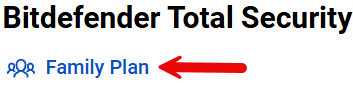
If you have been upgraded to the new plans, you will see the Individual or Family plan listed below the product name, as shown in the images. If nothing (Individual or Family) is mentioned below the product title, it means you are on the old plan.