We would say, with no doubt, that Bitdefender is one of the best available antivirus software you can go for! After all, awarded as the best detection engine by the AV-Comparatives Test. It’s one of the worth-depending-upon solutions when you need advanced protection from not only common viruses but also further threats such as spyware, spam, social media privacy, and web security.
However, you can find two versions of the security solution available – Bitdefender Antivirus Free
and Bitdefender Paid Antivirus, which is the starting variation. In addition, you can now buy Bitdefender Total Security at the lowest price. Also, you can read our Bitdefender Total Security review to know more about their top-of-the-line product.
In this Bitdefender Free vs Paid comparison, we look at the features available in the free version, the older paid plans, and the newer Bitdefender subscriptions to help you understand what additional protection you get with a paid edition.
Bitdefender Free Vs Paid Edition: Summary


Download Bitdefender Free Antivirus
Select the platform on which you want to install Bitdefender Free Antivirus.
Bitdefender Free vs Paid Feature Comparison [Older Editions]
Some antivirus features are available in both the free and premium versions of Bitdefender. Protection features that are present in both Free and Paid versions, and those that are missing are:
Features | Bitdefender Free | Antivirus Plus | Internet Security | Total Security | Premium Security |
|---|---|---|---|---|---|
Multi-Device Support | No | No | No | Yes | Yes |
Real-Time Protection | Yes | Yes | Yes | Yes | Yes |
Advanced Threat Defense | Yes | Yes | Yes | Yes | Yes |
Anti-Phishing & Anti-Fraud | Yes | Yes | Yes | Yes | Yes |
Multi-Layer Ransomware Protection | No | Yes | Yes | Yes | Yes |
Vulnerability Assessment | No | Yes | Yes | Yes | Yes |
Rescue Environment | No | Yes | Yes | Yes | Yes |
Autopilot | No | Yes | Yes | Yes | Yes |
Bitdefender VPN | Yes (limited) | Yes (limited) | Yes (limited) | Yes (limited) | Yes (Unlimited VPN) |
Anti-tracker | No | Yes | Yes | Yes | Yes |
Safe Online Banking | No | Yes | Yes | Yes | Yes |
File Shredder | No | Yes | Yes | Yes | Yes |
Webcam Protection | No | No | Yes | Yes | Yes |
Antispam | No | No | Yes | Yes | Yes |
Parental Control | No | No | Yes | Yes | Yes |
Privacy Firewall | No | No | Yes | Yes | Yes |
Speed Up Your Devices | No | No | No | Yes | Yes |
Anti-Theft | No | No | No | Yes | Yes |
Note: In the new plans, Parental Control is available with the family plans of Bitdefender Total Security, Premium Security and Ultimate Security.
Bitdefender Free Version: Protection Features
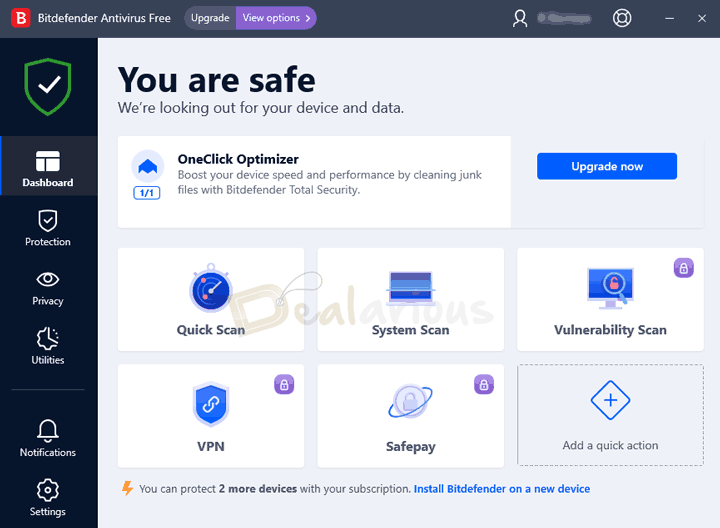
In the section below, I will go through the features that you get while using the Free Bitdefender application.
Bitdefender Web Protection
The Bitdefender Free version includes the web protection module. It installs on your browser as a plugin. Hence, it can scan and secure your browsing activities.
You can install Bitdefender TrafficLight on your browser and allow it to scan the pages you visit. Also, it is important to note that Bitdefender TrafficLight supports Firefox, Chrome, and Safari only. It performs two primary functions.
- Monitors the web pages you visit.
- Monitors your web searches and indicates the safety of the result pages.
Additionally, you can also blacklist websites or add blocked websites to the whitelist. Hence, you get complete browsing security with flexibility.
Scan Options in Bitdefender Free Edition
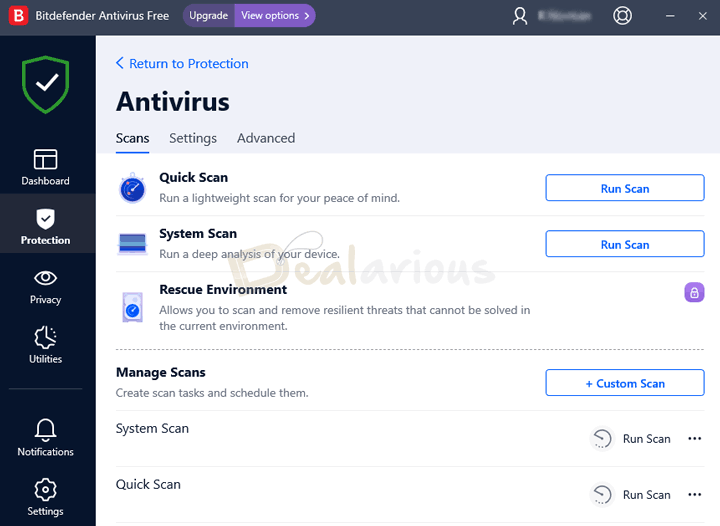
Apart from scheduling a System Scan or a Quick Scan in the Free edition, you can also create a Custom Scan accordingly. You can add or remove folders and files from scanning using the Manage exceptions option. Using this option, you can add folders that you are aware of attracting false-positive detection. However, you should always use the exceptions option with utmost care.
Exploit detection
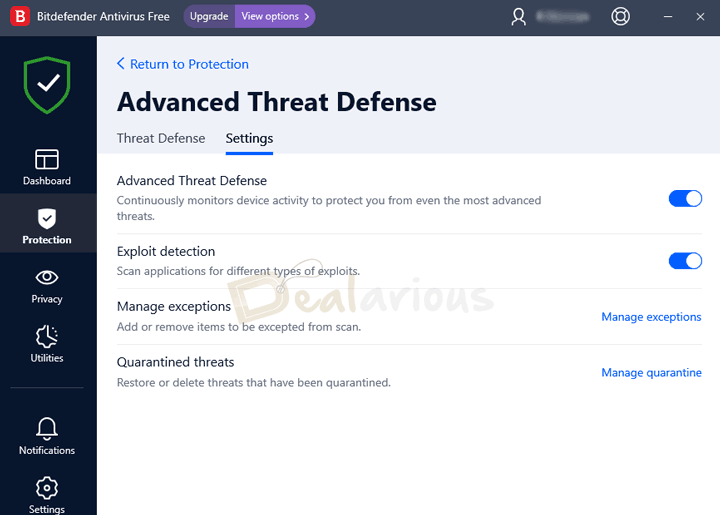
The new free version of Bitdefender includes the Exploit detection feature to protect your system against zero-day threats. You will find this feature under Protection -->Advanced Threat Defense. The Exploit detection feature is enabled by default.
Email protection
Bitdefender free antivirus provides email protection to email clients like Microsoft Outlook or Mozilla Thunderbird to secure your system against emerging malware.
Tip for Educational institutes:Take advantage of the Bitdefender student discount to purchase the best protection at a cheaper price online.
Bitdefender Paid Editions
Older Bitdefender Plans
There are different paid subscription plans, like Bitdefender Antivirus Plus, Bitdefender Internet Security, Bitdefender Total Security, and Bitdefender Premium Security.
Bitdefender Antivirus Plus
Designed especially for Windows PCs, Bitdefender Antivirus Plus provides coherent security to your system without hampering device performance. Just as the name suggests, the Plus in Bitdefender Antivirus Plus signifies its additional offering compared to the free version.
Bitdefender Internet Security
Bitdefender Internet Security provides additional benefits to its users for better protection of their sensitive virtual information.
Bitdefender Total Security
Bitdefender Total Security offers advanced features compared to Bitdefender Antivirus Plus and Internet Security. The most important is support for multiple OS Platforms like Windows, Mac, iOS, and Android. Antivirus Plus and Internet Security support Windows PCs only.
Bitdefender Family Pack
Bitdefender Family Pack is specifically designed to protect more than ten devices (upto 15) with a single license. The only difference between Family Pack and Total Security is the price and the number of supported devices.
Bitdefender Premium Security
This Bitdefender Premium security package is the united version of Bitdefender Total Security, Internet Security, and Antivirus Plus. Premium Security offers a few added benefits like Premium VPN service, which means no more getting frustrated with the limited 200/MB/day bandwidth. Another advantage of Bitdefender Premium Security is its premium support facility, which includes quick responses from customer support agents.
Newer Bitdefender Plans
- Antivirus Plus (Multi-platform)
- Total Security (Individual & Family)
- Premium Security (Individual & Family)
- Ultimate Security (Individual & Family)
Bitdefender Free Vs Paid: Lacking Features
Now, we shall check out the features you will possibly miss — or at least sense the absence of — in the free edition of Bitdefender Antivirus.
Not all features are available in all the plans. You can learn more about the features you get in each plan in compare Bitdefender products article. And these are the most prominent features you can find in the premium counterpart.
Bitdefender Antispam feature uses cloud email security to ensure a smooth email flow against malicious cyber threats. This feature filters irrelevant messages in your local email client to secure sensitive information. You can also manually trifle with the Antispam Settings to suit your best needs, which will be protected by the strongly improved security algorithms of Bitdefender.
Bitdefender Safepay is one of the professional ways to keep your confidential information safe as you process financial transactions. It’s a minimal web browser you can use during financial transactions, such as the purchase of something. To support this technology, Bitdefender has a password module, Bitdefender SecurePass (separate purchase), that can store your web service credentials as well as payment details, which can be used for auto-refilling of information required. This secure browser can help you a lot when you are using a public network — public Wi-Fi hotspots — for payment. Those who travel a lot will understand the absence of this feature, we suppose.
Don't want to pay yet? Try free 30 day trial by downloading Bitdefender offline installer.
This feature automatically analyses unnecessary junk files and takes the necessary steps to remove them to boost the performance of your device. However, you can only enjoy the benefits of this feature if you purchase Bitdefender Total Security or higher versions.
This is the most important feature you will miss in the free edition. Ransomware is a big security issue nowadays and losing this protection is usually not recommended. If you are using the free edition, make sure you are downloading applications from sources that you trust.
Bitdefender should add this protection to the free version as well. Ransomware protection is available by default in popular antivirus solutions like Avast Free and Windows Defender.
Bitdefender's advanced security technology fights against evolving cyber threats by analyzing and blocking sophisticated botnet-related URLs, brute force attacks, and malware.
Bitdefender Free includes VPN protection, but it is limited to 200MB of data per day. Would you like to upgrade to a Premium VPN subscription? You get unlimited VPN access with Bitdefender Premium Security and Ultimate Security plans. You can opt for a separate Bitdefender Premium VPN version that supports up to 10 devices. Our Bitdefender Premium VPN Review will help you decide if it is the best VPN for your needs.
The Anti-Theft feature helps you locate and secure your stolen device by blocking device access with a custom code and wiping device data remotely. These actions require your device to be connected to the Internet.
Parental Control in Bitdefender allows you to check and monitor the activities and location of your kids across multiple devices through Bitdefender Central. You get access to block websites that you feel are inappropriate for your kids, thus, protecting them from improper online content.
You can also limit their screen time, schedule restrictions, and many more. If they cross restricted boundaries, you will immediately receive a notification making sure they are consuming the right amount of appropriate information. However, you get access to this incredible feature only from Bitdefender Internet Security and higher versions.
A completely advanced security feature that allows the user to scan and remove resilient threats that can not be removed while Windows is operating. Thus, this feature reboots your system in the Rescue Environment to clean up advanced malicious threats, such as rootkits, before your computer starts operating again.
Advanced Features available in Newer Bitdefender Plans
- Scam protection
- Premium Password manager
- Identity protection
Most of the features are available in Bitdefender's Paid Plans, though availability varies between older plans like Internet Security and newer plans like Total Security (Individual & Family), Premium Security (Individual & Family), and Ultimate Security (Individual & Family).
Bitdefender Free Vs Paid: Pros and Cons
Bitdefender Free: Pros and Cons
Pros
- Real-time protection
- The application is light on system resources
- Clear Interface to navigate through
- Quality Web Protection
Cons
- Limited features
- Windows compatible software
- Lacks Firewall support, Ransomware Protection
- No Custom scanning option
- It does not provide Anti Tracker, Safepay
Bitdefender Paid: Pros and Cons
Pros
- Advanced threat protection features
- Comprehensive privacy and security features
- Supports Multiple OS platforms (Depending on the package)
- Clear and Intuitive user interface to navigate through
- Performance Optimizer
- Custom scanning options
- Safe online banking and payment features
Cons
- The application is a little heavy compared to the free version of Bitdefender because of the additional features.
- Limited VPN access of 200MB/Day in paid plans (For unlimited VPN, opt for Bitdefender Premium VPN or Bitdefender Premium Security)
- No Premium Password Manager
- It has limited functionalities on Mac and iOS devices as compared to Windows and Android.
Note: Older Bitdefender paid plans do not include features like a premium password manager or advanced identity protection tools by default. However, the new Bitdefender plans include a premium Password Manager and enhanced spam protection.
Bitdefender Free Vs Paid: Frequently Asked Questions
Is Bitdefender free good enough?
If you just need basic protection from common viruses, Bitdefender Antivirus Free Edition would do that job. Of course, you can have the simplicity and lightweight nature of Bitdefender paid Antivirus in the free edition.
Which is better: Bitdefender Free or Avast Free Antivirus?
The free version of both antivirus programs provides real-time protection. As mentioned above, there are some features in Avast Free, like Ransomware Protection and Wi-Fi protection, that you will miss in the free version of Bitdefender. You can try both and then make the right decision.
Bitdefender Free Vs Paid: Is it worth paying for Bitdefender?
At the end of this Bitdefender Free vs Paid comparison, we can confidently say that Bitdefender’s paid plans offer some useful features such as firewall protection, ransomware defense, parental controls, and more.
Older Bitdefender plans like Antivirus Plus, Internet Security, Total Security, and Family Pack still offer solid value, while newer Bitdefender subscriptions include additional tools like Password Manager and enhanced privacy features.
If you do not really need the extra features, the older Bitdefender plans are still worth it, as the core antivirus protection remains the same, and you can get them at a better price.
Overall, if you want more complete protection and extra peace of mind, upgrading to a Bitdefender paid plan is worth considering.
Changelog

Sourojit is the Executive Editor at Dealarious and has been writing reviews, tips, and how-tos since 2008. A Computer Science Engineer by degree, he enjoys turning complex tech into simple, useful insights.
Outside of work, he’s a DIY enthusiast who enjoys gardening, long drives, and building custom PCs, often experimenting with water-cooled setups. Over the years, he has played the roles of reviewer, storyteller, experimenter, and teacher.
To be fair though ransomware protection exists in Windows Defender as default and free I might add.