
Bitdefender Premium Security
$129.99 $49.99
Secure your Windows, Mac, Android, and iOS devices with the Bitdefender Premium Security bundle. You also get unlimited Bitdefender Premium VPN on every device.
With the Family Plan, you can invite up to five users from your Bitdefender Central account and share your subscription with them.
2026 Exclusive offer on Bitdefender Premium Security!
Global License | Email Delivery | No Auto-Renewal


Next Price Update in
Deals Gone Wild
-
88% OFF
Avast Ultimate Suite
$23.99 $49.95Price range: $23.99 through $49.95 Check Deal This product has multiple variants. The options may be chosen on the product page -
62% OFF
Bitdefender Family Pack
$45.99 $78.95Price range: $45.99 through $78.95 Check Deal This product has multiple variants. The options may be chosen on the product page -
74% OFF
Bitdefender Total Security
$25.95 $69.95Price range: $25.95 through $69.95 Check Deal This product has multiple variants. The options may be chosen on the product page -
79% OFF

CCleaner Professional 7
$10.95 $16.95Price range: $10.95 through $16.95 Check Deal This product has multiple variants. The options may be chosen on the product page
Description
Buy Bitdefender Premium Security from Dealarious at the current discounted price. Choose an Individual license for 5 devices or a Family license for 25 devices, with 1- or 2-year subscriptions. Your global activation key is delivered by email, and the subscription does not include automatic renewal.
Bitdefender Premium Security: Key Features
Real-Time Protection
Bitdefender actively monitors your system, identifies suspicious behavior from apps and processes running in the background, and blocks threats in real time before malware reaches your computer.
Multiple Scanning Options
To efficiently detect and block threats, Bitdefender offers several scanning options, including Quick Scan, System Scan, Custom Scan, Rescue Environment, and Vulnerability Scan.
Advanced Firewall Protection
Enabled by default, Bitdefender’s Firewall actively monitors incoming and outgoing traffic and blocks suspicious network activity. Its advanced customization options let you create rules and adjust settings to match your security needs.
Ransomware Remediation
When Bitdefender detects a ransomware attack, this feature instantly blocks all processes and creates a backup of your important files (e.g., documents, pictures, videos, or music) to keep them protected.
Scam Protection Pro
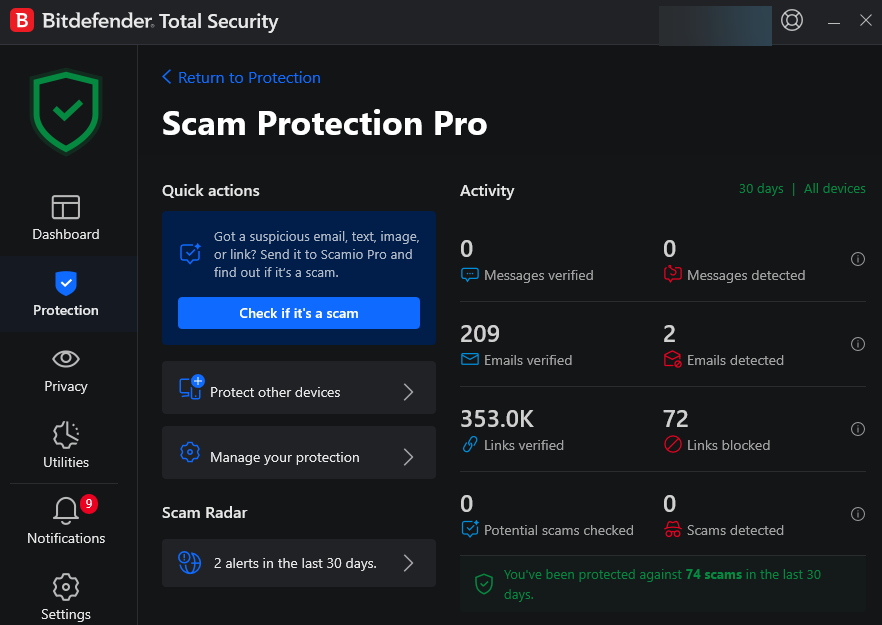
Scam Protection Pro is Bitdefender’s AI-powered tool for detecting and blocking online scams. It uses advanced AI to identify rapidly developing scam patterns and block them in your email, browser, messages, and other apps. It also acts as a personal assistant, helping you spot fraudulent text, links, and images. Additionally, you can ask questions about cyber threats to improve your overall digital safety.
Email Protection
This feature protects your email account by scanning your mailbox for malicious content. It currently supports only Gmail and Outlook accounts.
Cryptomining Protection
Cryptomining is a malicious practice that uses your device’s resources and processing power to generate revenue for attackers. With the Cryptomining Protection feature enabled, Bitdefender ensures that your system is safe from unauthorized cryptomining activity.
One-Click Optimizer
It allows you to enhance your system’s overall performance with a single click.
SafePay
It opens a secure virtual environment for private online transactions. As a result, you can bank and shop online without worrying about keyloggers or phishing attempts.
AntiTracker
AntiTracker is a browser extension that blocks tracking attempts by websites that collect data about your online activities to build user profiles and serve targeted ads. The extension supports Edge, Internet Explorer, Chrome, and Firefox.
Bitdefender SecurePass (Password Manager)
This password management module allows you to securely store your passwords and login credentials across multiple devices.
Note: To learn more about all the features offered, visit the official product page.
Supported Platforms
Bitdefender Premium Security supports Windows, macOS, Android, and iOS devices.
Downloading and installing Bitdefender Premium Security is straightforward through your Bitdefender Central account. For step-by-step instructions, follow our Bitdefender Installation & Activation Guide. If the web installer does not work, use the Bitdefender Offline Installer Kit.
To install the iOS or Android app, search for Bitdefender in the App Store or Google Play Store.
User Interface
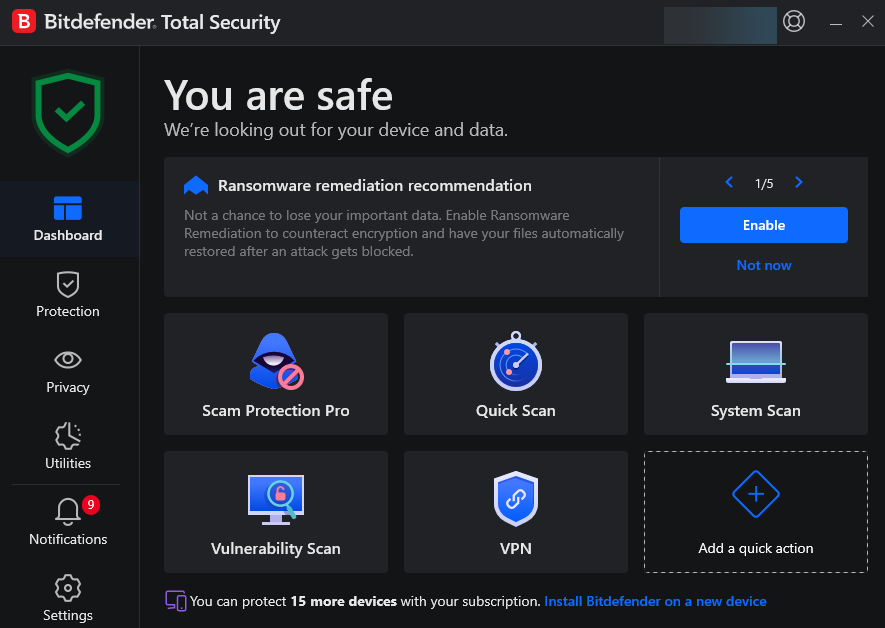
Once installed, Bitdefender is easy to navigate. The dashboard contains the major tools you need while remaining clean and well organized. You can also view and control the software’s key functions directly from the dashboard.
The dashboard also features Quick actions, which provide shortcuts to commonly used options. If Bitdefender detects an issue on your computer, it alerts you through a pop-up. You can resolve most issues through Notifications and access more advanced options through the Settings tab.
Bitdefender is easy for home users to navigate while also offering advanced settings for professional users.
Note: The interface is the same as the one in Bitdefender Total Security. The only noticeable change is that Email Protection and Scam Protection Pro appear in the app.
Functionality
Antivirus Protection
Bitdefender’s antivirus engine protects against many e-threats, including viruses, adware, malware, and ransomware. It uses a cloud-based virus database, allowing Bitdefender to run while consuming fewer system resources.
The cloud-based database also helps protect your system against zero-day threats.
Anti-Phishing, Anti-Fraud & Antispam
This module scans for and blocks fraudulent websites that may appear genuine. Visiting such websites can result in the theft of your financial information. Its advanced filtering system also warns you when you visit scam websites.
The Antispam feature filters irrelevant emails from your mailbox, keeping it organized. It supports leading email clients, including Outlook and Thunderbird.
Unlimited VPN
Bitdefender Premium Security includes an unlimited VPN plan. It helps protect your online activities by encrypting internet traffic, including financial information, passwords, and downloads. Bitdefender VPN is available on Windows, Android, macOS, and iOS devices.
Parental Control
Parental Control helps parents add an extra layer of online safety for their children. It filters inappropriate content, can limit screen time, and lets you monitor your children’s online activities remotely through Bitdefender Central.
Note: Parental Control is only available with the Bitdefender Premium Security Family Plan.
Rescue Environment
At times, antivirus software cannot remove advanced malware, such as rootkits, while Windows is running. To remove this type of malware, Bitdefender restarts the computer in Rescue Environment for cleaning and restoration if necessary.
Autopilot
Autopilot acts as a personalized security advisor for your devices. It can recommend security actions by analyzing your system’s needs and usage patterns.
Other Notable Features
In addition to the features above, Anti-Theft helps you track the locations of your devices from one place. Webcam Protection alerts you when apps try to access your webcam, helping prevent unauthorized access. Similarly, Microphone Monitor tells you which apps can access your microphone and when they do so. File Shredder securely deletes digital files so that recovery tools cannot restore them.
Support
If you encounter issues with Bitdefender, you can contact Bitdefender support through live chat, email, or phone. Bitdefender also provides knowledge-base articles, how-to guides, troubleshooting resources, user guides, and video tutorials.
Difference between Bitdefender Total Security and Premium Security
Both plans offer advanced security and share many protection features. However, there are a few differences between the two.
Bitdefender Total Security includes 200 MB of VPN traffic per day, whereas Premium Security provides unlimited VPN access. Premium Security also includes Scam Protection Pro and Email Protection, which are not available with Total Security.
Difference between Bitdefender Family Pack and Premium Security
Both Bitdefender Premium Security and Family Pack offer robust protection.
Bitdefender Premium Security includes several features that are not available with Family Pack, including Unlimited VPN, Scam Protection Pro, and Email Protection. Family Pack covers up to 15 devices, whereas the Premium Security Family plan covers up to 25 devices.
Bitdefender Premium Security: Coupon Codes & Pricing Plans
Choose the Individual plan if you need protection for one account and up to 5 devices. Choose the Family plan if you need protection for up to 5 accounts and 25 devices, including Parental Control. Both plans are available with 1- and 2-year subscriptions. The official prices are listed below.
Individual (5 devices, 1 account)
USD 129.99 (1 year)
USD 259.99 (2 years)
Family (25 devices, 5 accounts)
USD 169.99 (1 year)
USD 339.99 (2 years)
Select your preferred plan and subscription term to see the current Dealarious price. Your activation code is delivered by email, and the subscription does not include automatic renewal.
Bitdefender Premium Security Coupon FAQs
Is there a free trial available?
Yes. Bitdefender offers a 30-day free trial of Premium Security Individual. The trial includes all Individual-plan features, while Parental Control is available only with the Family plan.
How do I activate Bitdefender Premium Security with an activation code?
Sign in to Bitdefender Central and open My Subscriptions. Select “+ Activate with code,” enter the Bitdefender Premium Security activation key delivered by Dealarious, and select Activate. The subscription will then appear in your Bitdefender Central account.
How can I get a discount on Bitdefender Premium Security?
Choose your preferred plan and subscription term on this page to view the current Dealarious offer. Before purchasing, confirm the selected device limit, subscription length, final price, and renewal terms.
Will I get a refund on my purchase?
Refunds are available within 30 days of purchase only for qualifying license-related issues. Review our refund policy for complete eligibility requirements before buying.
How can I contact Bitdefender Support?
You can contact Bitdefender through its official support page.
Is Bitdefender Premium Security worth buying?
Bitdefender Premium Security is worth buying if you want antivirus protection, unlimited VPN, password management, Scam Protection Pro, and Email Protection in one subscription. Choose the Individual plan for one account and up to 5 devices, or the Family plan for 5 accounts and up to 25 devices with Parental Control.
If an unlimited VPN is not important to you, compare the current prices and buy Bitdefender Total Security or Bitdefender Family Pack instead.
Have you purchased Bitdefender Premium Security from Dealarious? Share your experience with the price, email delivery, and activation process in the review section below.
Juan –
The discount offer here is way cheaper than the official site. Activated instantly and good to go.
George –
Worth the upgrade to Premium Security. Will switch once my Total Security sub expires coming month.
Bryce –
Was on the old plan of Premium Security. Lately upgraded to the new Family Plan protecting even more devices at the best price. I really think Bitdefender should have continued the 10 devices plan for home users. 25 Devices in the Family Plan is a bit too much for me.
Ken –
Have previously purchased Bitdefender Total Security for many years from Dealarious and now I have moved to the Premium Security. A good buy as always!
Eric –
Got the license at a discounted rate, which was a nice bonus. Placed the order and received the activation email pretty quickly. My Individual subscription is now up and running without any issues. Appreciate the smooth process.