

 HOT DEAL
IObit Malware Fighter 14 PRO
$54.95 $10.25
Looking for serious PC protection without the hassle? Malware Fighter PRO 14 uses Bitdefender tech and a triple-engine setup to block ransomware and malware fast.
There are no extra steps — just install and stay covered. The subscription starts from the day of purchase.
BONUS: Extra 1 Month FREE + Free Upgrade to Next Version if released within active subscription period.
1 Year + 1 Month License | 60 Days Refund | No Auto-renewal



Deals Gone Wild
-
74% OFF

Bitdefender Total Security
$25.95 $69.95Price range: $25.95 through $69.95 Check Deal This product has multiple variants. The options may be chosen on the product page -
77% OFF
CyberGhost VPN 8
Original price was: $215.82.$49.50Current price is: $49.50. Check Deal -
93% OFF
IObit Combo Pack [6 Apps-3 Pcs]
Original price was: $349.68.$24.95Current price is: $24.95. Check Deal -
70% OFF
IObit Software Updater 9 PRO
Original price was: $29.99.$8.99Current price is: $8.99. Check Deal

Description
Get the best IObit Malware Fighter Pro Coupon Code and save instantly on powerful malware protection for your PC. No coupon entry needed — discounts apply automatically.
IObit Malware Fighter Pro uses a triple-engine setup to detect and remove malware, spyware, Trojans, adware, and other threats in real time. The latest version, 14, comes with an updated Bitdefender engine and an improved IObit Anti-Malware engine. Moreover, it runs alongside your existing antivirus, so you don’t need to uninstall anything.
During testing, the software worked smoothly without interfering with other security programs. This is our experience with the tested setup.
System Requirements & Installation
- Windows 11, 10, 8, or 7
- 1000 MB of free hard disk space
- 2 GB of RAM or more
- Minimum screen resolution: 1024×768
In our test, the installed app size was about 179 MB—lightweight for a full-feature malware suite. Installation took just under a minute on a standard Windows 11 system.
How to Install IObit Malware Fighter Pro
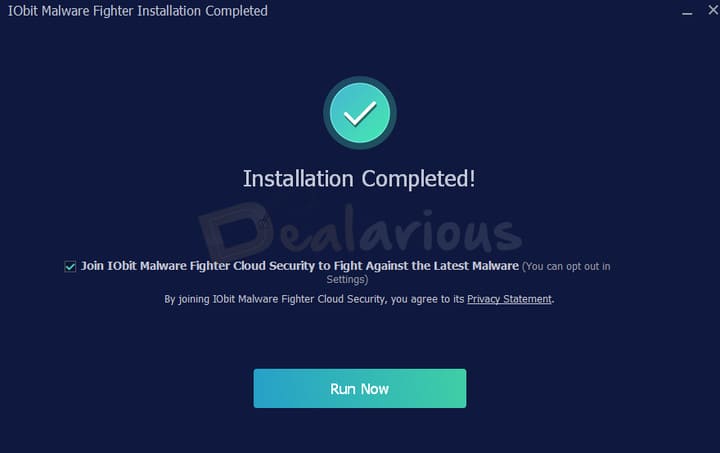
- First, download the installer from the official IObit site (Installer size: 63.7 MB).
- Next, double-click the file to begin installation.
- During setup, optional offers like iTop VPN may appear. These can be skipped.
- You can also click Custom Install to choose where the app gets installed or change shortcut preferences.
- After installation, you’ll be asked if you want to join IObit Malware Fighter Cloud Security. You can opt out anytime from the Settings.
IObit Malware Fighter 14 Pro: Features
IObit Malware Fighter Pro includes essential security tools and extra privacy controls. Here’s what you get:
- Real-time protection against malware, spyware, and ransomware.
- Triple-engine scanner powered by IObit and Bitdefender engines.
- Scheduled scanning with automatic threat database updates.
- Warns you if hackers try to access your camera or files.
- Scans for suspicious startup entries and scheduled tasks.
- Supports browser password protection for Google Chrome, Mozilla Firefox, Internet Explorer, and Microsoft Edge.
- Extra privacy tools like Anti-Tracking, Ads Removal, and Safe Box.
- Version 14 includes the latest Bitdefender engine and upgraded IObit Anti-malware engine to detect new threats, including AI-based threats.
- Improved Anti-Tracking with cookie cleanup support for newer browser versions.
- Improved Browser Password Guard
User Interface
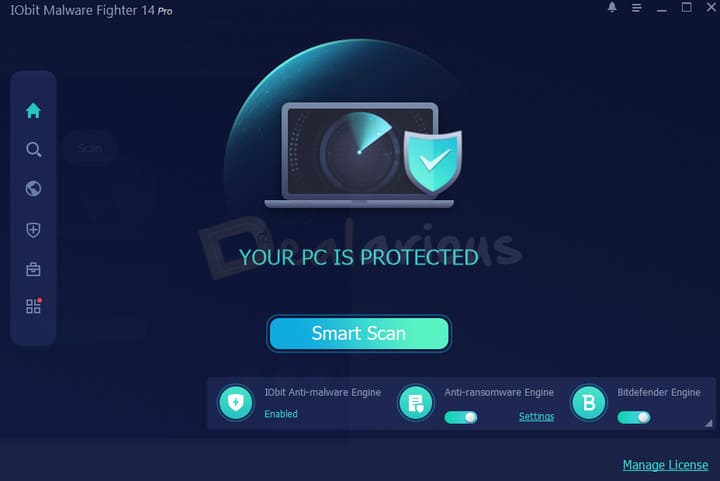
IObit Malware Fighter Pro keeps things simple. The layout is split into a left-side menu and a right-side detail area. As a result, each option you click on the left updates the panel on the right, making it easy to follow.
On the home screen, you’ll see the current protection status and a big button to start a scan. It’s hard to miss.
Scan
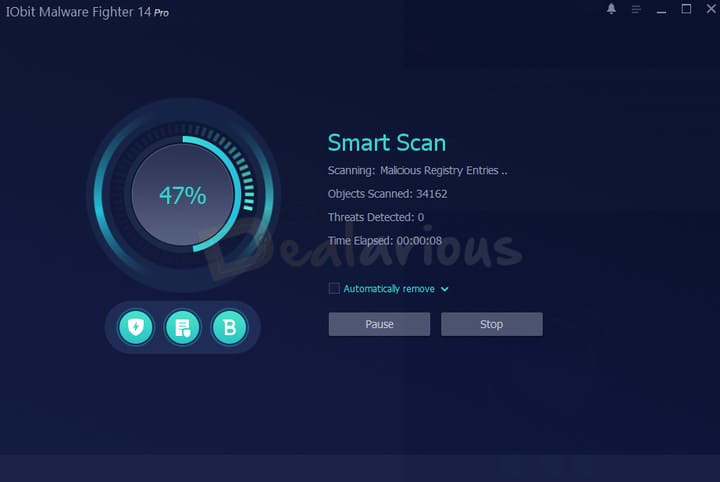
You can choose from three scan types depending on your needs:
- Smart Scan: Checks only the key areas where threats usually hide
- Full Scan: Covers the entire system — useful if you suspect a deep infection
- Custom Scan: Lets you pick specific folders or drives to scan
On our mid-range test PC, the Smart Scan took just under 4 minutes, which is decent for a daily check.
Browser Protect
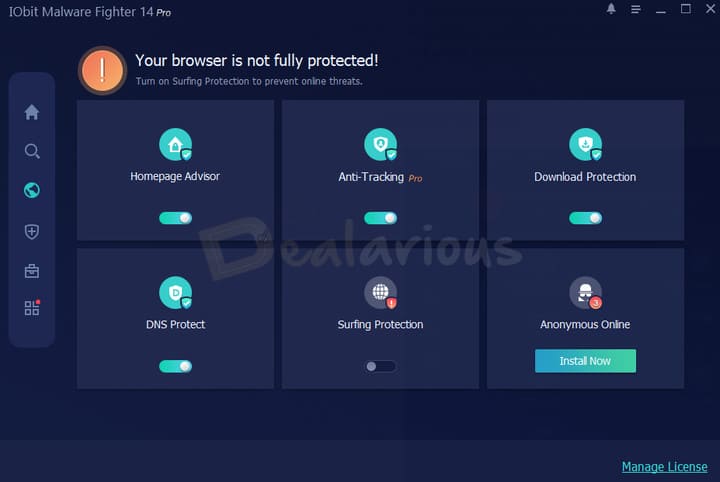
This section helps secure your browsing habits. It blocks malicious changes, tracks downloads, and protects your DNS settings. Here’s a quick look at the key options:
- Homepage Advisor: Notifies you if any program tries to change your browser’s homepage
- Anti-Tracking: Clears tracking cookies after you close your browser
- Download Protection: Scans files in real time as you download them
- DNS Protect: Prevents malware from altering your DNS settings
- Surfing Protection & Ads Removal: Blocks harmful links and removes unwanted ads
- Anonymous Online: Recommends a third-party VPN for added privacy
In fact, we noticed Download Protection kicks in instantly—even on small PDFs and EXE files —which is useful if you’re clicking around quickly.
Security Guard
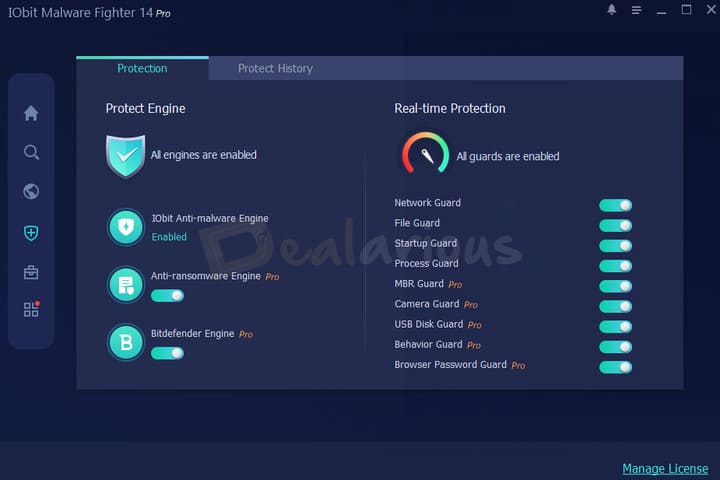
This area lets you manage all real-time protection modules. Each one can be toggled individually, giving you full control over your security setup.
By default, most options are turned on — so you’re protected right from the start. Here’s what you can manage:
- Network Guard: Stops suspicious internet activity
- File Guard: Monitors files for threats in real time
- Startup Guard: Keeps an eye on programs that try to auto-run
- Process Guard: Flags risky background processes
- MBR Guard: Protects your Master Boot Record
- Camera Guard: Blocks unauthorized webcam access
- USB Disk Guard: Scans USB devices automatically
- Behavior Guard: Detects unusual behavior patterns
- Browser Password Guard: Improved protection against password theft from major browsers
Note: Version 14 also includes AI Script Guard as part of Real-time Protection. According to IObit Support, it is not a separate feature with its own setting. Instead, it is integrated into Real-time Protection, which must be enabled to use it.
Tools
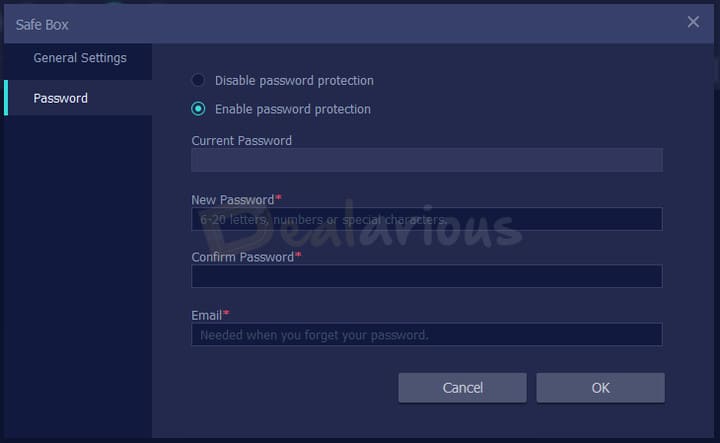
This section offers two extra utilities. While they’re not essential for core protection, they certainly add convenience:
- Safe Box: Lets you create a password-protected vault for sensitive files
- Free & Fast VPN: Suggests installing a third-party VPN for anonymous browsing
We tried setting up a Safe Box, and the process took under a minute — just set a password and select folders to protect.
Note: While iTop VPN appears under Tools, it’s actually a separate download with its own premium license. The free version gives you just 300 MB of data per day, and as expected, it comes with quite a few limitations. That said, Malware Fighter runs just fine without it — so you’re totally free to stick with your current VPN or skip it altogether.
Functionalities
The Triple Engine Scanner
IObit Malware Fighter Pro uses three engines to scan for threats. As a result, even if one engine misses something, the others usually catch it.
- IObit Anti-malware Engine: Handles malware detection. Version 14 upgrades this engine to improve protection against emerging threats, including AI-driven security threats.
- Bitdefender Engine: Offers advanced virus detection and uses the latest engine in version 14.
- Anti-ransomware Engine: Focuses on ransomware threats and blocking file encryption attempts
Version 14 also expands the threat database and improves scanning precision, according to IObit.
Consequently, the Full Scan with all three engines enabled took about 16 minutes on our clean test system. That’s reasonable, given the depth of scanning involved.
Threat Detection
The software rarely gives false positives. Instead of overwhelming you with alerts, it focuses on accuracy. This makes it ideal for users who don’t want constant pop-ups or manual decisions.
Also, it runs silently in the background. So you’ll barely notice it working — unless it catches something.
Missing Features
While IObit Malware Fighter Pro covers most security needs, it’s missing a few things. These include:
- Password manager
- Built-in VPN
- System optimization tools
If you need these extras, consider all-in-one security suites. For instance, Bitdefender Total Security, Norton 360 Deluxe, or Avast Ultimate include most of these tools at comparable pricing.
However, if your main goal is focused malware protection with light system usage, IObit still handles it well.
IObit Malware Fighter Pro Coupon Codes & Discounts
Looking to save with an IObit Malware Fighter Pro coupon? You’re in the right place. At Dealarious, the discount is auto-applied — no coupon code needed during checkout.
Here’s how the official pricing looks on the IObit website:
1 PC – 1 Year: USD 39.95
3 PCs – 1 Year: USD 54.95
With our deal, you can get a 3-PC license of Malware Fighter 14 Pro at a lower price, and that includes 1 extra month for free. Plus, if a new version releases during your subscription, you’ll get it at no extra cost. From a user standpoint, it’s also good to know: there’s no auto-renewal when you buy through Dealarious.
Want other malware protection options? Check out Malwarebytes Premium or ESET NOD32 Antivirus for similar protection at discounted rates.
Frequently Asked Questions about IObit Malware Fighter Sale
1. Is IObit Malware Fighter safe?
Yes. It’s developed by IObit, a trusted name in PC utilities. It uses Bitdefender, IObit, and Anti-ransomware engines together, offering reliable protection without slowing your system.
2. How do I get the best discount on Malware Fighter Pro?
Buy from the Dealarious Store. The latest deal includes 1 extra month free and a lower price than the official site — no code needed.
3. How do I activate IObit Malware Fighter Pro?
After installing, click the Enter Code button in the bottom-right corner of the app. Enter your license key and click Register Now.
4. How do I get a genuine IObit Malware Fighter license key?
Once you complete your purchase on Dealarious, your license key will be emailed to you instantly. Always check your spam folder just in case.
5. Does IObit offer direct coupon codes?
Sometimes, but they’re usually limited. Dealarious offers a better ongoing deal — no manual code required at checkout.
6. What’s the refund policy?
IObit offers a 60-day money-back guarantee. If you buy from Dealarious and run into license key issues, you can check our refund policy.
Quick Verdict
IObit Malware Fighter 14 Pro offers reliable malware and ransomware protection with minimal system impact. Its updated scanning engines improve threat detection, and it runs smoothly alongside other antivirus software. Moreover, with our coupon deal, you get 1 extra month and a free upgrade — no code required.
Conclusion: Is Malware Fighter Good?
We tested Malware Fighter 14 Pro on a Windows 11 system with Bitdefender already installed. It worked without conflicts and quietly handled most tasks in the background.
If you’re looking for easy-to-manage malware protection that doesn’t slow down your PC, this deal is worth it. In addition, you get an extra month and future updates — no code needed.
Darryl –
Quite a good deal. Browser protection is a nice bonus :-)
Ethan –
Using IMF on an old Win 8 machine of mine. A lightweight virus protection to have that doesn’t cost much.
Aaron –
Got 2 months free with the yearly subscription (total 14 months). Worth the buy!!