
Advanced SystemCare Ultimate 18
Original price was: $49.99.$10.99Current price is: $10.99.
Advanced SystemCare Ultimate 18 is an all-in-one security and PC Maintenance software. This program integrates antivirus protection powered by Bitdefender. It is top-rated by CNET.
The purchase includes a FREE upgrade to the next version if it is released within the license’s validity period.
Free Bonus Offer:
- Protected Folder 1 PC – 1 Year
Validity: 3 PCs – 1 Year| Download Only | 60 Days Money Back
Description
Advanced SystemCare Ultimate is the top-of-the-line maintenance tool from iObit. The section below will cover how Advanced SystemCare Ultimate makes a difference. You can also get the latest Advanced SystemCare Ultimate Coupons and buy them at the lowest price.
Note: This application is for Windows PCs only. If you need Mac maintenance, consider visiting MacBooster by iObit.
System Requirements & Installation
Here are the basic requirements:
- Windows 11, 10, 8.1, 8, 7, Vista, or XP SP3
- 500 MB free disk space
- Minimum screen resolution: 1024×768
- Installed Size (from our test): 316 MB
How to Install Advanced SystemCare Ultimate
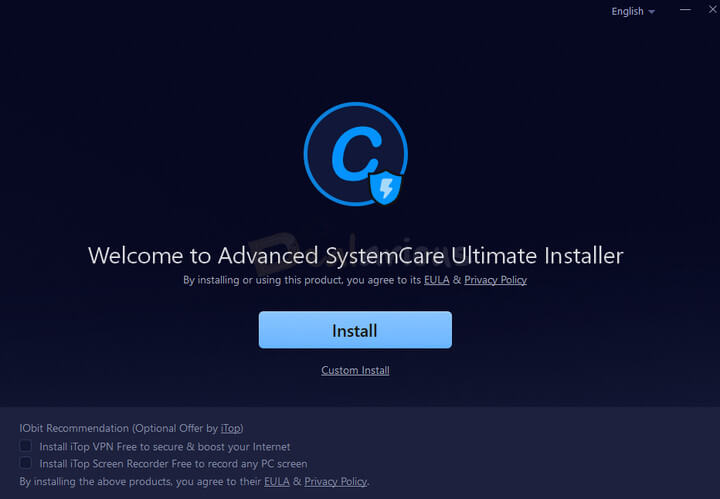
- Download the installer from the official IObit site (Installer Size: 142 MB)
- Run the installer by double-clicking the downloaded file.
- (Optional) Click Custom Install if you want to select a different install location, shortcuts, or avoid pinning to the taskbar.
- During installation, you will see optional software offers like iTop VPN or iTop Screen Recorder.
The installation took around one minute on our Windows 11 test system.
User Interface
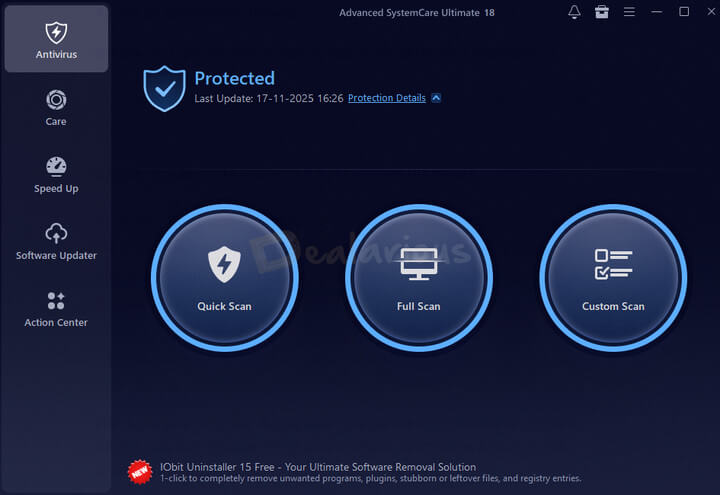
Advanced SystemCare Ultimate features the same clean and modern interface seen in the Pro version. The dashboard is neatly organized, making it easy for beginners to navigate. The main screen highlights your system status at a glance, and the left sidebar includes Care, Speed Up, Software Updater, Action Center, and a dedicated Antivirus section.
You can configure Advanced SystemCare Ultimate settings using the Settings tab, located at the top-right corner of the app. The Quick Settings tab lets you toggle essential features, such as real-time protection, AutoCare, and performance monitoring. The interface stays visually consistent with the Pro version.
Advanced SystemCare Ultimate 18 Features
It has a cleaner User Interface with an improved Antivirus Database, junk files database, Startup Optimizer, and Browser Protection.
Let us take a look at the features.
Real-Time Protection from Security Threats
Protects your system from viruses, ransomware, and other malware in real-time. However, we will never suggest using it as your Primary Antivirus. It complements your primary Antivirus in a supportive role.
Dual Engine Protection
Advanced SystemCare Ultimate 18 uses the latest Bitdefender engine and IObit’s anti-malware engine for extra protection.
Browser Protection
Includes Surfing Protection, Email Protection, and Ads Removal to block phishing sites, malicious ads, and browser-based threats. Also supports surfing on the latest Microsoft Edge (Chromium). To enable them, the IObit Surfing Protection extension must be added to your browser.
Privacy Protection
It includes Anti-tracking, Fingerprint Protection, and the new Safe Folder feature. This new tool lets you protect important files and folders from unauthorized access, hence adding an extra layer of security.
Internet Speedup with Internet Booster
Advanced SystemCare Ultimate optimizes your browser to speed up your browsing experience.
Smart Tools for Daily PC Maintenance
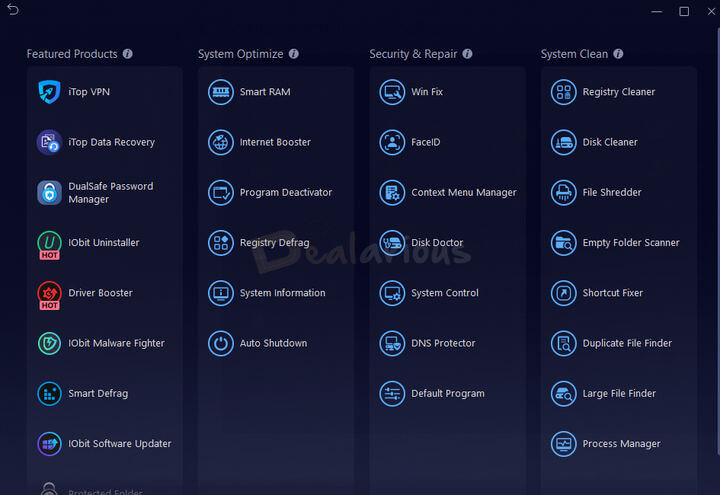
The Registry Cleaner is just one of the modules for maintaining the system. Advanced SystemCare Ultimate 18 also provides additional utilities to maintain your computer’s performance, including File Shredder and Duplicate File Finder. You don’t have to purchase individual programs, as this software offers them all in one. Head to the “Toolbox” tab and use any tool you wish. These are on-demand tools.
Face Recognition with FaceID
Provides an extra layer of protection from unauthorized system access. This system allows you to set your face as authorized while any other face is captured and logged.
DNS Protection
Advanced SystemCare Ultimate 18 provides DNS protection. Once enabled, it will prevent any application from changing its DNS settings. Hence, it protects you from DNS attacks. Optionally, you can also select among popular public DNS services from within the application interface.
Functionalities
Antivirus Protection
The Antivirus module in Advanced SystemCare Ultimate gives you a clear view of your PC’s security status and lets you fix issues with one click. It offers three scan types—Quick Scan, Full Scan, and Custom Scan.
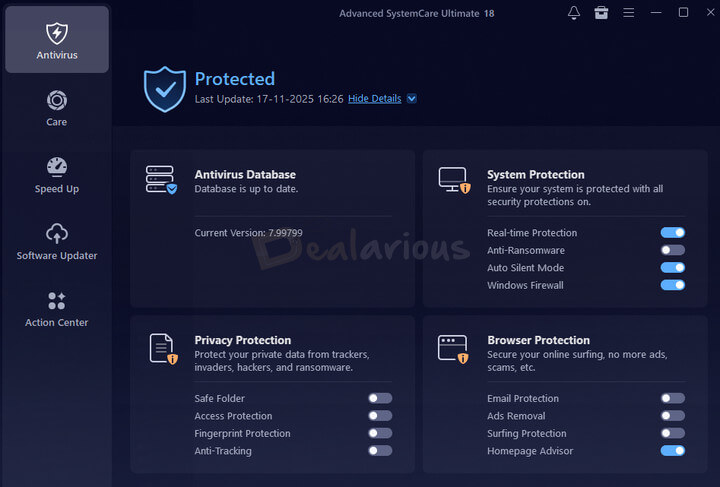
The module also includes four layers of protection—Antivirus Database, System Protection, Privacy Protection, and Browser Protection. All these can be configured through the Settings panel. Features like Email Protection, Ads Removal, and Surfing Protection require adding the IObit Surfing Protection browser extension.
Scan Performance (My Test Results)
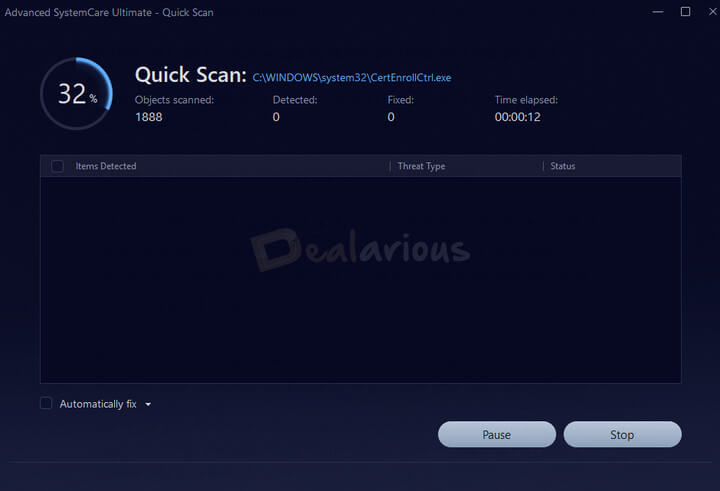
In my test, the Quick Scan completed in 7 minutes, which is reasonable for a light antivirus engine. The Full Scan took 3 hours and 40 minutes to complete, which is understandable since it thoroughly scans each file and location.
Optimization Modules: Same as Advanced SystemCare Pro Version
Advanced SystemCare Ultimate retains all the system optimization features from the Pro version—such as Care, Speed Up, and Software Updater. What sets Ultimate apart is its built-in antivirus protection, which combines optimization with real-time system protection.
Windows 10/11 & Antivirus Compatibility
Advanced SystemCare Ultimate is compatible with Windows 10 and Windows 11. For our tests, we used a 64-bit Windows 11 system and found no issues. Moreover, we combined it with Bitdefender Total Security, which worked without any issues or warnings.
The program automatically switches to Compatible Mode if another antivirus is detected. In this mode, its real-time protection is disabled to avoid conflicts. If you later remove the other antivirus, you will need to reinstall Advanced SystemCare Ultimate to restore full protection.
Note: It is not recommended to run two antivirus programs on the same PC.
Some users have reported that Advanced SystemCare is incompatible with Malwarebytes. It is falsely detected as a PUP and is removed by Malwarebytes. Hence, you will need to exclude it from the Malwarebytes exclusion list. In this way, only you can use both applications. To save more money, you can use our Malwarebytes coupon codes for the latest discounts.
Advanced SystemCare Ultimate 18 Vs Advanced SystemCare 19 Pro
The Ultimate version integrates an Antivirus engine. Compared with the Advanced SystemCare PRO version, that’s the only addition. If you plan to buy a basic antivirus, go with Advanced SystemCare Ultimate 18. This Coupon Code also helps you spend less on PC maintenance and security software. People with an antivirus already installed should go for the Pro version.
Remember, the antivirus module in the Ultimate version is very basic. Additionally, it integrates the Bitdefender Engine for a virus scan. Hence, it may not meet all your online security needs. Yes, it is beneficial and keeps your system clean. However, if you need a complete antivirus package, Bitdefender Total Security and ASC Pro Version are the best affordable combinations.
Advanced SystemCare Ultimate 18 Coupons
Advanced SystemCare Ultimate is available for 1 and 3 PCs. Here are the prices as per the IObit official site:
- 1 PC – 1 Year: USD 36.99
- 3 PCs – 1 Year: USD 49.99
At Dealarious, you will find the latest coupon codes and the best prices, with upto 80% off. Hence, you do not have to search for Advanced SystemCare Ultimate 18 Coupons.
However, we recommend installing the application’s free trial version. Doing so helps you identify any compatibility issues.
Frequently Asked Questions about IObit Advanced SystemCare Ultimate Sale
Q. Is Advanced SystemCare Ultimate free?
A) No. Advanced SystemCare Ultimate is not free. It comes with a free trial to test the features. Once the trial expires, you must purchase a license to continue using the antivirus.
Q. How do I get the best discount on Advanced SystemCare Ultimate?
A) You can get the best price by purchasing Advanced SystemCare Ultimate license directly from Dealarious Store.
Q. How do I activate Advanced SystemCare Ultimate?
A) Launch Advanced SystemCare Ultimate and click on the Enter code at the bottom left corner of the app. Enter the Advanced SystemCare Ultimate activation code key in the License Code field, hit Register Now, and you’re good to go.
Q. Do I receive any additional benefits with this deal?
A) Yes. If you purchase the 3 PCs – 1 Year license from Dealarious, you also get IObit Protected Folder (1 PC – 1 Year) for free.
Q. How many PCs does the Advanced SystemCare Ultimate license cover?
A) An Advanced SystemCare Ultimate license covers upto 3 PCs.
Q. What is the refund policy?
A) We offer a 60-day money-back guarantee on license-related issues only. You can request a refund during this period.
Conclusion: Is Advanced SystemCare Ultimate Worth the money?
Advanced SystemCare Ultimate 18 stands out with a stunning interface. It is easy to use and a single-click tool for all your needs. It can work in a fully automated mode. Hence, once you set it up, you can forget about it. It is compatible with Windows 10 and 11 and is light on system resources. Compared to other applications, ASC is superior in this category.
Dany –
Purchased the license seeing the low price. While activating it, I faced a problem and so had to reach out for support. Truly appreciate their effort in assisting me :-)
Alex –
Good value product at a good price!!
Griffin –
A good piece of software to protect my Windows PCs in real-time and comes with good tune-up capabilities. It’s well worth the price and cheaper than its competitors for the yearly subscription
Robbie –
Previously I have purchased Driver Booster from Dealarious. This time I have bought Advanced SystemCare Ultimate at a very discounted price. It just cost me $11 for 3 PCs – 1 Year subscription.
Based on features and pricing, it’s the best :-)
Ethan Jones –
Purchased from Dealarious as they had a good deal on the subscription. ASC Ultimate offers much more than expected from an antivirus program.