
EaseUS Data Recovery Wizard Professional
$69.95 $48.97
It helps recover deleted or inaccessible files after accidental deletion, formatting, partition loss, drive corruption, or a system crash.
Its two-step scanning process searches for recently deleted files before running a deeper Advanced Scan, while previews and filters help narrow the results before recovery.
Global Licenses | No Auto-renewal | 30 Days Refund



Next Price Update in
Deals Gone Wild
-
80% OFF

Avast Ultimate Suite
Original price was: $119.99.$23.99Current price is: $23.99. Check Deal -
63% OFF
CCleaner Professional 7
Original price was: $29.95.$10.95Current price is: $10.95. Check Deal -
93% OFF
IObit Combo Pack [6 Apps-3 Pcs]
Original price was: $349.68.$24.95Current price is: $24.95. Check Deal -
55% OFF
Movavi Video Editor 2026
$35.99 $42.95Price range: $35.99 through $42.95 Check Deal This product has multiple variants. The options may be chosen on the product page



Description
EaseUS Data Recovery Wizard Pro is a Windows data recovery application for retrieving deleted or inaccessible files after accidental deletion, drive formatting, partition loss, corruption, or a system crash. It supports recovery from common storage devices and includes additional tools for more advanced recovery situations.
For over 20 years, EaseUS has been providing utilities and multimedia tools, including EaseUS Data Recovery Wizard Pro. Along with file recovery from various storage devices, it offers media file repair, ChronoSnap, disk image creation, and lost-partition recovery and repair.
EaseUS Data Recovery Wizard Pro supports more than 1,000 file formats across categories such as documents, photos, videos, audio, email, and archives. You can also use our EaseUS Data Recovery Wizard coupon codes to get the software at a discounted price.
Note: Do not install EaseUS Data Recovery Wizard Pro or save recovered files on the drive where the data was lost. Writing new data to the affected drive can overwrite recoverable files and reduce the chance of successful recovery.
System Requirements
Here are the system requirements and compatibility details for EaseUS Data Recovery Wizard Pro.
OS: Windows XP and later
Installed Size Observed in Testing: Approximately 600 MB after installation
CPU: 500 MHz processor or faster
RAM: At least 2 GB
Supported File Systems: FAT (FAT12, FAT16, and FAT32), exFAT, NTFS, NTFS5, EXT2/EXT3/EXT4, HFS+, and ReFS
You can check EaseUS Data Recovery’s System Requirements for more details.
Download and Installation
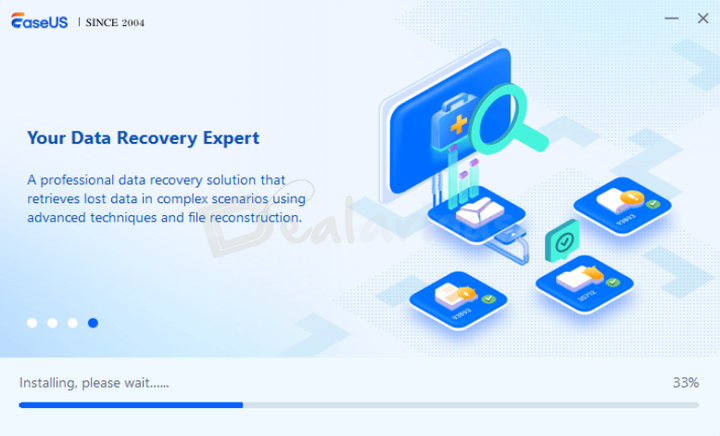
Installing EaseUS Data Recovery Wizard Pro is straightforward.
- Download the setup file from the EaseUS official website.
- Run the setup file to start the installation.
- Follow the steps in the setup wizard to complete the installation.
EaseUS Data Recovery Wizard Pro: Key Features
Here are some key features included in EaseUS Data Recovery Wizard Pro.
Scanning
EaseUS Data Recovery Wizard Pro uses a two-step scanning process. The initial scan uses directory information to look for recently deleted files, while Advanced Scan searches the target location more thoroughly for other recoverable files.
Cloud Data Recovery

EaseUS Data Recovery Wizard Pro supports cloud recovery for services such as OneDrive and Dropbox. It can retrieve files that remain available through cloud trash or version history, as well as files previously downloaded or synced through the desktop app. In testing, it could not recover online-only files that had been permanently deleted from the cloud service.
File Repair
File Repair helps repair corrupted media files, although results can vary. In testing, it produced better results when more of the original file data remained available; otherwise, it sometimes recovered only partial content.
Lost Partition Rescue
Lost Partition Rescue helps locate lost or deleted partitions and recover files from them. Depending on the condition of the partition and its data, it may also be able to restore the partition structure.
NAS and Linux Data Recovery
EaseUS Data Recovery Wizard Pro can connect to supported NAS and Linux systems for remote scanning and recovery. Compatible NAS brands include Synology, QNAP, Western Digital, NETGEAR, and TerraMaster, while supported Linux distributions include MX Linux, Manjaro, Mint, Ubuntu, and Debian.
Crashed PC Rescue
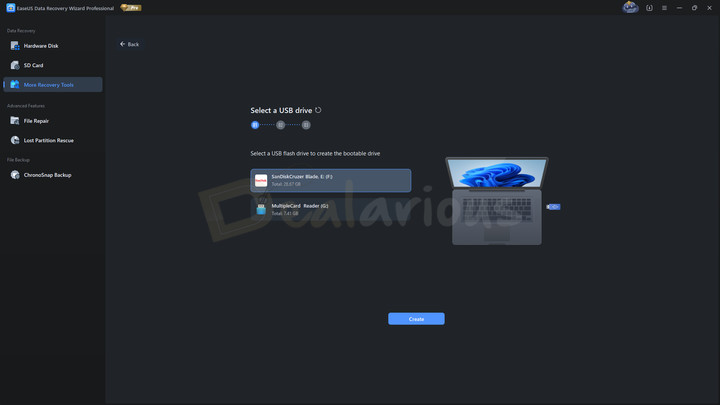
Available only on Windows, Crashed PC Rescue lets you create a bootable USB and access the EaseUS recovery environment when Windows cannot start because of a system crash, boot loop, or BSOD. You can then scan the affected drive and recover accessible files from the pre-boot environment.
Save Scan Session
After a scan, you can save the session and reload it later instead of scanning the same device again. Save the session file on a different drive from the recovery target to reduce the risk of overwriting recoverable data.
ChronoSnap
ChronoSnap is a backup feature that creates real-time version backups as files change. These saved versions let you return to an earlier state when needed.
Tip: Read our EaseUS Data Recovery Wizard Pro review to get a full picture of its effectiveness in real-world tests.
Interface
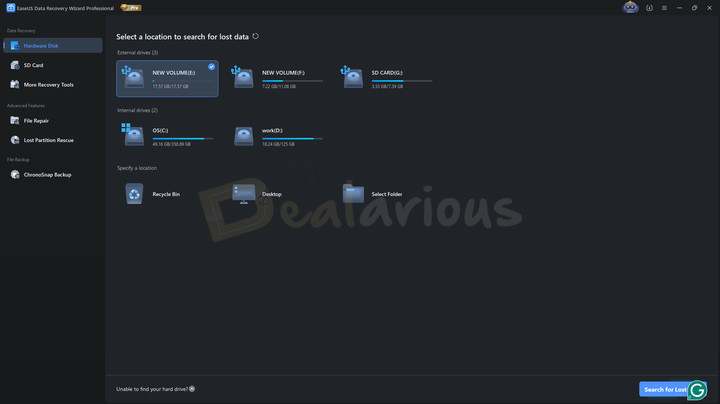
EaseUS Data Recovery Wizard Pro has a clean, organized, and modern interface. When launched, it opens to the main dashboard, which lists the internal and external drives connected to the system. It also provides quick access to scan specific locations:
- Recycle Bin
- Desktop
- Select Folder
Left Panel
The left panel organizes the available tools into three categories:
- Data Recovery: Hardware Disk, SD Card, and More Recovery Tools.
- Advanced Features: File Repair and Lost Partition Rescue.
- File Backup: ChronoSnap Backup.
Selecting a category opens its corresponding options in the right-hand panel.
The recovery workflow remains straightforward: select the target location, click Search for Lost Data, and then review and recover the required files. The results window places filtering options at the top and scan progress at the bottom, helping users narrow the results and monitor the scan from one screen. This arrangement also makes the main recovery steps easier for first-time users to follow.
Practical Recovery Coverage
Taken together, these features make EaseUS Data Recovery Wizard Pro suitable for more than routine deleted-file recovery. It covers common data-loss situations such as accidental deletion, formatting, partition loss, and OS crashes, while also supporting storage environments including RAID, NAS, Linux systems, SD cards, and supported camera storage. Its Quick and Advanced scans provide an initial search for recently deleted files followed by a deeper scan when needed. Recovery results still depend on the device’s condition and whether the missing data has been overwritten.
Support
EaseUS provides several support options, ranging from a knowledge base with FAQs, activation guides, and user manuals to assistance through live chat and email.
Live chat is available 24 hours a day from Monday to Friday, with limited weekend availability from 9:00 AM to 11:00 AM UTC+8. In testing, the connection was usually fast, although wait times can vary. Support responses were quick and solution-focused. Email support typically responds within 24 hours, and remote assistance may be available depending on the issue.
Why Choose EaseUS Data Recovery Wizard Pro?
In our tests, EaseUS Data Recovery Wizard Pro retrieved both old and recently deleted files across multiple data-loss scenarios, including Shift+Delete, formatting, and deleted partitions. It also preserved the original naming structure of many files and folders. Results were less consistent with some older deleted files, but the program remained useful across the common and more complex recovery scenarios tested.
EaseUS Data Recovery Wizard Pro: Coupon and Pricing Plans
EaseUS Data Recovery Wizard Pro is available in monthly, yearly, and lifetime plans for individuals.
Here are the regular prices (MRP) listed by EaseUS:
- Monthly Plan – USD 69.95
- Yearly Plan – USD 99.95
- Lifetime Upgrades – USD 149.95
Each license can be used on one computer at a time. If you replace the device, contact EaseUS support for assistance with license reactivation.
A Free edition and a Trial edition are also available. The Windows Free edition includes 500 MB of recovery by default, which can be increased to a total of 2 GB after sharing the software on social media. The Trial edition lets you scan and preview recoverable files but does not allow recovery. You can also use our EaseUS Data Recovery Wizard Pro coupon codes to get a better deal on the software.
Frequently Asked Questions
Is EaseUS Data Recovery Wizard Pro safe to use?
During testing, the installer returned no detections across 72 antivirus engines on VirusTotal, and the application showed no suspicious behavior during installation or use.
Where can I find discounts for EaseUS Data Recovery Wizard Pro?
Check the Dealarious Store product page for the current price and any available coupon or discount. EaseUS may also run separate promotions on its official website.
How do I activate EaseUS Data Recovery Wizard Pro?
To activate EaseUS Data Recovery Wizard Pro, launch the program, click the key icon at the top-right of the home screen, enter your 25-character license code, and click Upgrade.
How effective is the file repair tool in EaseUS Data Recovery Wizard Pro?
In testing, the repair tool was more effective when sufficient remnants of the original file remained available. If much of the file has been overwritten, the result may be incomplete or unusable.
Can I get a refund on my purchase from Dealarious?
Refund requests must be submitted within 30 days and are available only in eligible cases under the Dealarious refund policy, such as qualifying unresolved technical or license-key problems.
How can I contact EaseUS Support?
You can contact EaseUS through its official support page.
Conclusion
EaseUS Data Recovery Wizard Pro combines standard file recovery with additional options such as file repair, backup creation, and lost-partition recovery. Its straightforward interface and range of recovery tools make it suitable for users dealing with several common data-loss scenarios.
Additionally, an available EaseUS Data Recovery Wizard Pro coupon code can reduce the purchase price.
Alan –
I ordered it seeing the discount.The license was genuine as confirmed by Easeus support and activated the software successfully.
Lukas –
I tested the free version before then decided to purchase Pro plan after seeing the results.
Brett –
Good to have a reliable tool like Easeus when something goes wrong. It worked for the most part though some files were sadly damaged beyond recovery limits.