
Sticky Password Premium
$199.99 $59.99
Available on Windows, macOS, iOS, and Android, Sticky Password Premium offers a hassle-free password management experience. It serves as a secure, cross-platform vault for safely accessing your stored passwords and sensitive data across multiple devices.
Its advanced 256-bit encryption, 2-factor authentication, and a master password (that only you know) make Sticky Password a reliable password management tool. The Sticky Password Premium coupon code is already applied to the purchase link.
Global License | Official Purchase | 30 days Refund
Description
Established in 2001 and led by former AVG executives, Sticky Password Premium has grown over the past two decades from a simple password storage tool into a full-featured, cross-platform password management solution. It can securely sync your passwords across multiple devices while also offering features like auto-login, form filling, password generation, browser extension support, and, above all, centralized management. Backed by AES-256 encryption, it performs its core functions reliably while also offering a few unique additions, such as local Wi-Fi sync and a portable USB password manager.
An added advantage is that you can use our Sticky Password Premium coupon codes to get the best password-management experience across all your devices.
Caution: Keep your Sticky Password Credentials safe. Losing it to someone means they have access to all the accounts you have in it. It’s always recommended to change passwords periodically.
Download and Installation
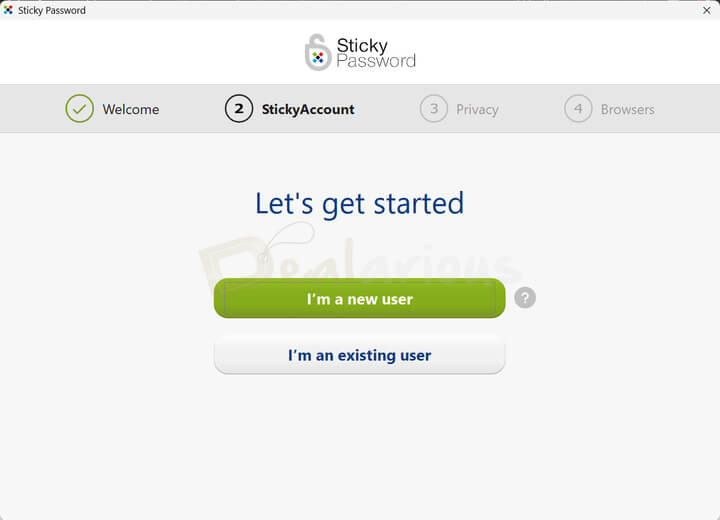
Installing Sticky Password Premium is quite easy.
- Visit the official Sticky Password website and download the executable file.
- Once downloaded, run the setup file, and Sticky Password will be installed in under a minute.
- Once installed, you are asked to sign in with your existing ID or sign up with an email address and a master password to get started with password management.
Sticky Password Premium: Key Features
Here are the key features of Sticky Password Premium that make it a reliable password management platform.
Automatic Form Filling
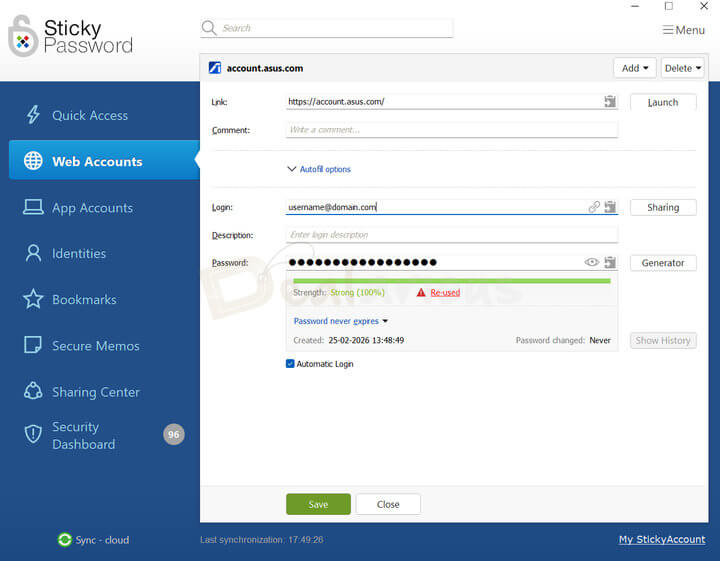
Once you enter your details in Sticky Password, it can auto-fill web forms using your saved profiles. You can also save new forms for future use.
Password Manager
Keeping track of multiple passwords across different accounts is indeed hectic. It is where Sticky Password’s password management comes in handy, letting you securely store and manage all your credentials in one place, keeping them safe behind a single master password. It means you no longer have to remember multiple credentials, just your Sticky Password account login.
Strong Password Generator and Log in
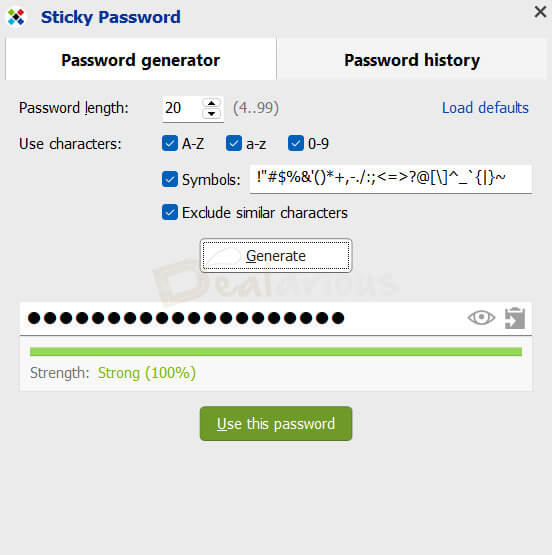
One of Sticky Password’s strongest features is its ability to automatically generate passwords during new account signups. All you need to do is choose the password length and character set, and the program will automatically generate strong, unique passwords.
Once the password is saved in the program vault, it will automatically log in to websites for which you have already stored login credentials. You do not have to type your passwords in front of anyone; just click on auto login.
Password Sharing and Emergency Contact
The program also lets you securely share and receive account credentials with a fellow Sticky Password user while providing some control over access permissions. Additionally, you can also add an emergency contact of your choice who can access your vault in case of an emergency. It is a thoughtful inclusion, adding an extra layer of reassurance, knowing that your data can still be accessed by someone you trust if something unexpected happens to you.
Multiple Syncing Options
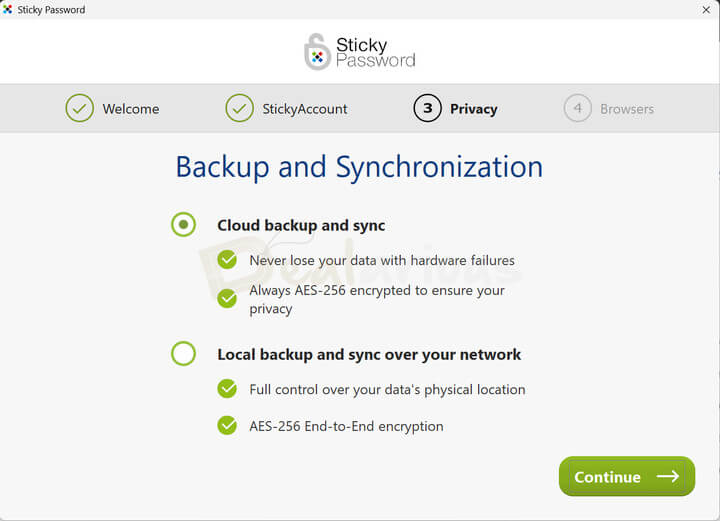
Another advantage of having Sticky Password is its multiple syncing options. You can sync your data across devices via Cloud Sync or Local Wi-Fi, or turn sync off to keep your data stored only on your device. It is actually helpful if you are a little skeptical about storing your credentials in cloud servers.
Secure Memos and Bookmarks
Another unique feature of Sticky Password Premium is Secure Memos. Here you can store your credit card numbers, licenses, passport information, or any other sensitive data in an encrypted format.
Portable Password Manager (Windows only)
Available only on Windows, it is another notable feature not commonly found in password managers. The Portable Password Manager feature in Sticky Password Premium lets you carry your encrypted data on a USB drive and use it on any other device without installing the software. It allows you to access and autofill logins on another device when you run the portable version.
Browser Extension
Sticky Password’s browser extension works with almost every popular browser, including Chrome, Edge, Firefox, Brave, Opera, etc. However, there’s one downside. Sticky Password browser extensions can be installed only after the program is installed on the OS. If you tend to uninstall the program, the extension will not work.
Contactless Connect
It is one of the most interesting features introduced by Sticky Password. This feature lets you securely share your login credentials to a targeted computer for a one-time session just by scanning a QR code. There is no need to install the program or extension on a device.
Dark Web and Breach Monitoring
Available with Sticky Password Premium, the Dark Web and Breach Monitoring feature checks your saved login and website credentials against known data breaches and alerts you in real-time. If your data is found to be at risk, it lets you assess the severity and take quick action accordingly.
Cross Platform Support
Sticky Password Premium’s cross-platform support lets you access all your passwords and accounts from any device, anywhere.
Tip: For detailed insight into how the program performs, read our Sticky Password Premium review.
Sticky Password Premium: Interface
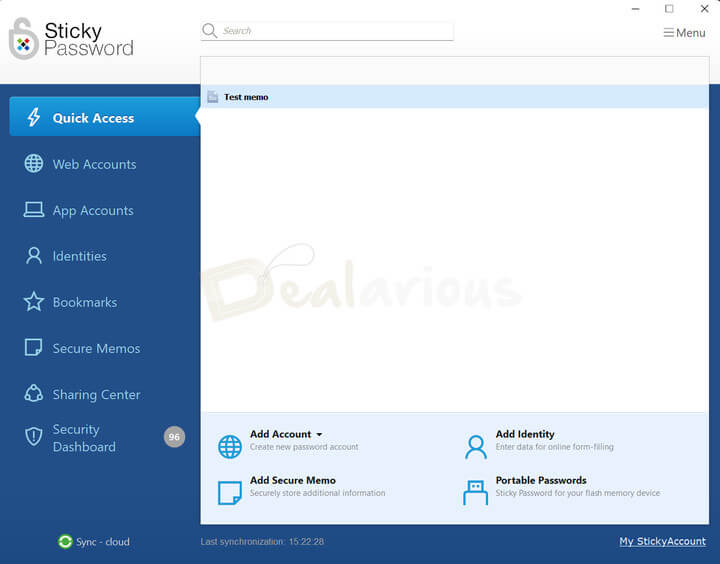
Sticky Password’s interface might feel a bit outdated at first, but it’s actually clean and easy to use once you get into it.
The main window is divided into two sections.
The Left Panel
It includes all the key options such as:
- Quick Access
- Web Accounts
- App Accounts
- Identities
- Bookmarks
- Secure Memos
- Sharing Center
- Security Dashboard
The Right Panel
Clicking any of these options will display relevant details and settings for that option in the right panel.
Additionally, if you want to personalize your password management experience, you can easily tweak various settings from the settings menu. Simply select the Menu icon in the top-right corner, then go to Settings. There, you will find options such as General Settings, My StickyAccount, Synchronization, Supported Browsers, Security, etc.
Sticky Password Premium: Functionality
256-bit AES Encryption
Sticky Password Premium uses AES-256 encryption to secure your valuable, sensitive information. This encryption model is widely adopted by government and security professionals, making unauthorized access extremely difficult.
Fingerprint Scanning
Available on Android and iOS devices, Sticky Password includes biometric authentication through fingerprint scanning. It makes password protection more personalized, faster, and secure.
Two-Factor Authentication
Sticky Password’s 2FA (two-factor authentication) adds a layer of security to the program. It ensures that even if someone illegitimately obtains your master password, they still can’t access your data without a second-step verification, such as a time-based 6-digit verification code. It makes unauthorized access more difficult and enhances platform security.
Support
Sticky Password offers support in multiple ways. There’s a knowledge base that includes FAQs for the most common queries, a user guide, activation queries, tips and tricks, etc. Human assistance is also available via email for premium users. All you have to do is fill out a simple form conveying your query, and they usually respond within a day.
Quick Verdict: Is Sticky Password Premium worth your money?
From our experience, Sticky Password Premium does more than just basic password management. It comes with additional tools such as a portable USB password manager, multiple sync options, browser extension support, secure password sharing, and more. Additionally, its AES-256 encryption makes it both practical and secure for everyday use.
Sticky Password Premium: Coupon Codes and Pricing
Sticky Password has a free version, plus two paid options—a yearly plan and a lifetime license.
- Yearly plan: USD 39.99
- Lifetime license: USD 199.99
The good part is that the lifetime plan is available at a much lower price using our Sticky Password Premium coupons.
You also get a 30-day free trial, which is useful if you want to test the premium features before committing.
FAQs
Is Sticky Password Premium Safe to use?
Yes, Sticky Password Premium is safe to use. It uses AES-256 encryption to secure your sensitive data, 2FA provides an extra layer of protection against unauthorized Access, and your stored credentials are always locked behind a master password that only you can access. Additionally, during our test, the program showed no signs of suspicious activities, and our antivirus checks returned clean results.
Is Sticky Password Free?
Yes. There is a free version with certain feature limitations. When you download Sticky Password, you start with a 30-day free trial. After the trial ends, it automatically switches to the free version.
How can I get the best deal on Sticky Password?
You can get the best deal by visiting the official website through our links. To proceed, click on the Buy Now link in the Sticky Password Premium coupon section above.
How to activate Sticky Password Premium?
To activate Sticky Password Premium, start by launching the program and navigating to the Menu option in the top-right corner of the main window. Then, select Help > Enter License Key> paste your license in the same window and hit OK. Sticky Password Premium will be activated.
Does Sticky Password Premium have a Dark Web Monitoring feature?
Yes, Sticky Password Premium offers a Dark Web and Breach Monitoring feature, but it is only accessible in the paid version.
Does Sticky Password offer a refund policy? / Can I get a refund for Sticky Password?
Sticky Password offers a 30-day money-back guarantee. You can contact their support team to request a refund or check their terms and conditions page for more details.
Conclusion
In short, Sticky Password Manager is more than just a capable password manager. Its centralized password management system, paired with AES 256-bit encryption and two-factor authentication, makes it a secure and reliable solution. Additionally, the interface is simple and easy to use, so navigation won’t be an issue. Its additional features help you go beyond basic password management tasks. However, at the end, you can always try the 30-day free trial version to test out the program first and make an informed decision.
Joseph Numbers –
I got the best deal of my life with this software. Now, I can access all my data and mails without any threat of hackers. Thank you Sticky password premium.
Dan Brinson –
Sticky passwords has made my life easy. I do not need to remember long complicated passwords now. It handles all my accounts pretty well. I am very happy with it!
Judy Wilkins –
I have really enjoyed using this product. I use it at home and work. I have to remember so many different passwords at work and also at home that I have locked myself out of one or more every other week. So embarrassing when this program can handle all of them.
Carrie Saine –
This is an impressive software. It protects you from all online thefts and potential hacker. Now I can safely access my account without any fear. Thank you Sticky Password Premium.
Jeffery Anderson –
The sticky passwords seem to give you the high-fy protection that you always want, this is especially with regards to the finger print scans. It is great! It would be tough to beat this software.