
Wondershare PDFelement 10
$159.00 $103.99
It is an all-in-one solution for managing your PDF files, available for Windows and Mac, Android, and iOS. It lets you easily view, create, edit, convert, and manage PDF documents. In addition to just creating and editing PDF files, you can use the OCR & AI feature of Wondershare PDFelement in a single click. Read our PDFelement 10 review for more details on the performance.
Use coupon on Final Checkout Page: SENKEVIN
Perpetual License | Authorized Global Reseller | 30 Days Refund
Description
We should consider Wondershare PDFelement 10 as a better alternative for editing PDF files. This tool is also available for Microsoft Windows, Mac, Android, and iOS. Hence, you can have the same PDF management experience on all devices. The all-new Wondershare PDFelement 10 has several features. It mainly focuses on viewing, Creating, Editing, Converting, and Managing.
With our Wondershare PDFelement 10 coupon codes, you will always get PDFelement at the best discount price.
Note: The Android application is available for free, so there is no need for a license. At Dealarious, you can purchase the license for Windows and Mac.
Wondershare PDFelement: System Requirements
Operating System: Windows Vista or above, macOS 10.14 or above, Android 5.0 or above, iOS 13 and above
Processor: 1Ghz Processor or above
RAM: 512 MB RAM (1GB Recommended)
Available Hard Drive Space: 445 MB or above
Wondershare PDFelement: Key Features
Below are some of the Key features of Wondershare PDFelement that make the program an efficient multipurpose PDF editing tool.
Edit, Convert, and Create PDFs:
With Wondershare PDFelement, you can edit your PDF files, convert them into Word, ppt, image, or other multimedia formats or create a PDF from any document.
Add Watermarks, Backgrounds, Headers, and Footers:
While making edits to your PDF file using the program, you can add or remove watermarks, backgrounds, headers, and footers. It gives you full-fledged flexibility to edit your document just how you like them.
Automatic Form Recognition:
PDFelement can also accurately recognize PDF forms, helping users easily copy and edit the contents.
AI Tools
The latest version, PDFelement 10, comes with new AI Tools powered by ChatGPT. With AI Tools, you can
- Chat with PDFs
- Translate your PDFs
- Ask for assistance in proofreading
- Detect AI Writing
- Rewrite your content
- Summarize PDFs in Markdown format
Screen Recorder:
To record the progression of your PDF file edits, you can use the screen recorder feature of Wondershare PDFelement.
Scrolling Screenshot:
Take long snaps of your document using the Scrolling Screenshot feature.
OCR:
If you have a scanned PDF document, you can convert it into editable text in a few seconds using the OCR feature.
Batch Process:
Drag and drop to batch process PDF. Convert, create, print, and compress PDF files in convenient batches in multiple formats.
PDF Compressor:
Compress PDF without losing quality. Share smaller PDFs to improve device space and efficiency. In the latest version, Wondershare claims to have improved the speed and quality by 20% compared to the previous version.
Protection:
Wondershare PDFelement 10 covers you with advanced security features like password protection and digital signature to ensure the integrity of your private information remains intact at all times.
PDF Redaction:
This feature allows you to delete sensitive information from a document. It is a very useful feature to hide crucial private information like address, credit card number, etc.
Form Data Extraction:
PDFelement assists you in extracting data from fillable form fields and other kinds of PDFs to CSV files, where you can manage the collected data.
Chat with PDF using AI Sidebar
The new AI Sidebar feature lets you chat with Lumi, the AI Assistant. You can ask general questions or queries from your PDF and get answers using “Ask PDF” within the AI Sidebar. You should upload your PDFs to Document Cloud for the AI Sidebar feature to work.
Note: For the AI tools to function properly, your PDFs must be uploaded to Wondershare Document Cloud.
Wondershare PDFelement 10: Interface
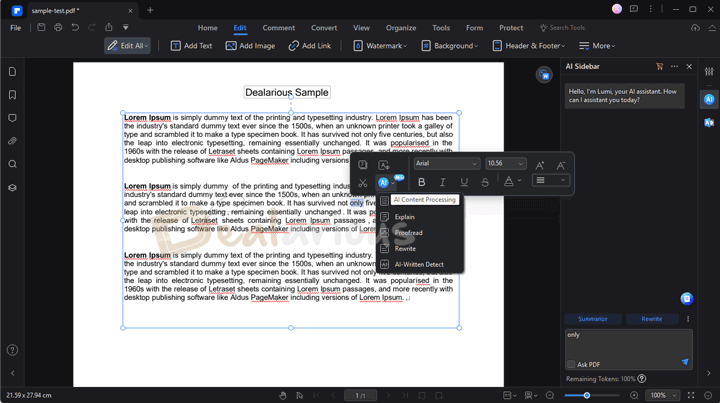
Wondershare PDFelement 10 has a new and improved user-friendly interface that simplifies access to its main functions. The Main Window features large clickable tiles that expand when needed. It allows you to easily edit, create, convert, and manage PDFs.
The editing window resembles Microsoft Office, with master functions like commenting, editing, converting, security, page management, etc. Clicking on these tools opens a secondary toolbar with specific options for each function.
If you’re familiar with Microsoft applications, navigating Wondershare PDFelement will be intuitive. Additionally, the program offers customization options, allowing you to personalize the interface with three themes (Light, Classic, and Dark) and select the tools you want to see on the start page.
Wondershare PDFelement: Functionality
With PDFelement, you can swiftly and easily edit your PDF files, saving time and streamlining your workflow.
Comprehensive Editing Tools:
Apply many edits to your PDF files. You can modify text, images, backgrounds, and watermarks, add or delete pages, merge or split documents, and even rearrange the order of pages effortlessly. The software offers a variety of annotation tools for highlighting, underlining, and adding comments to your PDFs.
Accurate Conversion:
PDFelement ensures accurate and reliable conversion of PDF files to other formats. Whether you need to convert a PDF to Word, Excel, PowerPoint, or image files, PDFelement maintains the original layout, formatting, and quality of the document during the conversion process. It makes repurposing and working with PDF content in different applications easier.
Batch Processing:
PDFelement supports batch processing, enabling you to perform edits or conversions on multiple PDF files in various formats. This feature is particularly useful when dealing with large numbers of documents, as it saves time and increases productivity.
Reliable File Protection:
PDFelement provides various security features to protect your PDF files. You can apply passwords, permissions, and digital signatures to restrict access, prevent unauthorized editing or printing, and ensure document integrity.
With the new Request eSign feature, you can get PDF documents signed safely. You can send PDF files for signature to recipients and track, manage, and validate the document’s status in real-time by visiting PDFelement’s Agreements section.
Wondershare PDFelement: Coupon Codes

PDFelement comes at a premium price, and there are three pricing plans available – Quarterly, Yearly, and Perpetual plans.
Looking at the retail price, we can say that it is overpriced. You can get the best prices on perpetual licenses using Wondershare PDFelement coupon codes. Hence, you will get an official discount. These coupons are valid for Windows and Mac versions.
Wondershare provides a 14-day trial of the PDFlement with limitations. Registered and unregistered trial versions are available.
Conclusion: Is PDFelement Worth the Purchase?
Considering all these, Wondershare PDFelement 10 is useful for managing your PDF Documents. Easy to use interface makes it the top pick. However, when compared to software like Adobe Acrobat Reader, Wondershare PDFelement is quite affordable, with active coupons readily available.
We recommend you get the PDFelement 10 version with OCR, AI Tools, and other advanced editing capabilities. It gives you more flexibility. With our always-updated PDFelement 10 coupon codes, ensure you get the best deal.
If you face any issues with the PDFelement coupon code discount, let us know in the comment section.
Felipe Patton –
PDFelement works better than any paid pdf editor. Have been using from the past one month. Still experimenting with all the features. So far good and it isn’t expensive too. Dealarious provided a great discount and I am able to get official support from Wondershare.
Kai Good –
After the trial, I decided to purchase the Pro version with lots of advanced features. The built-in OCR feature is indeed the best I have seen on any PDF editor yet. I am enjoying it.
Nicholas York –
One of the best PDF merger tools out there. Earlier I used to spend hours to combine two or more PDFs into one, but thanks to PDFelement which made it quick and easy to merge files.
This program works well to do anything with a pdf file. It helps when I have some important projects to do. Perfect!
Colin Swanson –
Our company has been using Adobe from the past 5 years. After the license expired, we were on the lookout for the best alternative tool.
A great deal on Dealarious prompted us to purchase PDFelement Pro. Received the license in few minutes and activation was successful, thanks to their support team.
We found it to be great when dealing with a lot of pdf documentation.
Garrett Wright –
What I like about the PDFelement is the number of features available for quickly editing and converting the PDF files and advanced annotation tools. Editing the files is very easy compared to Adobe Acrobat.
Very good value for the money!