
IObit Uninstaller 15 Pro
$59.93 $10.25
The complete solution allows you to uninstall programs with full effect and easily remove applications based on usage and size.
Also, read our Iobit Uninstaller Pro full review.
If the next version is officially released within the validity period of your license key, you will receive a free upgrade. The subscription starts from the day of purchase.
Exclusive Dealarious Holiday & New Year Sale!
Region: Global | Download Only | 60 Days Refund | No Auto-Renewal
Description
Discover the ultimate software removal tool with IObit Uninstaller 15 Pro. Designed for Windows PCs, it handles unwanted programs and malicious browser extensions. Experience a clutter-free computer, and take advantage of our exclusive deals to get the best value on your subscription.
Unlock exceptional savings with our IObit Uninstaller 15 Pro discount codes. Dive into a special promotion that extends your 1-year subscription by an extra two months at no additional cost. Act now and secure this unique offer!
IObit Uninstaller 15 Pro: Feature Overview
IObit Uninstaller 15 Pro effortlessly eradicates tough-to-remove software, outperforming the standard Windows uninstall feature. It doesn’t just delete programs; it ensures all leftover files are wiped clean, freeing up valuable space. Thanks to our promotional discounts, it’s the perfect solution for maintaining a lean system that is now within reach.
Similarly, some programs leave a lot of leftover files after removal. These files are no longer used and consume unnecessary space. Therefore, Uninstaller 15 Pro automatically removes leftover files, ensuring a clean uninstallation process and removing all unwanted software. Additionally, you can remove built-in modern apps in Windows 11, 10, and 8, which is a handy option if you are not using them.
Key Features of IObit Uninstaller 15 Pro
In this section, we will look at the significant features of the IObit Uninstaller 15 Pro.
Uninstall Unwanted Programs and Browser Extensions
It includes an in-depth scan support. It is helpful for Windows Updates and Browser extensions. You can remove malicious software and browser extensions. Extras include add-ons from popular internet browsers like Google Chrome, Mozilla Firefox, and Microsoft Edge.
IObit Uninstaller Pro effectively removes stubborn programs and malicious extensions. The latest version, IObit Uninstaller 15, supports removing over 4000 stubborn programs. Another new addition is that IObit Uninstaller can now better support ARM systems, as the previous versions did not support this system. What’s best? Even the toughest adware threats can be eliminated by this tool. Hence, you can eliminate threats disguised as useful browser plugins or toolbars.
For complete protection, apps can club it with Advanced SystemCare Pro.
Efficient Browsing Experience
Removing all kinds of malicious extensions with full effect is possible. IObit also has dedicated options for removing dangerous adware. In short, IObit Uninstaller 15 Pro gives you a clean, seamless, and efficient browsing experience on your device.
Additional Features of IObit Uninstaller 15 Pro
Problematic Windows Updates
In addition to the Program Uninstalling and Browser Extension removal tool, Uninstaller 15 Pro has some other features. For instance, you can deal with those problematic Windows Updates, which isn’t usually possible.
Bulk Removal of Applications
The best part is here. Uninstaller 15 Pro also lets you bulk remove applications. Now, you can select and perform complete software uninstallation in one go. Isn’t it time-saving? Also, it allows you to quickly find apps based on their criteria. This placement method helps you quickly find large, recent installs and less-used programs.
System Restore
Before uninstalling a program, the IObit Uninstaller creates a system restore point. It supports creating a system restore point to restore your PC to the previous state if there is a system failure.
Visit the official website of IObit Uninstaller to see the full feature list.
IObit Uninstaller 15 Pro User Interface
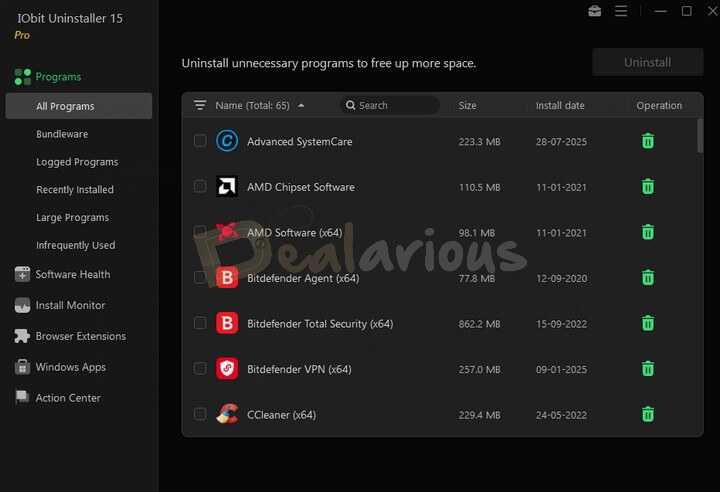
IObit Uninstaller 15 Pro boasts a very user-friendly interface. When the program is launched, the interface appears in Dark mode by default. However, you can change it to Light mode via Settings, which is conveniently located under the Options icon at the top right of the main screen.
Main Options
The main screen of IObit Uninstaller displays six options: Programs, Install Monitor, Software Health, Browser Extensions, Windows Apps, and Action Center.
Programs
The Programs option shows a list of All Programs, Bundled Programs, Logged Programs, recently installed programs, large programs, and infrequently used programs installed on your PC.
Software Health
This feature in IObit Uninstaller Pro scans your system for outdated and malicious programs that can slow down system performance. It includes 9 areas, from removing installation leftovers to updating outdated software and cleaning installation files to free up more disk space.
Install Monitor
It detects and logs system changes during installation, which helps you see what changes the monitored programs made during installation. Install Monitor offers two ways to monitor program installations: Auto Monitor and Manual Monitor.
Browser Extensions
This section protects your browser by uninstalling unwanted and malicious extensions. IObit Uninstaller supports the following 5 browsers:
- Internet Explorer
- Google Chrome
- Mozilla Firefox
- Microsoft Edge
- Opera
It divides extensions between Trusted and malicious Browser Extensions. You can also rate the extensions based on your experience with them.
Windows Apps
It lists all the built-in Windows apps and apps downloaded from the Windows Store. You can also check the user ratings of these Windows apps and determine whether to remove them.
Note: The Windows Apps option is only available on Windows 8 or later.
Action Center
You will find well-known IObit products you can install for better protection and system performance here.
Tools
The Tools and Options icon is at the top right corner of the main screen. IObit Uninstaller includes six powerful tools:
- Software Updater
- Easy Uninstall
- Force Uninstall
- Stubborn Program Remover
- File Shredder
- Windows Updates Uninstall
The Options section contains Settings, System Restore, Uninstall History, Export program list, Feedback, Check for updates, User manual, Technical support, What’s new, and your subscription details.
IObit Uninstaller 15 Pro Coupon Codes & Pricing Plans

Dealarious Store provides the latest deals on Iobit Uninstaller 15 Pro. These discounted Iobit uninstaller prices may change without notice and depend on our stock’s availability. Hence, it is a better idea to make an ongoing offer. Also, note that there are no automatic subscription renewals when you buy from us.
Secure the latest IObit Uninstaller 15 Pro at a special Dealarious Store price. Our offers are subject to change, so it’s wise to capitalize on the current deal promptly. For your ease, we ensure a smooth transaction with secure SSL payment options, including PayPal. Enjoy an additional two months free with our one-year subscription offer—the best value you’ll find online!
If you use the IObit Uninstaller 15 Pro Coupon Code or promotional codes at Dealarious.com, you get a 60-day money-back Guarantee. It applies to license errors that our team cannot solve. We also provide complete License validity period protection. When your purchase is complete, you receive the license code via email.
Frequently Asked Questions about Iobit Uninstaller Sale
Q) Is Uninstaller Pro Safe to use?
A) Absolutely, Uninstaller Pro is entirely safe-to-use IObit software. It is one of the best-selling applications from IObit. It is a must-have software if you frequently install many applications on your system. Furthermore, we offer amazing discounts on Uninstaller Pro.
Q) How do I get the IObit Uninstaller License Key?
A) As soon as you buy Uninstaller Pro using our fantastic deal, we send the IObit Uninstaller license key directly to your email.
Q) How do I activate IObit Uninstaller Pro?
A) Launch IObit Uninstaller Pro and click on the Enter Code section at the bottom right corner of the app interface. Enter the activation code purchased from Dealarious. Next, click on the Register Now button. The product is now activated.
Q) How often are there huge discount codes or exclusive deals for Uninstaller?
A) Interestingly, Dealarious regularly offers online sales of the IObit Uninstaller discount coupon code. The exclusive coupon code is available throughout the year.
Q) How do you use the IObit Uninstaller coupon code?
A) At Dealarious Store, you do not have to use the Exclusive discount code during checkout. The Uninstaller coupon discount code is directly applied to your original purchase price.
Q) Does IObit Uninstaller have an exclusive renewal price?
A) Indeed, Iobit provides exclusive coupon promo codes for renewing the license code or subscription. However, you can find a better discount price at Dealarious Store.
Q) Are there Free product updates on IObit Uninstaller?
A) Yes, you will receive all the product updates for free. Moreover, when you buy a subscription with a promo code from Dealarious, you are entitled to free upgrades to the next version of IObit Uninstaller Pro.
Q) What is the Refund Policy for IObit Uninstaller?
A) We provide a 60-day Money-Back Guarantee. If you encounter technical issues that our technical support team cannot solve, you can easily claim your refund from the Dealarious Store.
Q) Do I get Customer Service on purchases?
A) Yes, for Purchase-related queries, you can contact customer support at Dealarious for 24×7 support or IObit Official support for product-related issues.
Conclusion
For the savvy user, IObit Uninstaller 15 Pro is a sound investment. Its user-friendly interface caters to all, regardless of tech expertise. Grab our special offer today and make your PC cleaner and more efficient. We’re here for you throughout the license period, so you’re always supported.
Please let us know if you face any issues using our IObit Uninstaller coupons and special offers. We cover the entire license validity period, so we are always available whenever you need us.
Josh Taylor –
Reliable and does a good job of getting rid of all the leftover uninstall files on my Windows PC. This time renewed my subscription at a good price. Cost me only $10.25.
Sam –
This uninstaller from Iobit works well, with many features and options to keep my PC clean from unwanted software. I’m happy that it saved my valuable time. The uninstaller is cheaper here than the official store.
Chris Baldwin –
Compared to other third-party uninstallers that I have tried, IObit Uninstaller is more efficient and reliable.
There is much to like about IObit Uninstaller as a PRO user with features like Stubborn Program Remover and Bundleware Removal.
Todd Lacy –
Best uninstaller utility and my favorite. This Christmas, renewed it at a much discounted price with extra 2 months FREE validity.
Great buy and Good customer service from Dealarious Store.
Xavier Haynes –
A saving of 80% off the regular price.
The lowest price I could find was through Dealarious store. Happy Black Friday!!